Quick verdict
Bluedot is worth considering if the main problem you want to solve is not “I need another meeting transcript,” but “I need meetings to turn into usable notes, follow-ups, clips, and searchable context without adding a visible bot to every call.”
That is the real buyer tension here.
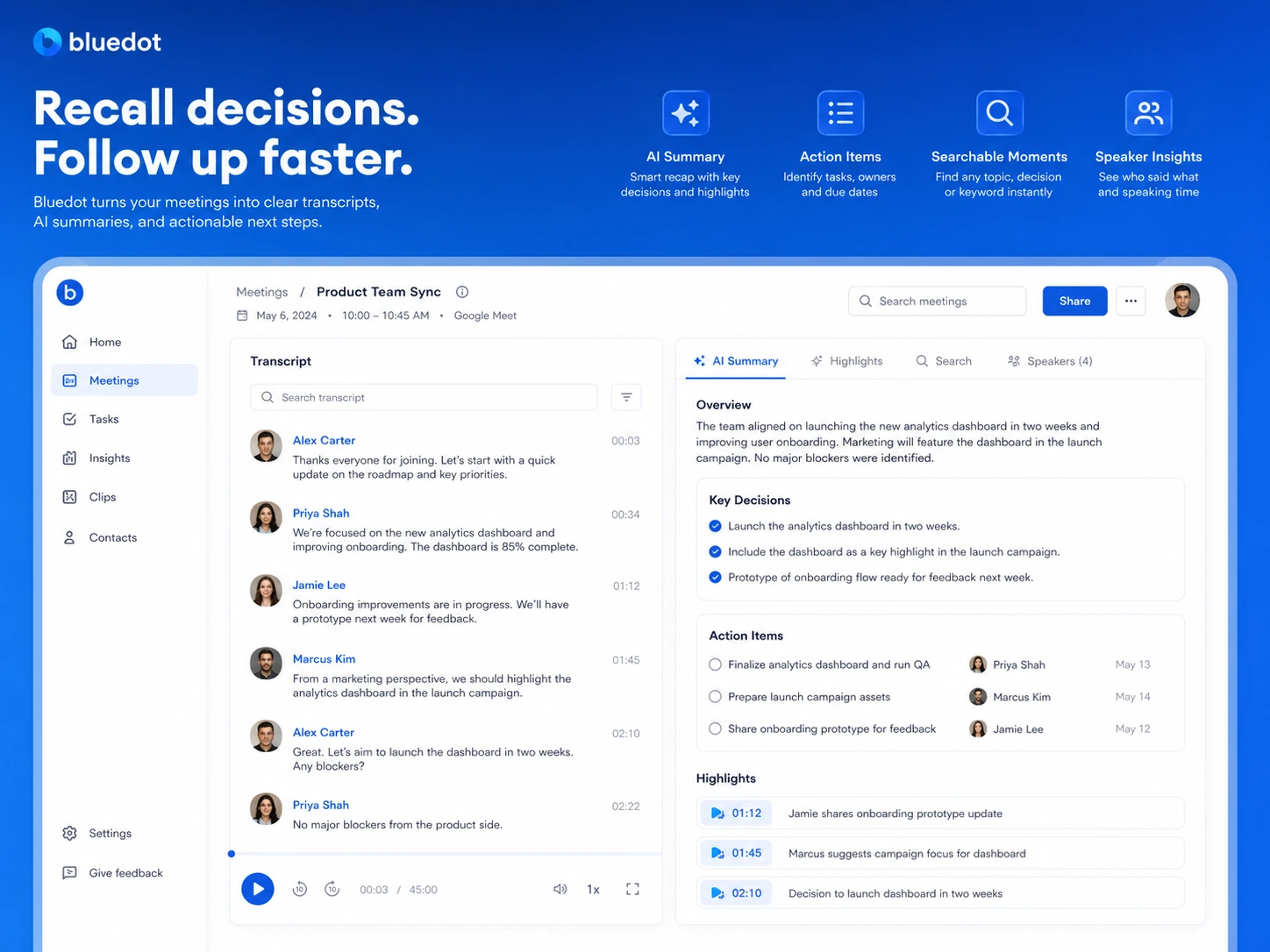
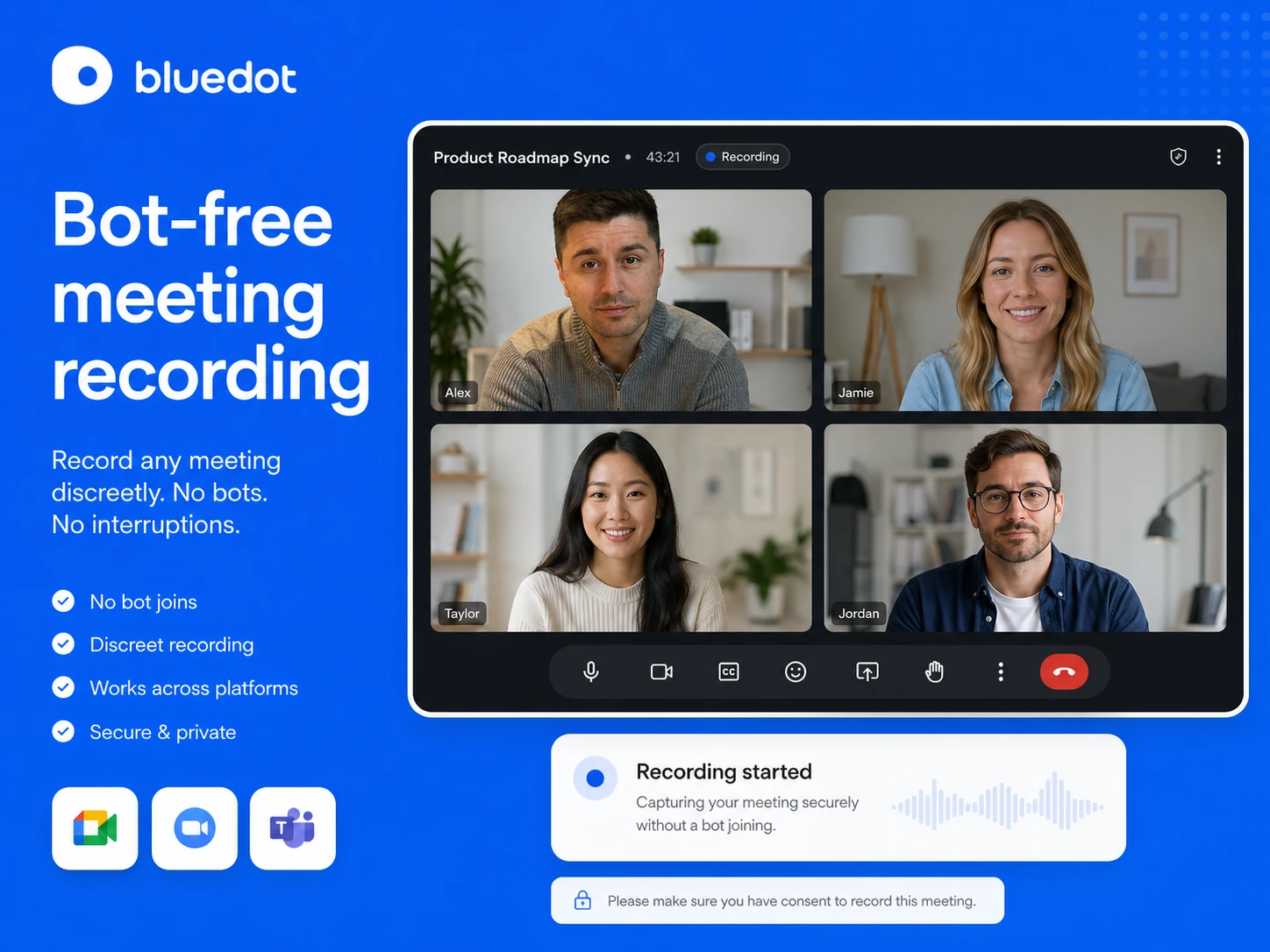
Many AI meeting tools look similar from a distance. They record, transcribe, summarize, and promise to save time. Bluedot’s sharper angle is the capture model: it is positioned around bot-free recording through browser, desktop, and mobile workflows, with summaries, transcripts, clips, CRM routing, and meeting memory layered on top.
I would not judge it only by the homepage. The better test is whether Bluedot fits the way your team actually runs meetings. If you record customer calls, recruiting interviews, founder meetings, internal reviews, or sales conversations every week, the value can become practical. If you only need an occasional transcript, the paid plans may be more tool than you need.
The strongest reason to consider Bluedot is that it combines recording, transcription, summary, and routing without forcing every meeting into a visible notetaker-bot experience. The main caution is that the Free plan is limited, payments are described as non-refundable, cancellation can affect recording access, and recording consent is still your responsibility.
For my money, the safe path is simple: test one real meeting first, check whether the summary is useful without heavy cleanup, then decide whether Basic, Pro, or Business matches your real workflow.
Next step: If Bluedot still fits your meeting workflow, verify the current buyer route, pricing, and active offer path before choosing a plan.
Review snapshot
| Review point | Practical take |
|---|---|
| Best for | Founders, sales teams, CS teams, recruiters, consultants, managers, and operators who record recurring meetings |
| Not ideal for | One-off users, refund-sensitive buyers, or teams without a recording-consent process |
| Main use case | Bot-free meeting capture, transcripts, summaries, clips, and follow-up routing |
| Free path | Free plan allows a limited lifetime test before paid recording becomes necessary |
| Entry paid path | Basic fits audio-first users; Pro and Business matter when video, imports, templates, or CRM integrations matter |
| Main strength | Less intrusive capture model plus useful post-meeting workflow routing |
| Main concern | Non-refundable payment language, cancellation access risk, and plan-fit differences |
| Direct alternatives | Fathom, Fireflies.ai, Otter.ai, tl;dv, Avoma |
| Best next step | Record one real meeting and judge summary quality, consent workflow, and integration fit before annual billing |
What is Bluedot?
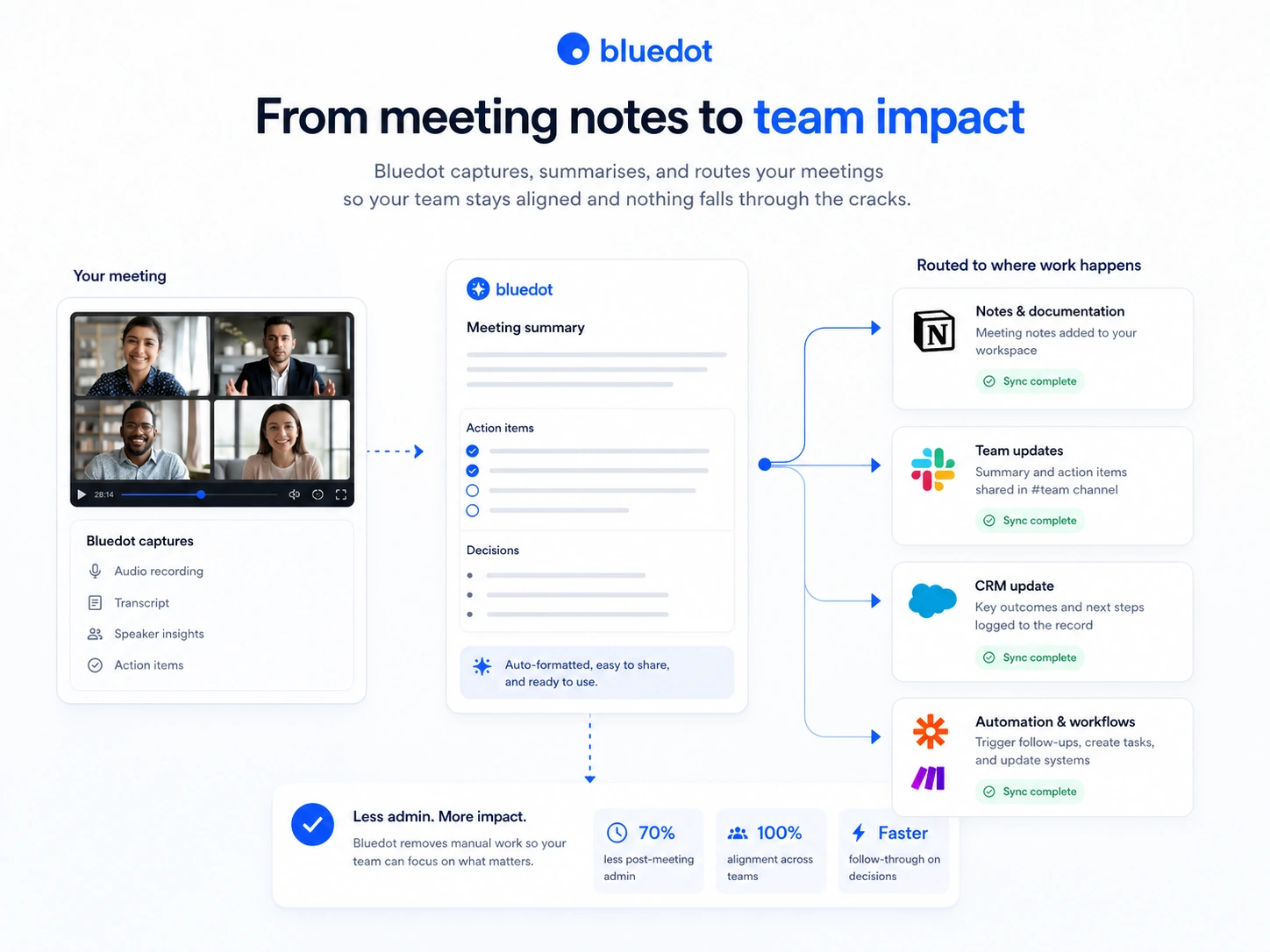
Bluedot is an AI meeting note taker and recorder for online, phone, and in-person conversations. In plain buyer language, it records meetings, creates transcripts, generates AI summaries, lets teams revisit or share key moments, and can route meeting outcomes into tools such as CRM systems, Notion, Slack, Zapier, Make, and related workflow destinations depending on the plan.
The product’s current public positioning leans heavily into bot-free recording. That means the normal value pitch is not “add another meeting participant.” It is closer to “capture the conversation from the user’s side, then turn the recording into notes and follow-up material.” For buyers who dislike visible meeting bots, that can be a meaningful difference.
But this is not a magic meeting brain.
Bluedot does not remove the need for judgment. A transcript can still need cleanup. A summary can miss nuance. A clip can be helpful but still need context. And a bot-free recording model still needs a clear consent policy. The tool can reduce admin work, but it cannot replace the team’s responsibility for deciding when recording is appropriate and who should access the output.
Our review approach compares public product pages, pricing details, help documentation, deal terms, buyer workflow fit, and nearby alternatives. I would not treat a low entry price, a coupon route, or a clean demo video as proof that Bluedot fits every team. The product becomes interesting only when the meeting records actually become useful after the call.
Who should use Bluedot?
Bluedot makes the most sense for teams and individuals who already have a meeting follow-up problem.
Founders and operators are a good fit when decisions keep getting lost between strategy calls, customer conversations, team standups, and investor-style meetings. Bluedot can help turn those calls into searchable records, but the condition is that someone actually reviews and organizes the outputs afterward.
Sales and customer success teams should look at Bluedot when call follow-up is eating time. If recordings, summaries, objections, customer requests, and CRM updates matter, the higher plans become more relevant. The part to verify is plan-level access to HubSpot, Salesforce, imports, and workflow automation before assuming the cheapest paid plan will handle the whole revenue process.
Recruiters and hiring managers may benefit when they run many interviews and want structured records of candidate conversations. This is useful only if the team is careful about consent, retention, and who can review recordings later. Hiring conversations are sensitive, so the recording workflow matters as much as the transcript.
Consultants, coaches, and client-facing professionals can use Bluedot to preserve decisions and action items after calls. The buyer check is whether the client relationship is comfortable with recording and whether summaries are reliable enough to reduce follow-up work.
Managers and internal teams may also find it helpful when recurring meetings create too many action items to track manually. Bluedot is more useful here when notes move into a workflow, not when recordings become another archive nobody opens.
Who should avoid Bluedot?
I would avoid Bluedot if you only need a few casual transcripts each year. The Free plan can handle initial testing, but a recurring subscription makes less sense unless meetings are a repeated workflow.
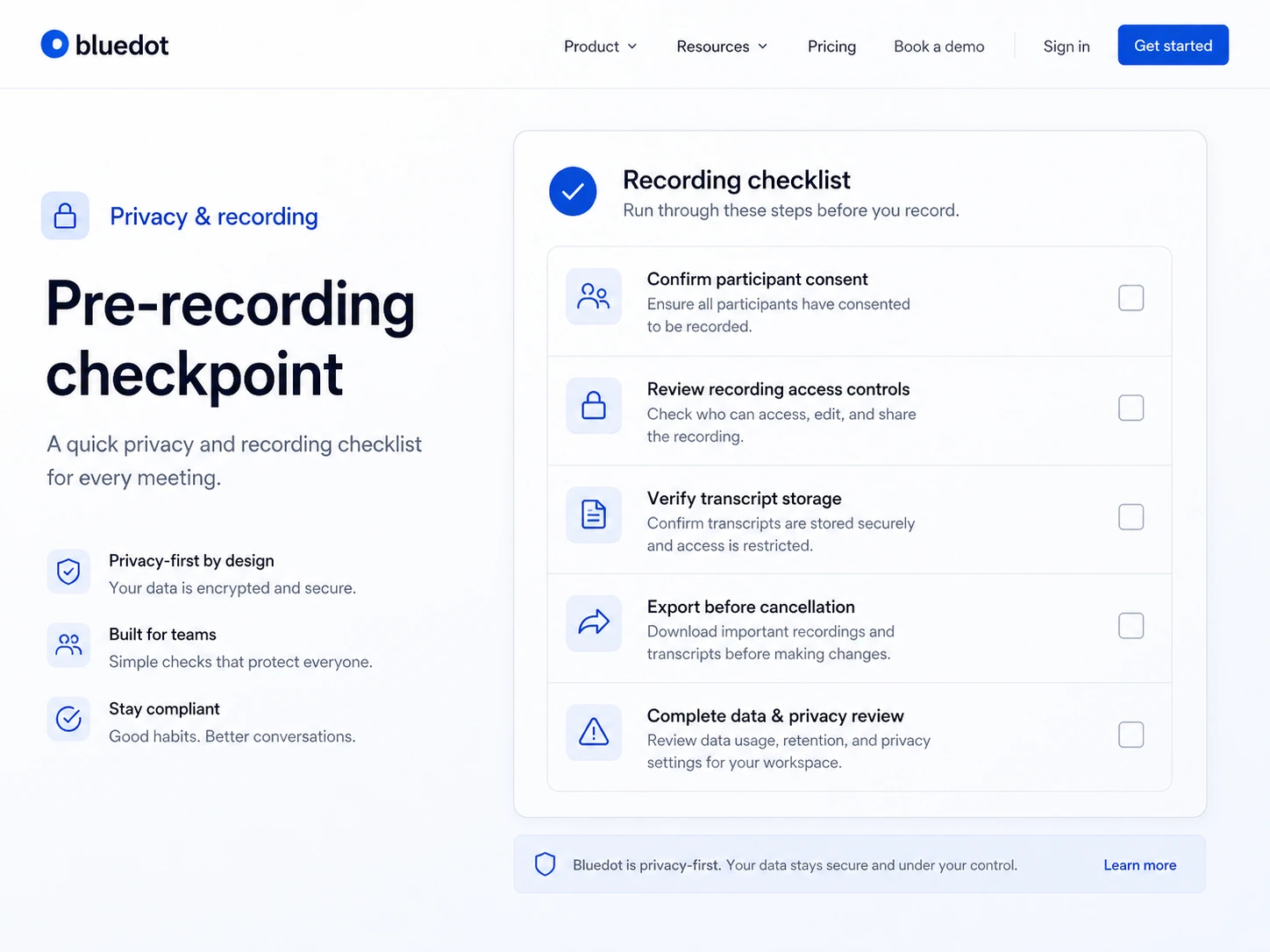
I would also be careful if your team does not have a recording policy. Bot-free recording can feel less awkward than a visible meeting assistant, but it also increases the need for transparency. The product can capture conversations; it does not decide whether recording is appropriate in your location, industry, or customer context.
Bluedot is not ideal for buyers who need generous refund flexibility. Public terms describe payments as non-refundable, and cancellation can affect access to stored content. That does not automatically make the product risky, but it does mean you should test before paying and avoid annual billing until the workflow is proven.
The Basic plan may also disappoint buyers who assume “unlimited meetings” means full video capture and unlimited duration. Basic is better treated as an audio-first path. If video meetings, custom templates, imports, and CRM integrations matter, you will likely need to compare Pro or Business carefully.
Finally, Bluedot may not be the best fit if your organization wants a visible bot in every meeting for transparency, governance, or participant awareness. In some teams, a bot-free approach is the advantage. In others, the visible bot is actually part of the compliance comfort.
How Bluedot fits into a real workflow
A realistic Bluedot workflow starts before the meeting, not after it.
First, the team decides which calls can be recorded and how participants will be informed. That step is easy to skip because the product is built to make capture feel smooth. I would not skip it. Meeting notes are useful only when the recording practice is acceptable to the people involved.
Second, the user records the meeting through the appropriate capture path: browser, desktop, mobile, or another supported route. That choice matters because a founder recording a Zoom call, a recruiter recording an interview, and a consultant capturing an in-person session have different expectations.
Third, Bluedot creates the transcript, summary, action items, and searchable meeting record. This is where the tool starts to save time. Instead of returning to memory or scattered notes, the user has a structured record to inspect.
Fourth, the buyer decides what happens next. A sales team may route notes into CRM. A manager may share a summary with the team. A recruiter may compare interview notes. A founder may search across previous customer conversations. A consultant may clip a key segment and send it to a client.
The common mistake is treating the recording as the finished result. The better workflow is recording → summary → review → routing → follow-up. Bluedot can support that chain, but the buyer still needs a habit around what to do after each call.
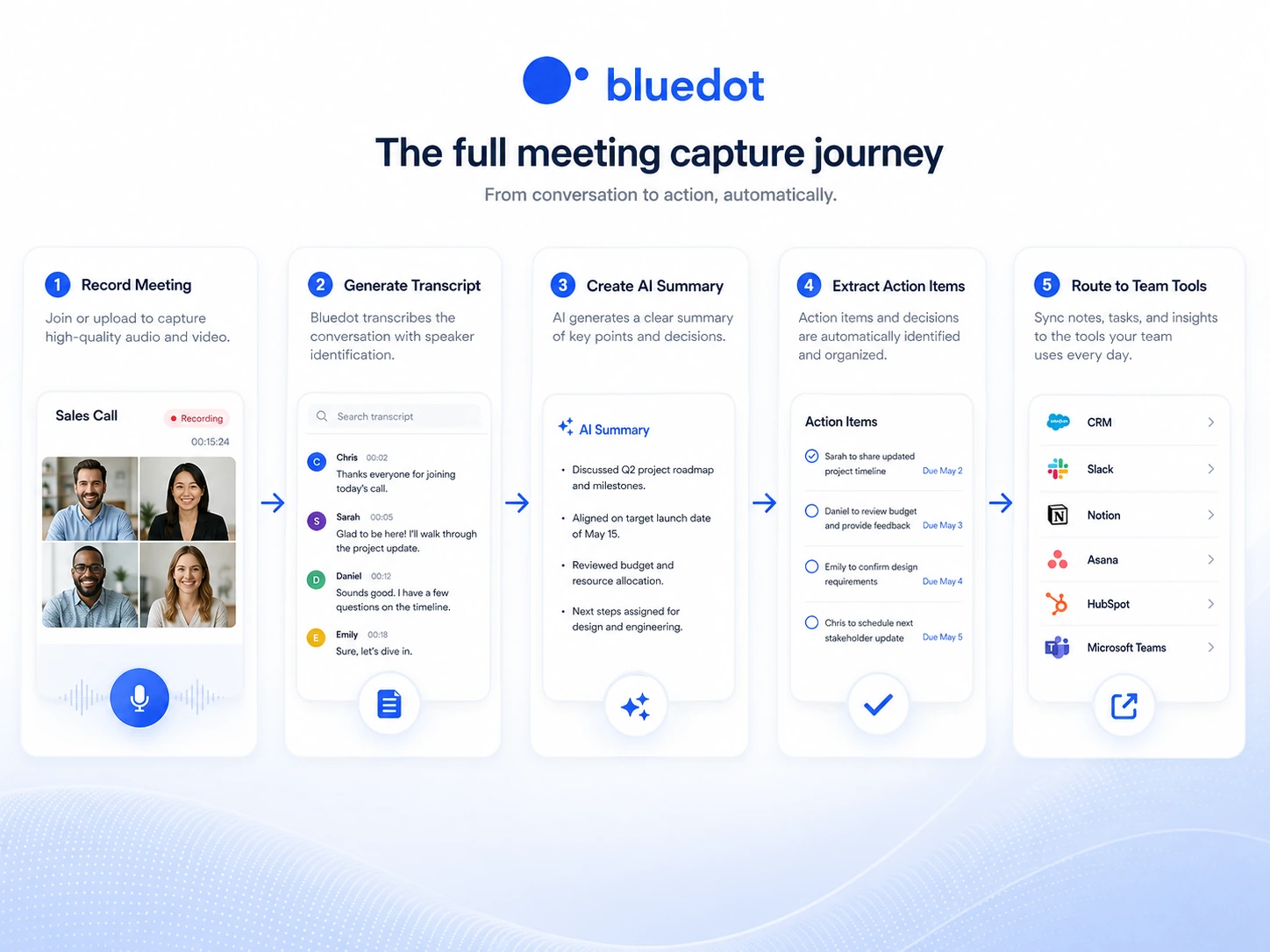
Workflow check: Before paying, test Bluedot on a real meeting and confirm that the transcript, summary, and routing path reduce work instead of creating another archive.
Real-world buyer scenarios
A founder running customer discovery may like Bluedot because the tool can preserve the exact language customers use. That can be useful for product decisions, landing page copy, sales objections, and roadmap notes. It may fail if recordings are not reviewed or tagged afterward. A folder full of unused transcripts is not a customer insight system.
A sales manager may use Bluedot to capture discovery calls, objections, and next steps. The practical value is not just the summary. It is the handoff into CRM, the ability to revisit call moments, and the consistency of follow-up. This buyer should verify Business-level CRM access before assuming Bluedot will fit the sales stack.
A recruiter may use Bluedot to reduce note-taking during interviews. The advantage is focus: listen to the candidate instead of typing constantly. The risk is sensitivity. Candidate conversations require clear policies around recording, access, deletion, and sharing.
A consultant or agency owner may use Bluedot to capture client calls and generate structured follow-ups. The tool can reduce “what did we agree on?” friction, but only if the client understands the recording practice and the consultant checks the summary before sending anything externally.
Key features that actually matter
Bot-free meeting capture
Bluedot’s most important feature is the capture model. Recording without adding a visible bot can make meetings feel more natural, especially in customer calls, interviews, and internal discussions where a bot participant would be distracting.
Buyer note: bot-free should not become silent recording. The team still needs a clear consent practice.
Transcripts, summaries, and searchable records
The core product value is turning meetings into transcripts, summaries, action items, and searchable context. This matters when meetings create decisions, objections, tasks, or customer insights that need to be revisited later.
Buyer note: judge the tool on a real meeting with real jargon, multiple speakers, and follow-up decisions. Demo examples are not enough.
Clips, comments, and async sharing
Bluedot is more useful when a team can share specific moments instead of forwarding an entire recording. Clips and comments can help managers, sales teams, recruiters, and customer teams review context faster.
Buyer note: if your team rarely shares recordings or highlights, this feature may not change the purchase decision.
CRM and workflow routing
Bluedot can become more valuable when notes move into CRM, Notion, Slack, Zapier, Make, HubSpot, or Salesforce workflows. That is where it shifts from “meeting recorder” to “post-meeting admin reducer.”
Buyer note: check plan-level integration access. CRM workflows are not the same as basic transcription.
Multi-platform capture
Bluedot’s browser, desktop, and mobile positioning matters because meetings do not all happen in one place. Some are on Zoom, some on Google Meet, some on Teams, and some in person.
Buyer note: test your actual meeting environment. A tool can support many platforms publicly and still feel better in some capture modes than others.
Pricing and plan value
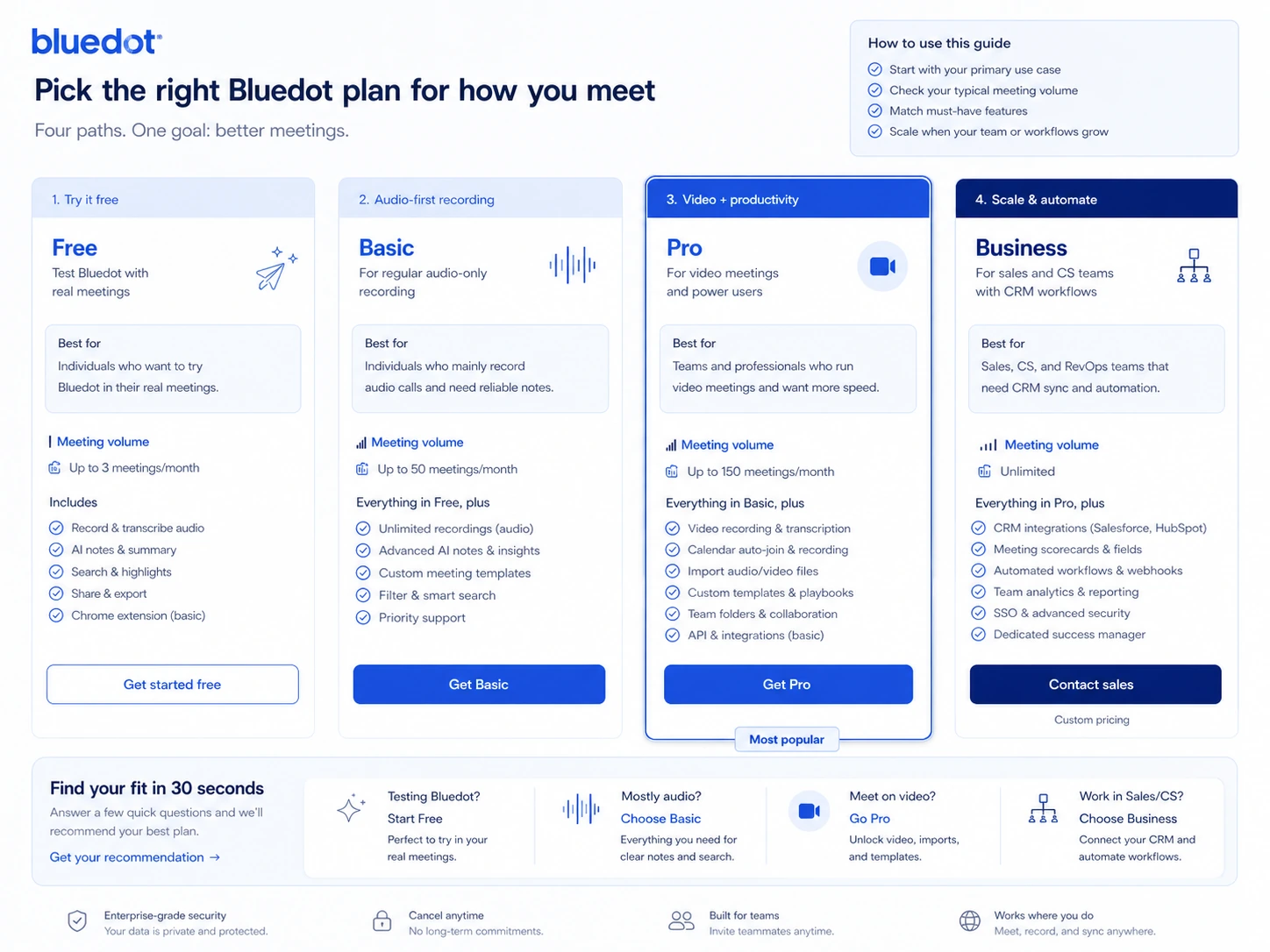
Bluedot’s pricing is clearer than many AI meeting tools, but the cheapest paid plan is not automatically the best deal.
At the time of this review, the public pricing page presents a Free plan, Basic, Pro, Business, and an Unlimited request-pricing path. The Free plan allows a limited lifetime test. Basic is positioned around unlimited audio-only meetings, unlimited storage, a one-hour maximum per recording, and public webhooks. Pro adds video meetings, unlimited duration, custom meeting templates, and imports. Business adds unlimited imports plus HubSpot and Salesforce integrations. Unlimited is positioned for fixed pricing, unlimited paid seats, SSO, SCIM, and access to all features.
That structure makes the plan decision fairly practical:
- Free is for testing transcript and summary quality.
- Basic is for regular audio-first users.
- Pro is for buyers who need video, longer sessions, imports, and templates.
- Business is for sales and customer success teams that need CRM workflows.
- Unlimited is for larger teams that need governance and fixed pricing.
The buyer mistake is choosing Basic because it is the first paid option and then discovering that video recording, imports, or CRM sync were the real reason you wanted Bluedot. The better approach is to map your actual meeting workflow to the plan features before checkout.
Annual billing can reduce the monthly-equivalent price, but I would not start annual unless Bluedot has already proven value in real meetings. Because public terms use non-refundable language, the safer path is to test carefully, choose monthly if uncertain, and move to annual only after usage becomes repeatable.
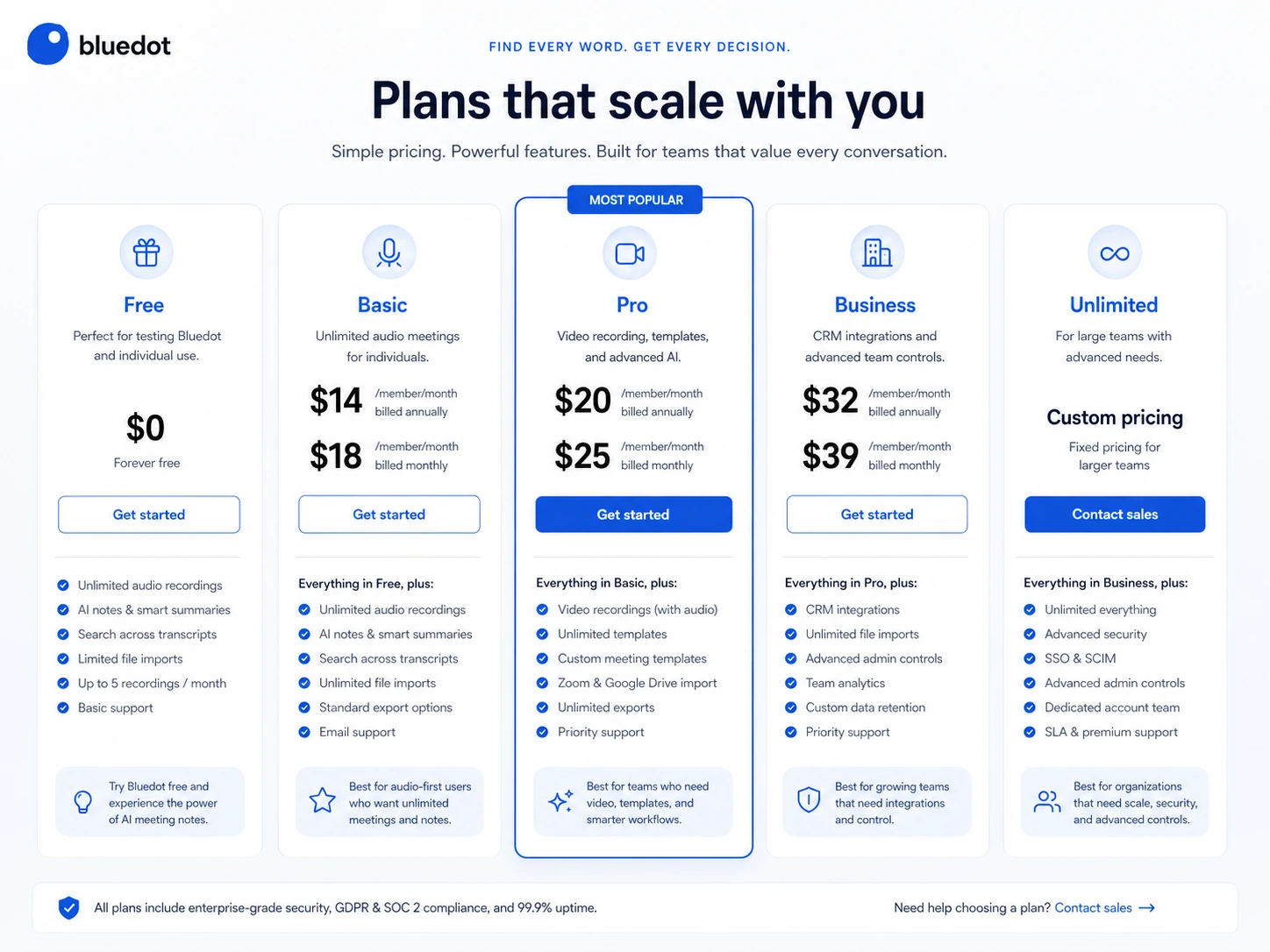
Pricing check: If Bluedot fits your workflow, compare the current Free, Basic, Pro, Business, and Unlimited paths before deciding between monthly and annual billing.
Free plan, trial, coupon, and checkout notes
Bluedot’s free path is useful, but it should be treated as a proof step, not a production plan. A limited number of lifetime meetings is enough to test the capture experience, summary quality, transcript usefulness, and whether your team is comfortable with the recording process.
The coupon question is secondary. A discount can improve a purchase, but it should not be the reason you choose a meeting recorder. First answer the workflow question: will Bluedot actually reduce follow-up work after calls you already run?
The safer checkout order is:
- Record one real meeting on the Free plan.
- Check transcript quality and speaker handling.
- Review summary usefulness and action items.
- Test whether the follow-up route works for your tools.
- Compare Basic, Pro, and Business against your actual recording needs.
- Read cancellation and recording-access language before annual billing.
- Only then check the current offer or coupon route.
I would be especially careful if multiple paid users, multiple workspaces, or CRM integrations are involved. Per-member and per-workspace billing can matter more than the headline plan price.
Checkout note: Use the coupon route only after the plan fit is clear. The discount path should support the decision, not drive it.
What I would check before buying Bluedot
If I were buying Bluedot for a real team workflow, I would check these items before paying:
- Whether the team is comfortable with bot-free recording and has a clear participant-consent process.
- Whether the Free plan output is good enough on a real meeting, not just a clean test call.
- Whether Basic’s audio-only path is enough or whether video recording and unlimited duration make Pro necessary.
- Whether imports, custom templates, HubSpot, Salesforce, Zapier, Make, Slack, or Notion are actually needed.
- Whether paid seats, free members, multiple workspaces, and prorated billing match how the team will use the workspace.
- Whether non-refundable payment language changes the monthly versus annual decision.
- Whether important recordings and transcripts can be exported or preserved before cancellation or downgrade.
A simple test before paying
Before paying, I would run a small test like this:
- Choose one real meeting with normal jargon, interruptions, and action items.
- Inform participants that you are using an AI note-taking or recording tool.
- Record the meeting using the capture mode you expect to use in production.
- Review the transcript for speaker clarity, technical terms, and missing context.
- Review the summary, action items, and any generated follow-up material.
- Try the integration or sharing path you would use after a real customer, team, or recruiting call.
- Decide whether the output saves enough work to justify the paid plan.
If the test only creates another thing to clean up, wait before paying. If it removes a real follow-up burden, then the plan comparison becomes more serious.
Pros explained
Bluedot’s biggest advantage is that the recording model can feel less intrusive than a visible bot. For client-facing teams, recruiters, and founders, that can make conversations feel more natural. The value is strongest when the team still handles consent properly.
The second advantage is that the Free plan gives buyers a real starting point. It is not a long-term free workspace, but it is enough to test whether the product’s summaries and transcripts fit your style of meetings.
The third advantage is the plan ladder. Audio-only, video, imports, templates, CRM integrations, and enterprise-style controls are separated in a way that gives buyers clear decision points. That is better than a vague “contact sales for everything” model.
The fourth advantage is workflow routing. A meeting recorder becomes more valuable when the notes land where the work happens. For sales, customer success, recruiting, and operations teams, integrations can matter more than the transcript itself.
Cons explained
The first drawback is the limited free path. Five lifetime meetings can prove whether the workflow fits, but it will not support anyone who records recurring calls. Buyers who expect a generous ongoing free plan may be disappointed.
The second drawback is refund and cancellation risk. Public terms describe payments as non-refundable, and pricing FAQ language warns that cancellation can affect recording access. That makes monthly testing and export discipline more important.
The third drawback is plan mismatch. Basic may look attractive, but audio-only recording and one-hour limits can be too tight for buyers who need longer video calls, imports, or custom templates. A cheap plan that misses the workflow is not a bargain.
The fourth drawback is consent complexity. Bot-free recording is commercially attractive, but it also puts more responsibility on the buyer to communicate recording clearly. This is especially important for customer calls, interviews, sensitive internal meetings, and regulated environments.
Green flags and red flags
Green flags for Bluedot:
- You record meetings weekly and already lose time on follow-up notes.
- Bot-free capture is important for your customer, hiring, or internal conversations.
- You need searchable transcripts and summaries, not just raw recordings.
- Your team can benefit from clips, comments, CRM updates, or workflow routing.
- You are willing to test the Free plan before committing to a paid plan.
Red flags for Bluedot:
- You are buying only because an offer path looks attractive.
- Your team has no consent or recording-access policy.
- You need refund flexibility after paying.
- You assume Basic covers every serious recording workflow.
- You need enterprise controls but have not verified the Unlimited path.
The product can be useful, but it rewards careful buyers more than impulsive ones.
Bluedot vs alternatives
Bluedot belongs in a direct comparison set with AI meeting note takers and meeting intelligence tools. The right alternative depends on whether you care more about bot-free capture, generous free use, searchable meeting intelligence, live transcription, video sharing, or revenue-team workflows.
Fathom vs Bluedot
Fathom may be the easier comparison if you want a simple AI meeting assistant with a strong reputation for ease of use. Bluedot may make more sense if bot-free capture, cross-platform recording, and privacy-positioned meeting workflows matter more than a familiar assistant experience.
Fireflies.ai vs Bluedot
Fireflies.ai is usually worth comparing when searchable conversation intelligence, a broad integration ecosystem, and team meeting archives are the main priorities. Bluedot may be a better fit when the visible bot experience is the problem you are trying to avoid.
Otter.ai vs Bluedot
Otter.ai is a strong comparison for buyers who want mainstream transcription familiarity and live meeting-note workflows. Bluedot’s edge is more about bot-free capture, meeting clips, and CRM-oriented follow-up rather than simply being a known transcription brand.
tl;dv vs Bluedot
tl;dv may be stronger when async video sharing, meeting clips, and team review of recorded calls are the center of the workflow. Bluedot still deserves a look if the buyer wants a bot-free recorder with CRM and team memory positioning.
Avoma vs Bluedot
Avoma is more of a revenue-team conversation intelligence route. It may be better for teams that need sales coaching, pipeline insight, and meeting analytics. Bluedot may feel lighter and more flexible for teams that mainly want capture, notes, summaries, and routing.
Trust, refund, and buyer-risk notes
Bluedot has several trust signals worth noting: public pricing, a clear Free plan, visible plan differences, browser and app capture routes, Chrome Web Store presence, and third-party review activity. Those signals help, but they do not remove buyer risk.
The first risk is payment flexibility. Public terms describe payments as non-refundable. If that wording matters to you, treat the Free plan as mandatory and choose monthly until usage is proven.
The second risk is stored content. Meeting records can include customer details, employee comments, candidate interviews, legal discussion, financial context, and internal plans. Before using Bluedot broadly, decide who can access recordings, how summaries are shared, and what must be exported before cancellation.
The third risk is recording consent. Bluedot’s bot-free approach may reduce meeting awkwardness, but it can also make recording less visible. The buyer still needs to inform participants and follow applicable rules.
The fourth risk is plan overbuying. Pro and Business can be justified when video, imports, templates, and CRM integrations matter. They are harder to justify when the team only needs basic notes.
The fifth risk is output trust. AI summaries should be reviewed before they become customer follow-ups, candidate notes, CRM updates, or team decisions. The tool can speed up review. It should not be the only review.
Final verdict
Bluedot is a strong candidate if your real problem is recurring meeting capture and follow-up, especially when visible meeting bots feel intrusive or awkward. It is most interesting for founders, sales teams, customer success teams, recruiters, consultants, and operators who need meeting notes to become searchable, shareable, and actionable after the call.
I would consider Bluedot if you record meetings every week, care about bot-free capture, and want summaries, transcripts, clips, and routing into your existing workflow.
I would skip it if you only need occasional notes, require flexible refunds, have no recording-consent process, or are unsure whether your team will actually use the meeting archive.
I would compare it with Fathom for simplicity, Fireflies.ai for searchable meeting intelligence, Otter.ai for mainstream transcription, tl;dv for async video sharing, and Avoma for revenue-team conversation workflows.
The safest next step is not to choose the cheapest plan immediately. Record one real meeting, inspect the output, test the follow-up route, and only then decide whether Basic, Pro, Business, or a larger team plan fits.