
AdminKit Pricing, Plans & Developer Fit
AdminKit is best understood as a Bootstrap 5 admin and dashboard template for developers who want a ready-made UI foundation, not as a hosted SaaS product. The free version can be enough for evaluation or lighter internal dashboards, while AdminKit PRO is a one-time license decision for teams that need more pages, components, plugins, color schemes, support, and source files for production work.

Fit → price → checkout
Use these routes after the official-site check: coupon first, review for fit, compare if unsure.
AdminKit pricing snapshot
Fast commercial checks before pricing, coupons, or a deeper review.
AdminKit product tour
AdminKit is easier to evaluate visually because the product is a UI template. The media plan focuses on the dashboard surface, pricing and license table, component library, and documentation path so buyers can judge whether this is a useful development shortcut or more template than the project needs.


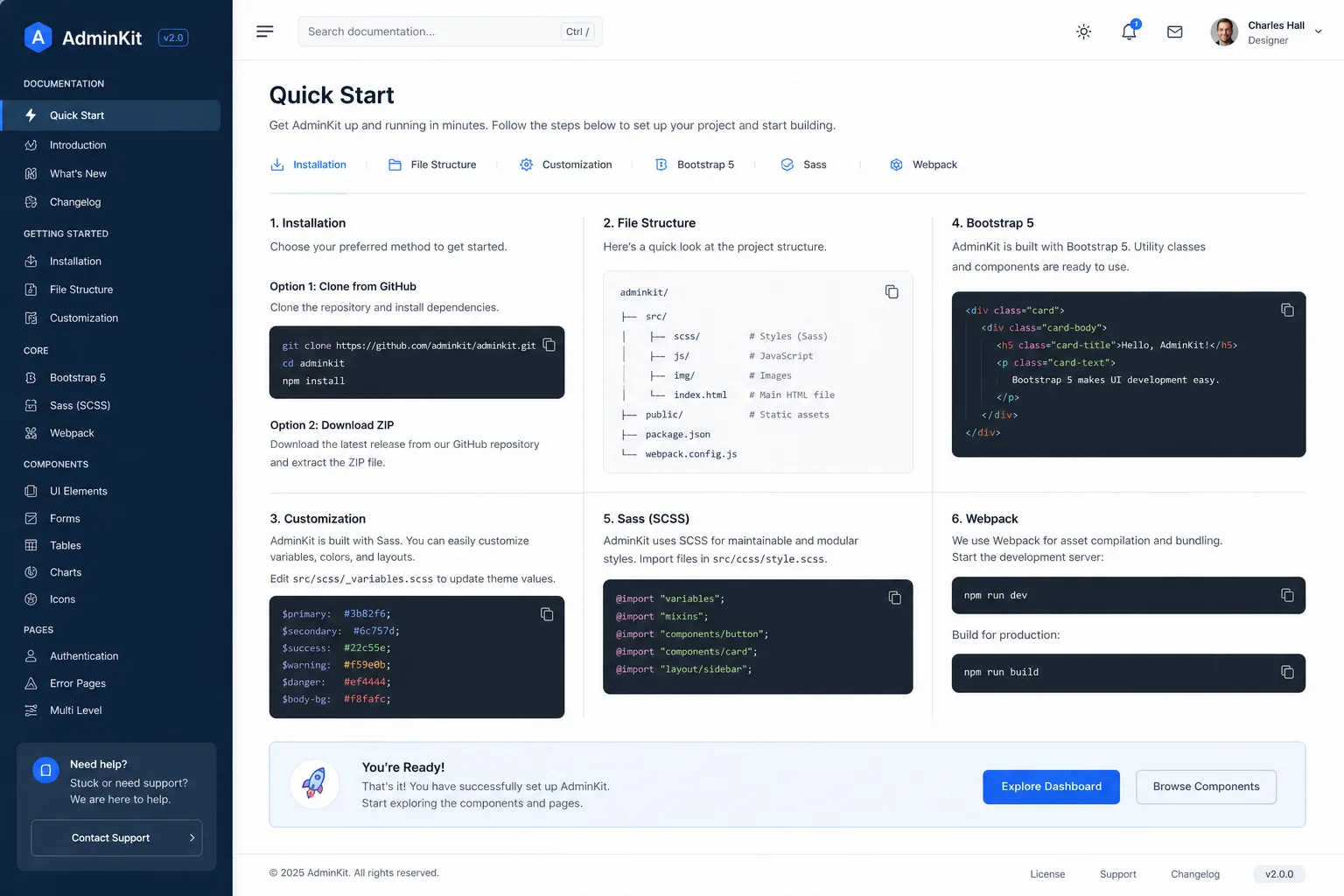
AdminKit should be evaluated as a development shortcut, not as a finished hosted product. The buyer is usually trying to decide whether a Bootstrap 5 admin template can save enough interface work to justify adopting its structure, styling, plugins, and license limits. That makes the free version and live demo important before the paid checkout step.
What AdminKit actually does
AdminKit provides a Bootstrap 5 admin and dashboard template with prebuilt layouts, UI components, forms, tables, charts, icons, pages, and supporting assets. Developers can use it as a starting point for SaaS dashboards, internal tools, analytics panels, client portals, and admin interfaces. It does not create the backend logic, database model, authentication system, or business workflow for the buyer.
- Use it as a front-end UI foundation for admin and dashboard screens.
- Inspect the demo to see whether the included pages match the project shape.
- Treat implementation effort as part of the buying decision.
Who gets the best fit
AdminKit fits developers and technical teams that already know they need an admin UI and prefer Bootstrap 5. It is especially sensible when the team has repetitive dashboard screens to build and wants a familiar component system instead of a custom design process. The fit is weaker for buyers who expect a hosted app builder or a workflow automation platform.
- Best for Bootstrap-friendly development teams.
- Good for dashboards, admin panels, client portals, and internal tools.
- Weaker for no-code buyers or teams locked into a different component stack.
Free version versus PRO license
The free version is the safest first step because it lets the buyer inspect the Bootstrap structure and decide whether the template style fits. PRO becomes more relevant when the project needs a larger set of pages, more UI elements, more plugins, multiple dashboards, color schemes, premium support, and broader license rights. The paid plan should not be judged only by the $59 entry point.
- Free version is useful for technical evaluation and lighter dashboard starts.
- Hobby is positioned for personal websites or side projects.
- Company and Enterprise are better aligned with teams, multiple products, and broader reuse.
Implementation and stack fit
AdminKit can be used with static HTML, CSS, and JavaScript files, and the repository also describes a Webpack build path. The official FAQ says buyers can bypass the Webpack build step and edit the static files directly. That is helpful, but teams working in Laravel, Rails, ASP.NET, React, Vue, or another framework still need to estimate adaptation time.
- Check whether static files are enough or whether the build workflow matters.
- Confirm how easily the template can be integrated into your application stack.
- Avoid assuming a framework-native experience unless you have tested the integration path.
Refund and checkout checks
AdminKit promotes a 30-day money-back guarantee, and the license agreement gives the more precise rule set. The request must be made within 30 days from purchase, and the buyer must not have requested support. That makes it important to test the free version, demo, and docs before buying, especially if you may need support during evaluation.
- Read the license agreement before paying.
- Avoid requesting support if you are still deciding whether to refund.
- Confirm whether the license fits client work, multi-product use, and team size.
Relevant alternatives to compare
The closest comparison depends on whether the buyer wants code, no-code, or a broader app builder. AnotherWrapper is closer if the priority is developer boilerplate logic. Jet Admin is more relevant if the buyer wants no-code internal tools. Adalo and BASE44 make more sense when the buyer wants to build an app rather than integrate an HTML admin template.
- Compare AnotherWrapper if the project needs a broader boilerplate starting point.
- Compare Jet Admin if the team prefers no-code internal tool building.
- Compare Adalo or BASE44 if the buyer needs app creation rather than template integration.
Safest next step
The safest AdminKit path is simple: open the live demo, download or inspect the free version, read the documentation, and then compare the PRO license tiers only if the template already fits the project. Buyers who still need to validate the product should read the review path first. Buyers who already know AdminKit fits can move to pricing or the store offer route and check the current checkout terms.
- Start with the demo and free version.
- Read docs before choosing a paid license.
- Use the coupon or pricing path only after fit is clear.
Best savings path from this store page
This is the clearest savings route to check once the product already looks like a fit.
AdminKit provides a free Bootstrap 5 admin template path for developers who want to test the UI kit before buying a Pro license.
Official homepage positions AdminKit as a free and premium Bootstrap 5 admin template.
20% off reported Pro checkout coupon
One-time Hobby license from $59
Use comparison routes when the category fit is still open
Use these comparison routes when the product still looks plausible, but the category fit is not fully settled.
Better when the buyer wants a broader developer boilerplate instead of only an admin dashboard template.
Better when the buyer wants a no-code internal admin tool rather than adapting Bootstrap source files.
Better when the buyer wants a no-code app builder with product logic, not just front-end admin UI.
Better when the buyer wants AI-assisted app building instead of a coded Bootstrap dashboard template.
Verification points worth checking before you click out
Where this store usually fits best in the workflow
Use AdminKit when a SaaS product needs dashboard screens, settings pages, charts, tables, forms, and user interface patterns without starting from a blank design file.
Use AdminKit when developers need a Bootstrap-based admin interface for internal operations, support tooling, analytics, or back-office screens.
Use AdminKit when an agency can reuse a polished template across client projects while staying inside license limits for developers and products.
Use the free version when the buyer wants to study Bootstrap 5 dashboard structure or prototype an admin UI before committing to a paid template.
Practical checkpoints before and after signup
- Open the live demo and compare included pages against the real dashboard screens required.
- Check the GitHub repository and docs to understand source structure, build workflow, and customization surface.
- Decide whether Bootstrap 5 is the right technical foundation for the project.
- Download or inspect the free version before considering a PRO license.
- Test whether static HTML, CSS, and JavaScript are enough or whether the Webpack path is needed.
- List which PRO-only pages, plugins, or support needs justify paying.
- Choose Hobby only when one developer and one product are enough.
- Choose Company or Enterprise only when developer count, product count, support period, or reuse scope requires it.
- Read the refund conditions before requesting support or buying for client work.
- Integrate the template into the actual application stack with a narrow dashboard screen first.
- Track how much code must be replaced, not just how many components are included.
- Keep license, source files, and support documentation organized for future updates.
Fast-read signals for workflow fit and buying friction
Questions readers usually ask before choosing this store
Is AdminKit a no-code admin tool?
No. AdminKit is a Bootstrap 5 admin and dashboard template. It helps with the front-end interface, but buyers still need developers to connect data, logic, authentication, backend workflows, and deployment.
Does AdminKit have a free plan?
Yes. AdminKit has a free open source version that can be used for evaluation and lighter dashboard starts. The PRO version is a paid one-time license with more pages, components, plugins, color schemes, support, and source assets.
How much does AdminKit PRO cost?
The public pricing page lists AdminKit PRO licenses as one-time payments: Hobby at $59, Company at $399, and Enterprise at $799. Buyers should verify the current checkout page before paying because license details and offers can change.
Does AdminKit offer refunds?
AdminKit publishes a 30-day money-back guarantee. The license agreement says the request must be within 30 days of purchase and support must not have been requested, so buyers should read the license terms before checkout.
What is the safest next step before buying AdminKit?
Open the live demo, inspect or download the free version, read the docs, and confirm that Bootstrap 5 fits your application stack. Move to the PRO license only when the extra components, pages, plugins, and support solve a real project need.
Choose the next route that matches what you still need to decide
The strongest next click depends on whether you still need product judgment, a savings route, or a broader category comparison.