
Chatbase Pricing, Plans & Support Agent Fit
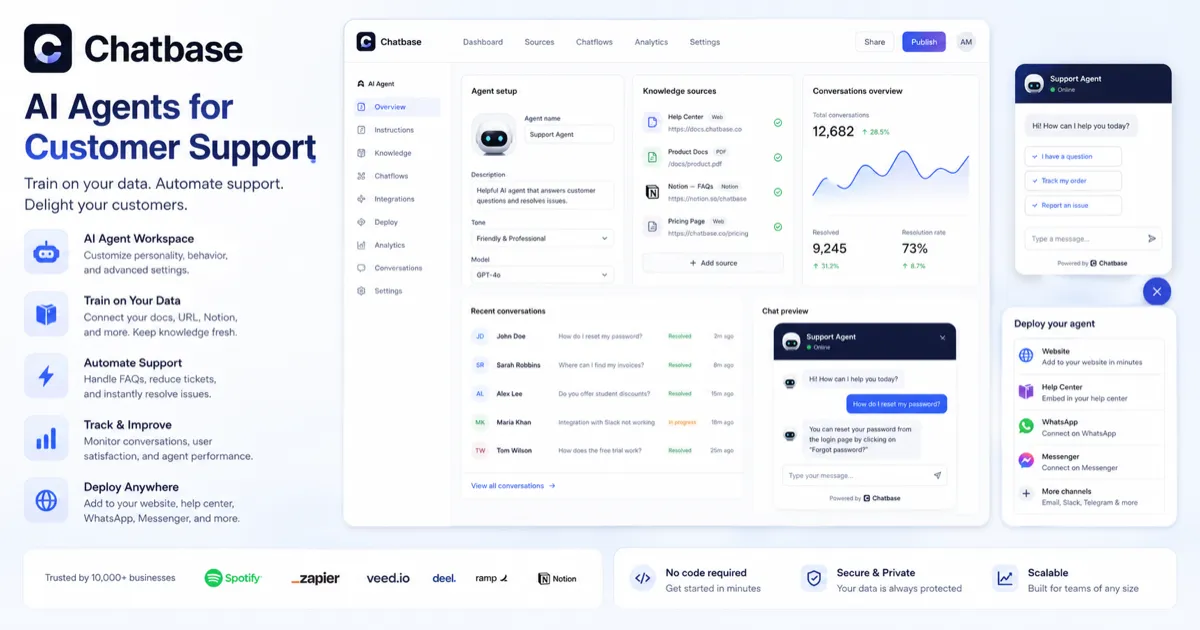
Chatbase is an AI customer support agent platform for building, training, deploying, and improving support agents from business data. It is stronger than a simple FAQ chatbot when a buyer needs sources, actions, integrations, escalation, analytics, and a real support workflow. The buying decision should start with support volume and implementation fit: how many customer questions need automation, which systems the agent must connect to, how many message credits are realistic, and whether API access or help desk integrations are required.
Fit → price → checkout
Use these routes after the official-site check: coupon first, review for fit, compare if unsure.
Chatbase pricing snapshot
Fast commercial checks before pricing, coupons, or a deeper review.
Chatbase product tour
This walkthrough is useful if you are trying to decide whether Chatbase can become a real support layer or only a small website chatbot. Watch how the agent is built, trained, embedded, and tested, then compare that setup effort against the support questions your team actually receives every week. The important buying question is not whether the demo looks easy. It is whether your knowledge base, integrations, and message volume are ready for an AI support agent.
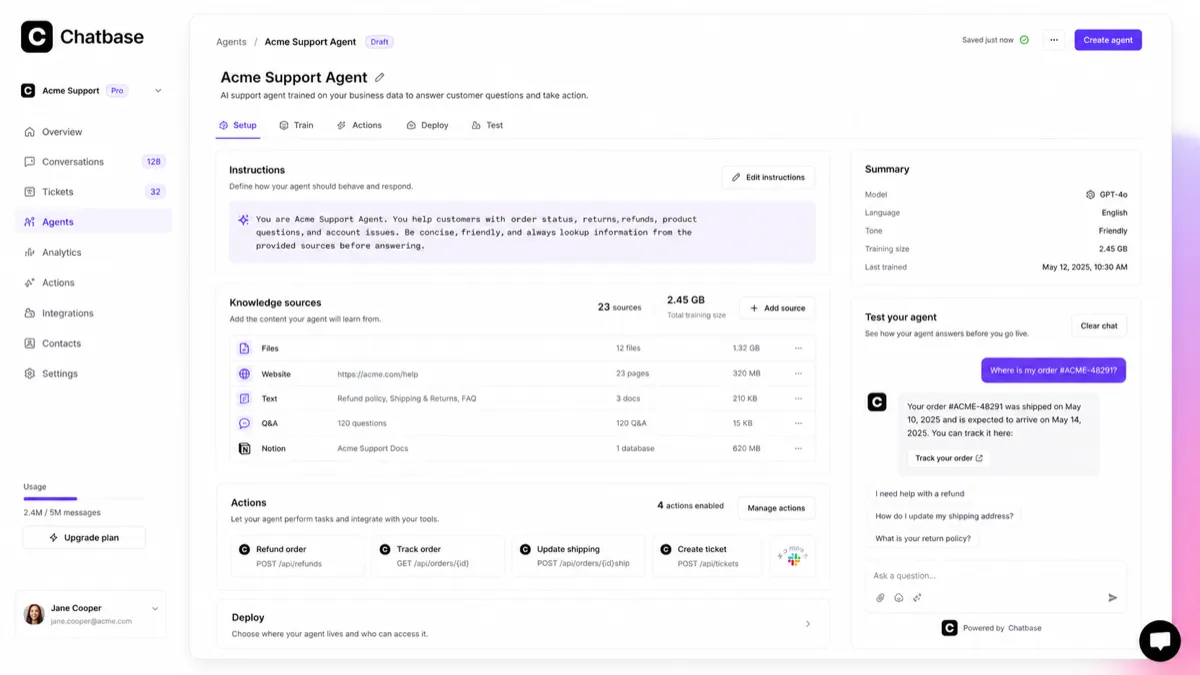
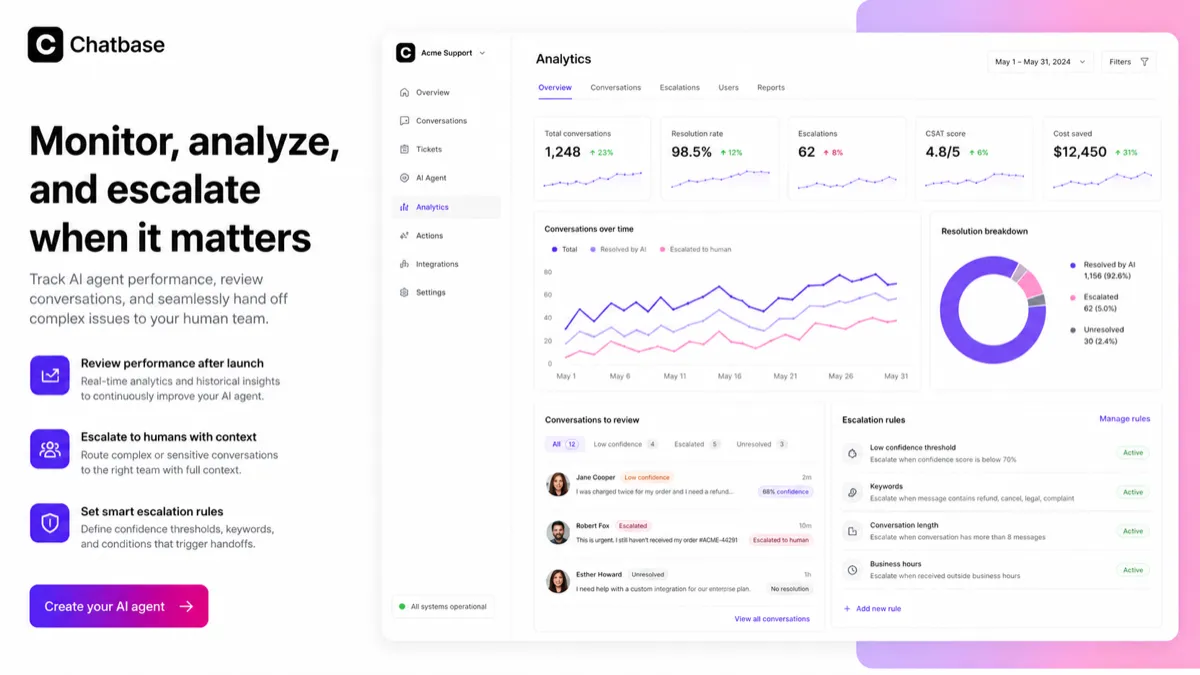
Chatbase is best read as an AI support-agent platform for businesses that want to answer customer questions, collect leads, route harder issues, and connect support conversations to real systems. The store page should not sell it as a magic chatbot. The safer question is whether your team has enough support volume, clean enough knowledge sources, and a clear enough workflow to make the paid plan worthwhile.
What Chatbase actually does
Chatbase lets a buyer build AI support agents trained on business data, then deploy them through a website widget and connected support channels. The product is strongest when the agent can answer repetitive customer questions, use company knowledge, trigger actions, collect leads, and escalate unresolved conversations to a human. If your support problem is mainly messy internal documentation, fix the source material before paying for scale.
- Train agents on documents, websites, databases, and support knowledge.
- Deploy agents through embedded chat, messaging channels, and business integrations.
- Use analytics and conversation review to improve answer quality after launch.
Pricing and plan fit
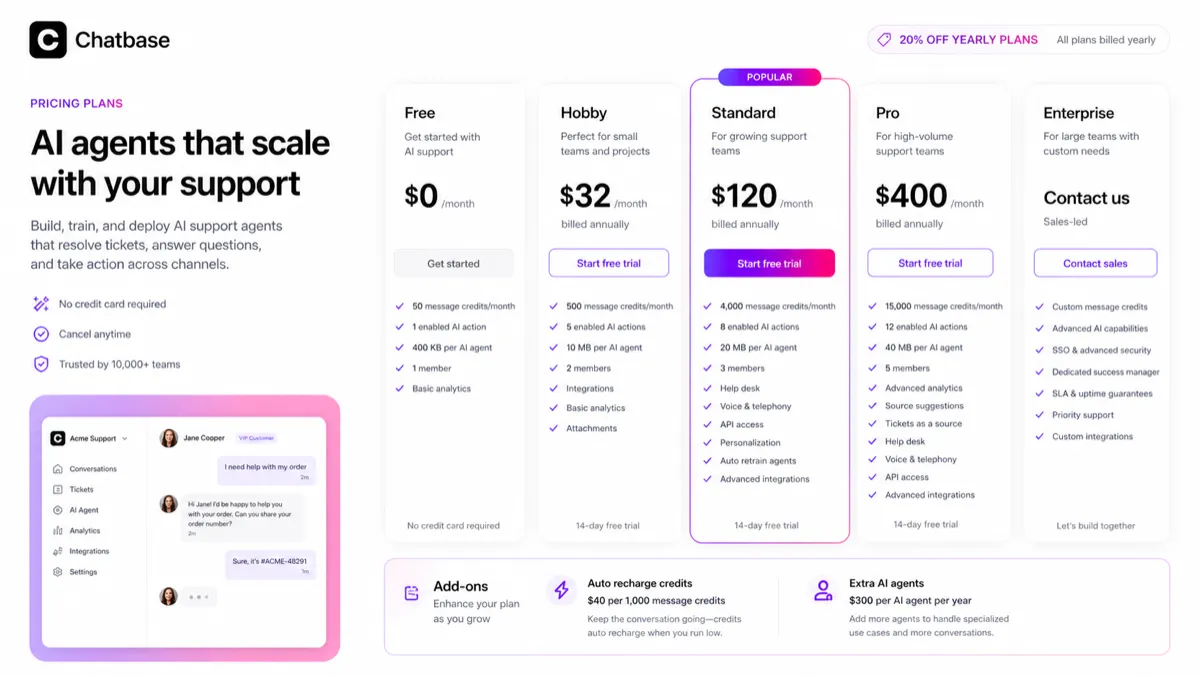
Chatbase pricing is built around message credits, AI actions, training content size, seats, integrations, analytics, model access, and add-ons. The free plan is useful for proving that one small agent can understand your knowledge base, but it is not enough evidence that the paid rollout will be affordable. Standard and Pro become more relevant when API access, advanced integrations, voice, telephony, auto retraining, and deeper analytics matter.
- Use Free for a real proof of concept, not as a full support replacement.
- Compare Hobby and Standard by credits, members, API access, and integration requirements.
- Calculate add-ons before assuming yearly billing is the cheapest real path.
Integrations, actions, and API access
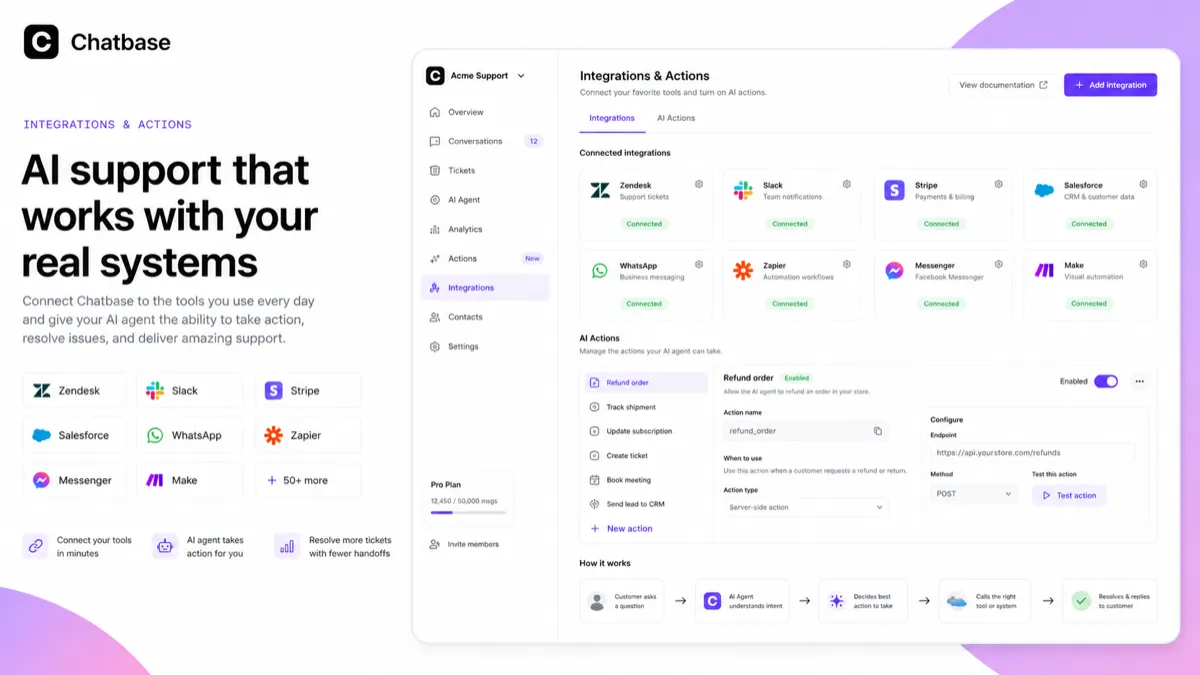
Chatbase becomes more interesting when the buyer needs more than a chat window. The official site highlights integrations with tools such as Zendesk, Slack, Stripe, Salesforce, Calendly, WhatsApp, Zapier, Messenger, Make, and ecommerce or CRM systems. The API documentation also describes sending messages, managing agents, retrieving conversations, handling leads, and building custom chat experiences. That matters for teams that want the agent to retrieve account information, update records, collect leads, or connect support to existing operations.
- Check whether your required integration is available on the plan you intend to buy.
- Confirm API access before planning a custom product or backend workflow.
- Use actions only when permissions, data quality, and escalation rules are clear.
Video walkthrough for voice support setup
This second video is useful if your buying question is whether Chatbase can handle more than text chat. Watch how the voice-agent setup works, what the customer experience looks like, and where configuration decisions appear. Pay attention to handoff, clarity, and whether the use case is realistic for your support team. If the voice workflow feels more advanced than your current needs, start with a normal chat agent and move slowly toward telephony.
What to verify before checkout
Before paying, confirm the current price, billing interval, message credits, training content size, member count, number of enabled AI actions, API access, help desk integrations, voice or telephony access, auto-recharge settings, branding removal cost, cancellation terms, and refund language. Chatbase can be a strong support automation tool, but it should be bought as a workflow investment rather than a casual chatbot subscription.
- Verify whether the price shown is monthly, yearly, or annualized monthly.
- Check whether public coupon or partner deal claims work on the exact plan you need.
- Read refund language before annual billing because paid fees are not positioned as generally refundable.
Best next step for Chatbase buyers
The safest next step is to build a free test agent with real support content, then compare the output against your actual support queue. If the test agent handles common questions accurately, move to the review page for deeper product fit and then to the pricing or coupon path. If the test exposes weak source material, fix the knowledge base first. Chatbase should reduce support friction, not create another system the team has to clean up later.
- Use the review path when workflow fit is still unclear.
- Use the coupon or pricing path only after the product already fits the support problem.
- Keep a human escalation path for cases where the agent should not decide alone.
Best savings path from this store page
This is the clearest savings route to check once the product already looks like a fit.
The Hobby plan is the lower paid entry point on Chatbase annual billing, useful when the free tier is too small but the buyer does not need Standard-level capacity.
Reported yearly savings path
Use comparison routes when the category fit is still open
Use these comparison routes when the product still looks plausible, but the category fit is not fully settled.
Chaindesk is worth comparing when the buyer wants another no-code AI support chatbot path and needs to test pricing, training sources, and deployment style side by side.
Chatsimple can be a lighter comparison for website chat and lead capture, while Chatbase is stronger to inspect when support-agent depth and integrations matter.
CustomGPT fits buyers focused on private-data chat and knowledge-base retrieval, while Chatbase leans more clearly into customer support agents and workflow actions.
SiteSpeakAI is a relevant alternative for website support automation, especially when the buyer wants to compare setup simplicity against Chatbase's broader support-agent tooling.
Verification points worth checking before you click out
Where this store usually fits best in the workflow
Chatbase fits teams that answer the same shipping, billing, onboarding, product, troubleshooting, or policy questions repeatedly and want an AI agent to handle the first layer before a human steps in.
Ecommerce and SaaS buyers can connect product, account, order, or help desk data so the agent can answer common questions, collect leads, and escalate complicated cases to the right human workflow.
Chatbase can help websites capture leads and guide visitors through product questions, but buyers should measure whether the agent improves qualified conversations rather than simply adding another widget.
Teams with developer or operations resources can explore API access, custom actions, webhooks, and integrations to connect customer conversations with internal systems and automated support flows.
Practical checkpoints before and after signup
- Choose one support area with clear source material, such as shipping, billing, onboarding, product setup, or refund policy.
- List the questions the agent should answer and the cases that must escalate to a human.
- Estimate monthly support conversations so message credits and add-ons can be compared realistically.
- Train the agent on real support content and test messy customer questions, not only perfect demo prompts.
- Check hallucination risk, source relevance, tone, escalation behavior, lead capture, and conversation analytics.
- Ask support staff whether the answers would actually reduce ticket volume.
- Verify billing interval, message credits, training size, AI action limits, seats, API access, integrations, add-ons, and cancellation terms.
- Test any public coupon path at checkout without exposing the code in public copy.
- Compare annual savings against the risk of limited refunds and changing support needs.
- Review conversations weekly and improve weak sources before blaming the model.
- Track unresolved questions, escalations, customer satisfaction, and credit usage before renewal.
- Keep human handoff rules, permissions, and data access aligned with support policy and privacy requirements.
Fast-read signals for workflow fit and buying friction
Questions readers usually ask before choosing this store
Is Chatbase just a website chatbot?
Not exactly. Chatbase includes website chat deployment, but the stronger use case is building AI support agents trained on business data, connected to support workflows, actions, analytics, and integrations.
Does Chatbase have a free plan?
Yes. The official pricing page shows a Free plan with 50 message credits per month, 1 member, and 400 KB per AI agent. It is best used to test answer quality and setup fit before choosing a paid plan.
Which Chatbase plan should a small team check first?
A small team should usually test Free first, then compare Hobby and Standard by message credits, training content size, members, AI actions, API access, and integrations. Standard becomes more relevant when API access, advanced integrations, voice, or auto retraining matter.
Are Chatbase coupon codes reliable?
Public coupon and partner deal sites report Chatbase savings paths, but the safest confirmed baseline is the official annual billing discount shown on the pricing page. Any coupon path should be tested at checkout without exposing a code in public-facing content.
What should buyers verify before paying for Chatbase?
Buyers should verify live pricing, billing interval, annual discount, message credits, training content size, agent count, seats, AI actions, API access, integrations, add-ons, refund language, and whether the support agent performs well on real customer questions.
Choose the next route that matches what you still need to decide
The strongest next click depends on whether you still need product judgment, a savings route, or a broader category comparison.