Quick verdict
AI Detector Pro is worth considering if you need a repeatable checkpoint for AI-assisted writing, not a magic truth machine that can settle authorship questions by itself.
That distinction matters more than the headline score.
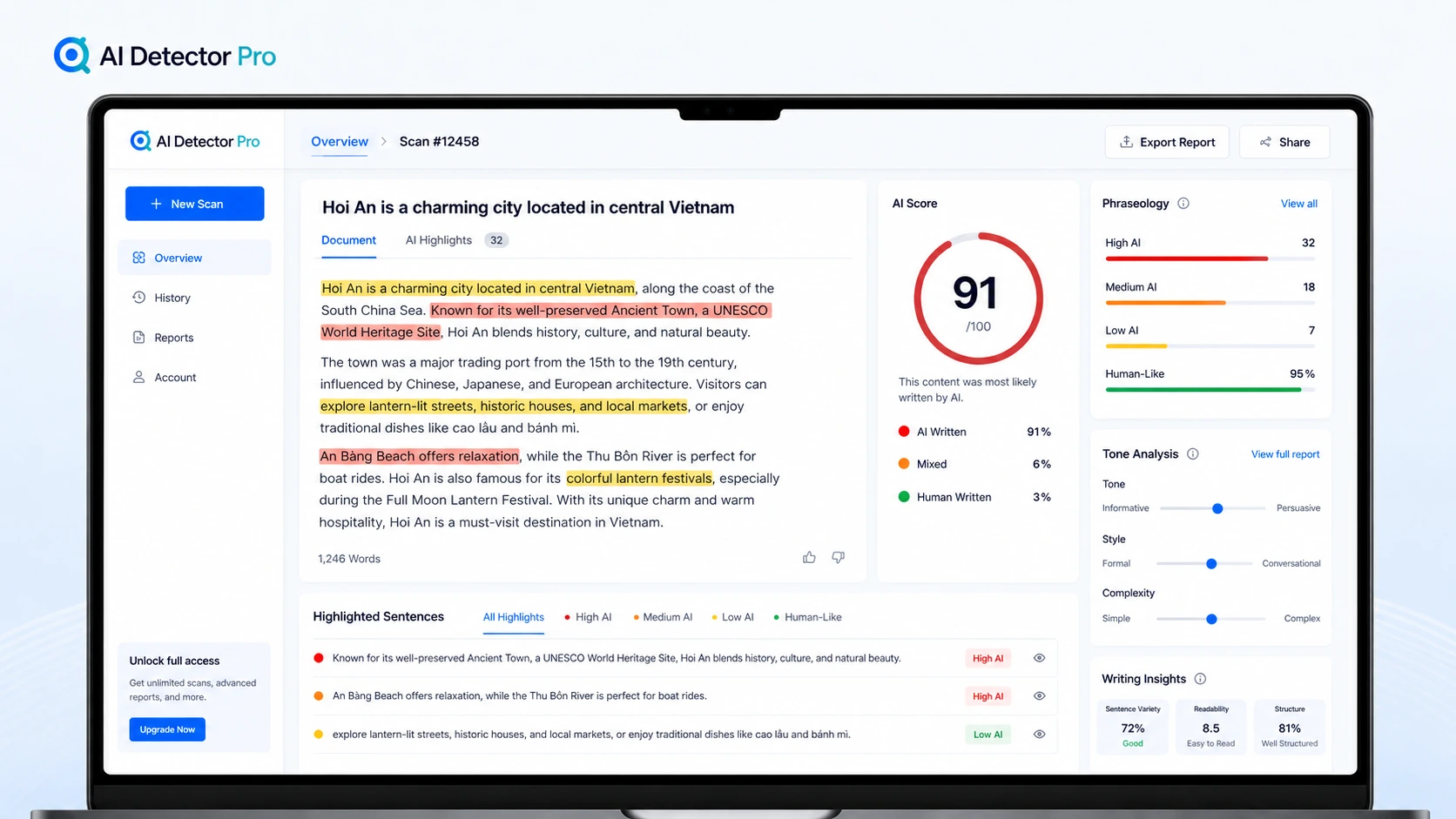
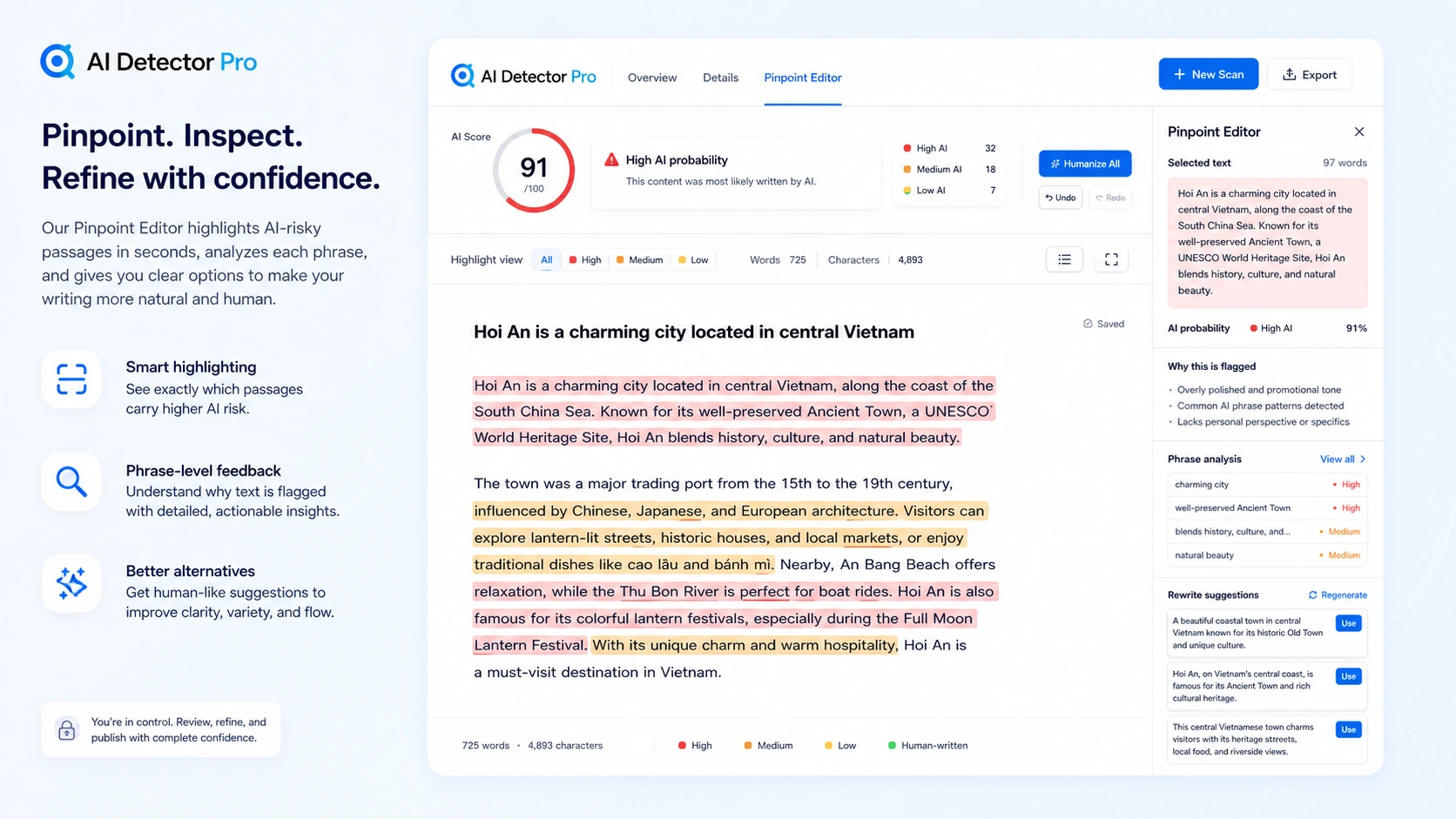
The product is built around AI detection, highlighted passages, tone and phraseology signals, humanization suggestions, document plugins, reports, export, and an optional API route. In plain terms, it tries to help buyers find text that may look AI-generated and then decide what to revise. That can be useful for writers, editors, freelancers, students, educators, SEO teams, and agencies that review drafts often enough for a structured tool to save time.
I would be careful, though, if the buyer’s real need is certainty. AI detection is still probabilistic. AI Detector Pro’s own public pages caution that no detector can be perfectly accurate, and that is the right expectation to preserve. A detector can support judgment. It should not replace it.
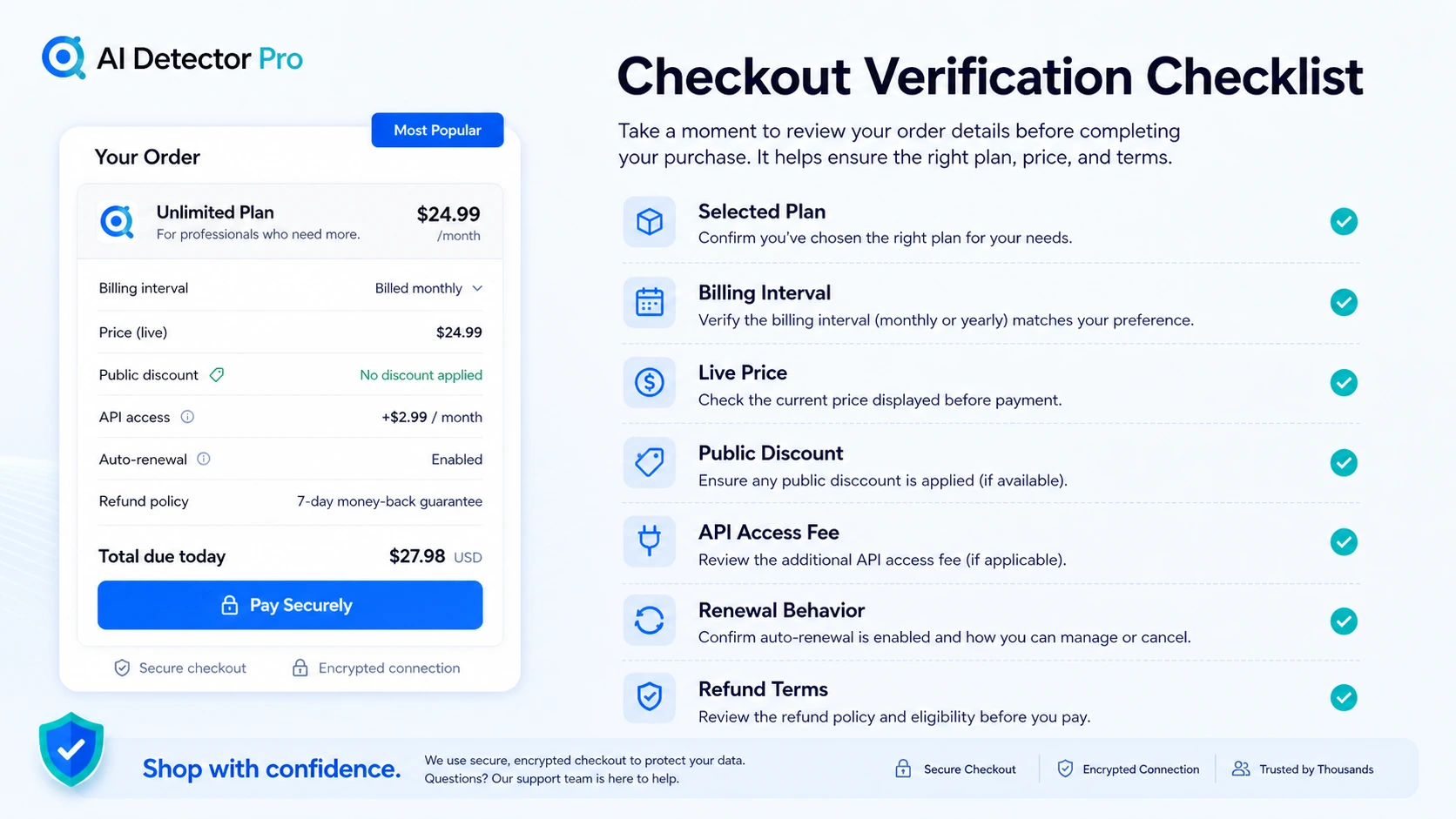
The pricing is also a two-part decision. The free plan gives a small test path. The current public pricing page shows Basic and Unlimited paid plans with a visible pricing-page discount, but the buyer still needs to verify live pricing, billing interval, refund terms, and whether plugin, report, export, or API needs justify paying.
For my money, AI Detector Pro makes the most sense when you already have a real review workflow: draft, scan, inspect flagged passages, revise manually, use suggestions carefully, and make the final editorial decision yourself.
Next step: If AI Detector Pro still fits your workflow, verify the current buyer route before relying on any score or discount.
Review snapshot
| Review point | Practical take |
|---|---|
| Best for | Buyers who repeatedly review AI-assisted drafts before publishing, submission, or client delivery |
| Not ideal for | One-off users, high-stakes proof decisions, or teams needing a broad compliance platform |
| Main use case | Detecting likely AI-written passages and deciding what to revise |
| Free path | Free plan with a small monthly scan allowance for testing workflow fit |
| Paid path | Basic makes more sense for moderate recurring checks; Unlimited only makes sense if scan volume is real |
| Main strength | Detection plus paragraph-level review and humanization guidance in one workflow |
| Main concern | Detection accuracy, refund language, monthly cancellation, coupon behavior, and API cost need verification |
| Direct alternatives | Originality.ai, Copyleaks, GPTZero, Winston AI |
| Best next step | Test real samples before upgrading or choosing annual billing |
What is AI Detector Pro?
AI Detector Pro is an AI content detection and humanization workflow tool. It scans text for signals that may look AI-generated, highlights passages that deserve review, gives tone and phraseology clues, and offers rewrite suggestions for English text.
That makes it different from a simple paste-and-score checker.
The better way to understand the product is as a review layer. You bring in a draft, inspect where the tool thinks the writing may trigger AI-detection patterns, decide whether the feedback makes sense, revise the text, and recheck when needed. The Word add-in is especially important because it moves part of that process into the document editor instead of forcing every buyer to copy text back and forth.
The common wrong expectation is that AI Detector Pro can prove whether a person wrote something. I would not use it that way. The product can provide signals, but a signal is not a verdict. This is especially important for academic, hiring, client, legal, or compliance-sensitive settings where a false positive can create real harm.
Our review approach compares public product pages, pricing details, help documentation, deal terms, buyer workflow fit, privacy language, third-party review patterns, and nearby alternatives. We do not treat a discount, free plan, or headline score as proof that the product fits the buyer.
The homepage makes the use case look simple: detect and remove AI. The buying decision is narrower. Does this tool help you make better editing decisions inside a workflow you already repeat?
If yes, it can make sense.
If no, the score is just another number to worry about.
Who should use AI Detector Pro?
AI Detector Pro fits buyers who need a review checkpoint often enough for the tool to become part of a real process.
Writers and freelancers reviewing AI-assisted drafts are the most obvious fit. If you use AI to draft outlines, paragraphs, emails, articles, or client-facing copy, AI Detector Pro can help identify sections that sound too machine-like. The condition is simple: you must still be willing to edit. If the buyer wants a one-click guarantee, this is the wrong expectation.
SEO publishers and small content teams may also find value. A publisher that reviews multiple drafts per week can use the tool as a pre-publish checkpoint before content goes live. The stronger fit is not “avoid every AI flag.” It is “find weak, generic, repetitive, or suspiciously polished passages before a human editor signs off.”
Students, educators, and academic-adjacent buyers may consider it for document review, but they should be more cautious than casual users. A detector can help start a conversation about writing signals, but it should not be used as final proof. Before paying, this group should test several known samples and compare the results with another tool.
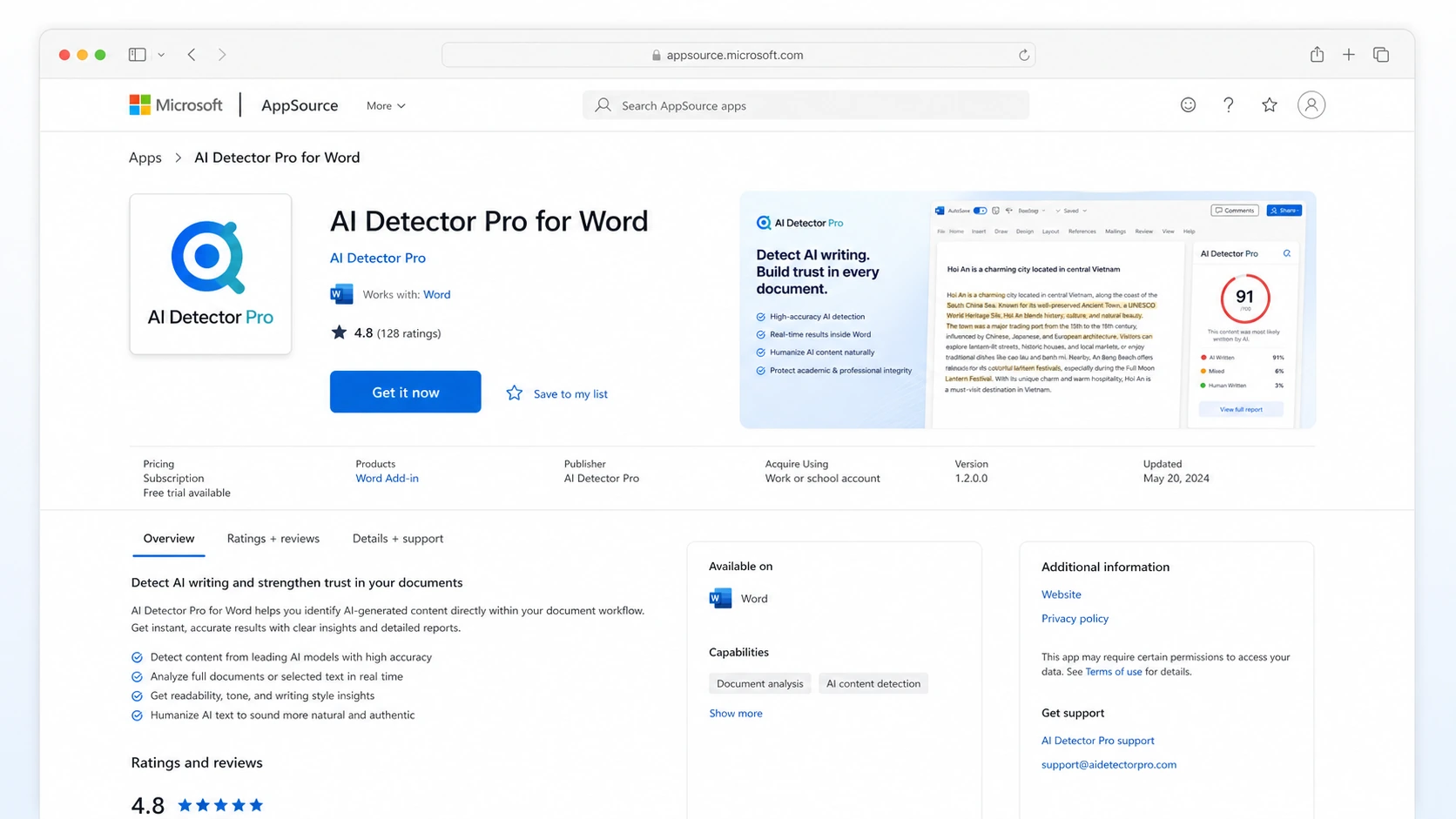
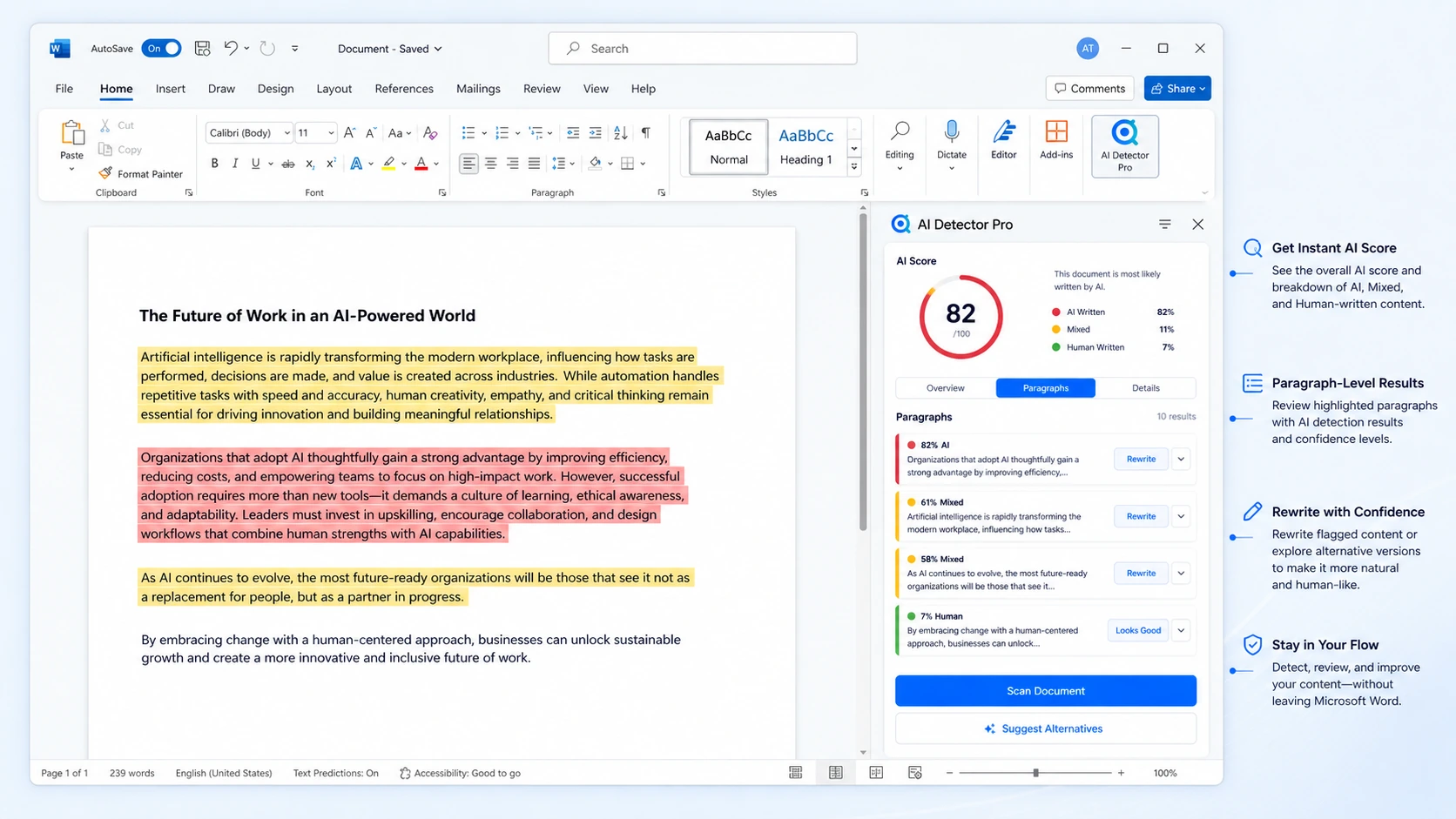
Microsoft Word users have a more specific reason to look at AI Detector Pro. The Word add-in can scan a whole document or selected sections, highlight paragraphs, show a score in the task pane, and offer alternatives. That matters when the buyer works with essays, reports, SOPs, articles, or client drafts inside Word.
Agencies or technical teams may care about reports, export, white-label reporting, or API access. I would verify those needs before choosing a plan. API access is visible as an additional-fee path, so it should not be assumed to be included in the headline subscription.
Who should avoid AI Detector Pro?
AI Detector Pro is not the right purchase for everyone.
I would skip it if you only need one casual scan. The free plan may be enough for a quick check, and a paid subscription can easily become unnecessary if you do not review content repeatedly.
I would also avoid it if you need legally or academically conclusive proof that text was written by AI. No AI detector should be treated as that kind of authority. A score may support a review process, but it should not be the entire decision.
Teams that need a mature institutional workflow should compare broader platforms first. If the buying decision depends on plagiarism checking, classroom management, formal compliance, enterprise integrations, governance, or large-scale audit trails, Copyleaks, Originality.ai, GPTZero, or Winston AI may be better starting points depending on the use case.
Buyers who only want the discount should slow down. A pricing-page discount can make a useful tool cheaper, but it does not make an unnecessary workflow valuable. The easy mistake is buying because the price looks temporarily attractive, then realizing the tool is not used often enough.
I would also be careful with sensitive or confidential documents. AI Detector Pro’s privacy language says text must be run through AI models for scans, markup, and editing, and some models may be provided by third parties. That may be normal for this category, but teams with strict confidentiality rules should read the privacy policy before uploading internal material.
How AI Detector Pro fits into a real workflow
A realistic AI Detector Pro workflow starts before the scan.
First, choose a document that represents your actual work. Do not test only a tiny paragraph or a perfectly artificial sample. Use a draft you would genuinely publish, submit, or send to a client.
Second, run the scan and look past the overall score. The useful part is the highlighted text and the explanation around what may be triggering detection. A single number may be easy to remember, but it is usually less useful than knowing which passages need attention.
Third, compare the highlighted areas with your own judgment. Does the sentence sound generic? Is the paragraph too formulaic? Did AI produce a clean but slightly empty explanation? Or is the detector flagging a normal, polished human paragraph?
Fourth, revise manually before relying on automated suggestions. AI Detector Pro can provide alternatives, but the buyer still needs to protect meaning, tone, accuracy, and originality. A lower AI score is not a win if the final text becomes vague or awkward.
Fifth, recheck only when it helps. Repeated scanning can become a trap if the buyer starts optimizing for the detector rather than the reader. The better target is writing that is clear, specific, truthful, and genuinely edited.
Workflow check: Test AI Detector Pro with one real draft before treating the paid plan as necessary.
Real-world buyer scenarios
A freelance writer preparing client content is a practical fit. The freelancer may not need a full enterprise platform. They need to know whether a draft sounds too generic, whether certain sections are likely to raise concerns, and whether a manual editing pass is enough before delivery. AI Detector Pro can help if the buyer uses the feedback as a revision guide rather than a pass/fail certificate.
A small SEO publisher has a different problem. The publisher may receive AI-assisted drafts from writers, contractors, or internal workflows. In that case, AI Detector Pro can act as one checkpoint before editorial review. The risk is over-relying on detection scores while ignoring factual accuracy, originality, search intent, and usefulness. A publisher should compare AI Detector Pro with Originality.ai if plagiarism, readability, and publishing QA matter more than humanization suggestions.
A student or academic editor should use more caution. AI Detector Pro may help identify passages that sound machine-like, especially inside longer documents, but a detector result should not be treated as proof. For this buyer, the better test is to scan known human writing, known AI-assisted writing, and mixed writing, then see whether the results are stable enough to be useful.
An agency buyer may be attracted to reports, exports, white-label options, and API access. This is where the pricing decision becomes more serious. If client reporting is part of the workflow, verify which plan includes the needed reporting features. If automation matters, confirm API costs separately before building the tool into a client process.
Key features that actually matter
AI detection with highlighted passages
The strongest feature is not the score by itself. It is the ability to see which passages triggered the detection signal. This helps buyers move from anxiety to action: inspect the flagged text, decide whether the concern is reasonable, then revise where needed.
Buyer note: Treat highlighted passages as review prompts. Do not treat them as final proof.
Humanization and rewrite suggestions
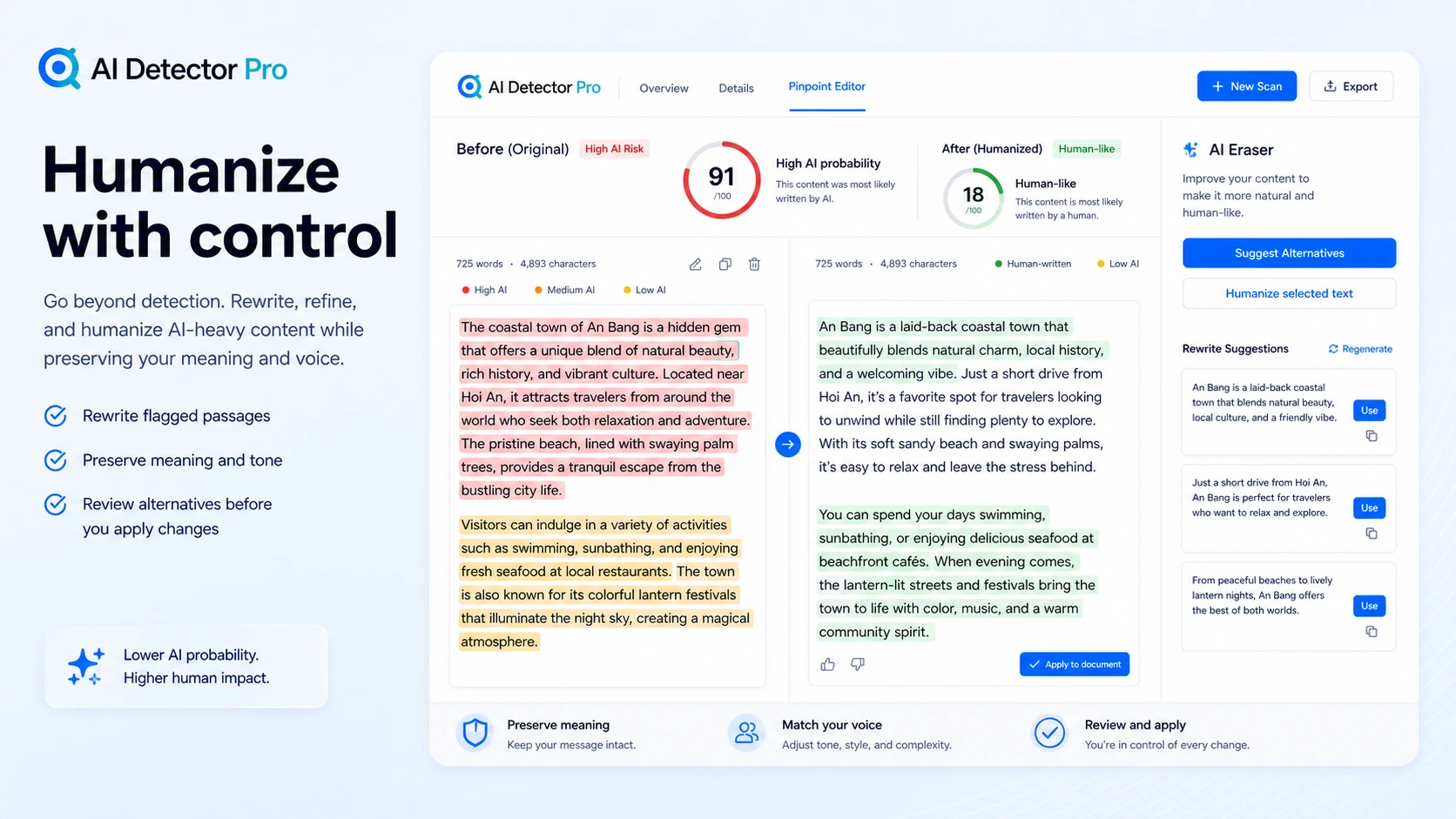
AI Detector Pro includes rewrite suggestions designed to make text sound less AI-like. This is useful when the buyer wants help spotting stiff, generic, or overly predictable phrasing.
The risk is that buyers can start chasing a lower detector score instead of better writing. I would use suggestions as ideas, then rewrite in my own editorial voice.
Buyer note: The final text should become clearer and more natural, not merely harder for a detector to flag.
Microsoft Word and Google Docs workflow
Plugin support matters because many serious review workflows happen inside documents. The Word add-in can scan document text, highlight paragraphs, show results in a task pane, and offer alternatives. For long documents, that is more practical than copying text into a web checker repeatedly.
Buyer note: Word users should verify document length behavior, login requirements, and whether selected-section scanning fits their daily process.
Reports, export, and agency-facing features
Branded reports, white-label reports, and data export may matter for consultants, agencies, editors, or teams that need to show work to clients. These features are less important for casual users.
Buyer note: Do not pay for report features unless you know who will read those reports and how often you will generate them.
API access for technical workflows
AI Detector Pro lists API access as available for an additional fee. That can matter for technical teams, SaaS workflows, or internal tools, but it should be treated as a separate buying decision.
Buyer note: Confirm the current API pricing, limits, and access requirements before planning a developer workflow around it.
Pricing and plan value
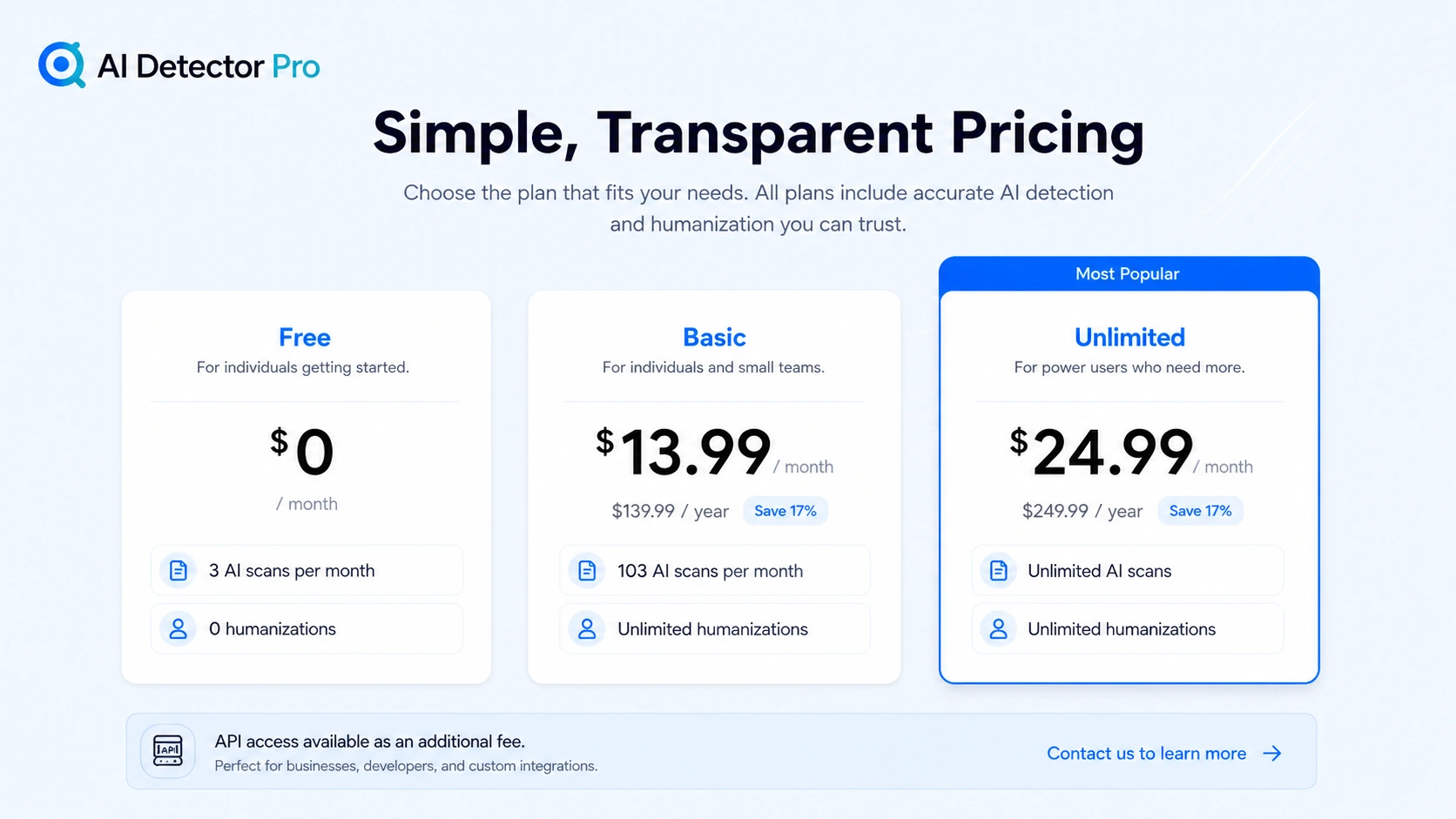
The current public pricing page presents three main paths: Free, Basic, and Unlimited.
The free plan is the safest first step. It includes a small monthly scan allowance and no humanizations, so it is not a full production path. But it can answer the most important question: do the scan results and feedback style help your real editing process?
The Basic plan is the more realistic first paid route for buyers with recurring but moderate use. The public pricing page currently shows Basic with a monthly and yearly option, and a visible pricing-page discount. It includes a higher monthly scan allowance and unlimited humanizations. That can be enough for freelancers, editors, and small teams that review drafts regularly but do not need unlimited scanning.
The Unlimited plan should be judged by actual volume. It sounds attractive, but unlimited scanning only matters if scanning is truly repeated and necessary. If you scan a few drafts per month, the bigger plan may be more comfort than value.
Annual billing deserves caution. The pricing page shows lower annual totals compared with month-to-month buying, but annual value depends on repeated use. I would not move to annual billing until the workflow proves itself across several real documents.
API access should be treated separately. The pricing page notes that API use costs extra. Developer buyers should not assume that the subscription alone covers API economics, technical access, or volume needs.
Pricing check: If the workflow fit is clear, compare the live plan limits and checkout terms before choosing monthly or annual billing.
Free plan, trial, coupon, and checkout notes
The free plan is useful, but limited. It is best for checking the interface, the feedback style, and whether the detector highlights passages in a way that changes your editing process. It is not the best path for heavy content production.
I did not see a separate traditional free trial positioned as the main evaluation route. The free plan is the safer evaluation path.
The coupon or discount route should be treated as secondary. AI Detector Pro’s public pricing page currently displays a pricing-page discount for paid plans, and the site also says coupon pricing can continue while the buyer remains subscribed. That can be useful, but it should not drive the decision. The better order is workflow first, plan fit second, checkout discount third.
Do not expose or rely on a coupon code from old content without checking the current buyer route. Public offers can change, and checkout behavior matters more than a stored note.
Refund language needs more care than the homepage might suggest. AI Detector Pro publishes a 30-day money-back guarantee page for new accounts, but the Terms include additional cancellation and refund details. Monthly cancellation does not create a prorated monthly refund, annual cancellation has its own prorated language within a stated window, and special promotional benefits can be lost when cancelling. Buyers should read the current terms before annual billing.
What I would check before buying AI Detector Pro
If I were buying AI Detector Pro for a real workflow, I would check these points first:
- Whether the free plan’s limited scans are enough to test real documents, not just toy samples.
- Whether the highlighted passages actually help me edit better.
- Whether humanization suggestions improve clarity without changing meaning.
- Whether Basic scan volume is enough or Unlimited is genuinely needed.
- Whether Word or Google Docs plugin support fits the way I already work.
- Whether reports, data export, white-label output, or API access are truly necessary.
- Whether the refund, cancellation, and annual billing terms feel acceptable before checkout.
The mistake buyers often make here is comparing the paid plans only by the discount. That is too shallow. The better comparison is between workflow needs: how many documents, how much revision support, which editor environment, whether reports matter, and whether API access is part of the plan.
A simple test before paying
Before paying, I would run a small test like this:
- Prepare three samples: one human-written draft, one AI-assisted draft, and one mixed draft.
- Scan each sample and look at the highlighted passages rather than only the score.
- Check whether the tool flags text that you also find generic, predictable, or machine-like.
- Try a few rewrite suggestions, but edit the final wording manually.
- Compare the result against one established alternative if the decision is important.
- Re-read the final text for clarity, accuracy, originality, and tone.
- Upgrade only if the tool changes your editing decisions across real examples.
This test is deliberately small. You do not need a perfect benchmark to make a better buying decision. You need to know whether AI Detector Pro helps you produce better reviewed text inside your own process.
Pros explained
The first real pro is focus. AI Detector Pro is not trying to be a general writing suite, SEO platform, or enterprise compliance system. It is focused on detection, flagged passages, tone signals, and rewrite guidance. That makes it easier to understand when it belongs in the workflow.
The second pro is the free starting point. The free plan is limited, but that is enough to test whether the feedback style is useful. A limited free path is better than paying before you know whether the tool fits.
The third pro is document workflow support. The Word add-in is not a small detail. For buyers who work in long documents, scanning and revising inside the editor can matter more than a prettier web dashboard.
The fourth pro is the combination of detection and revision guidance. A score by itself often leaves buyers asking, “Now what?” AI Detector Pro tries to answer that by showing passages and offering alternatives. That is useful when the buyer treats the output as editing support.
The fifth pro is the broader upgrade path. Reports, exports, white-label options, and API access can make the tool more relevant for agencies or technical buyers, provided those buyers verify plan details and extra costs.
Cons explained
The biggest con is the category itself. AI detectors can be wrong. They can miss AI-assisted text, and they can flag human writing. That is not just a technical footnote. It changes how the tool should be used. A buyer should treat the result as a signal, not a final judgment.
The second con is refund complexity. The money-back page sounds simple, but the Terms add more detail around monthly cancellation, annual prorated refunds, promotional benefits, and subscription renewal. This does not mean buyers should avoid the product. It means they should read the current terms before paying.
The third con is humanization risk. Rewrite suggestions can help, but they can also push buyers toward detector-chasing. If the revised text becomes less precise, less truthful, or less like the author, the tool has not solved the real problem.
The fourth con is API uncertainty for technical buyers. API access is visible, but the public pricing page says it costs extra. If API use is central to the workflow, the buyer needs to confirm cost and limits before planning around it.
The fifth con is that broader teams may need more than AI Detector Pro provides. If plagiarism checks, institutional reporting, classroom workflows, admin controls, or large-scale governance are the real buying criteria, a broader platform may fit better.
Green flags and red flags
Green flags are clear with AI Detector Pro. The product makes more sense when the buyer has repeated review work, real documents to test, a need for highlighted passages, and a willingness to revise manually. It also looks stronger when the buyer works inside Word or Google Docs and values document-level review.
Another green flag is when the buyer cares about editing decisions, not just scores. If AI Detector Pro helps you notice weak passages, tighten vague wording, and make the final draft sound more specific, it is doing useful work.
The red flags are just as important.
Be careful if you are buying because of a discount before testing the product. Be careful if you expect a detector to prove authorship. Be careful if you plan to upload sensitive documents without reading the privacy policy. Be careful if annual billing looks attractive before the tool has proven repeated value. Be careful if API access is a must-have but the extra cost has not been confirmed.
The safest buyer is not the person who believes every detection claim. It is the person who uses detection as one checkpoint inside a broader review process.
AI Detector Pro vs alternatives
AI Detector Pro has direct alternatives, but the tradeoffs are not identical. This matters because “AI detector” can mean several different buyer jobs: content publishing QA, academic review, plagiarism-aware originality checking, document reporting, or text humanization support.
Originality.ai vs AI Detector Pro
Originality.ai is usually the stronger comparison for publishers and SEO teams that want AI detection, plagiarism checking, readability, and team-oriented content QA in one place. If the buyer’s workflow is publishing-side originality review, Originality.ai may be the broader fit.
AI Detector Pro may still make sense if the buyer wants a more focused detection-and-humanization workflow, especially with Word or Google Docs support. The tradeoff is breadth versus focused revision guidance.
Copyleaks vs AI Detector Pro
Copyleaks is a stronger route for institutional, education, enterprise, or plagiarism-aware workflows. Buyers who care about broader originality infrastructure, integrations, and governance should compare it before choosing AI Detector Pro.
AI Detector Pro is more attractive when the buyer wants highlighted AI signals and rewrite suggestions rather than a larger compliance-style platform.
GPTZero vs AI Detector Pro
GPTZero is a natural comparison for educators, students, and buyers who want a recognized AI detection brand. It may be a better first comparison when education-style detection and explainability are more important than humanization support.
AI Detector Pro may be better if the buyer wants to revise flagged text inside a document workflow rather than only evaluate whether text looks AI-generated.
Winston AI vs AI Detector Pro
Winston AI is worth comparing when reports, document review, OCR-style workflows, or professional originality checks matter. It may be the better fit for buyers who need formal-looking review outputs.
AI Detector Pro may still appeal to buyers who care more about editing passages and reducing AI-like phrasing inside a content workflow.
Trust, refund, and buyer-risk notes
The trust picture for AI Detector Pro is mixed in a normal buyer-review way.
On the positive side, the official pages are relatively specific. The pricing page shows plan structure, scan allowances, humanization access, plugin support, reports, export, and API notes. The Word add-in page explains scanning, highlights, paragraph details, alternatives, and rescanning. The money-back page gives a public refund route for new accounts.
On the cautious side, the Terms add details that buyers should not ignore. Monthly cancellation does not appear to create a prorated monthly refund. Annual cancellation has its own prorated refund language. Promotional benefits can be lost after cancellation. Pricing for new subscribers can change. API access costs extra. And AI detection itself is not perfectly accurate.
The privacy angle also deserves attention. To provide scans, markup, and editing, text has to be processed by AI models, and the policy says some models may be provided by third parties. That is not unusual for an AI workflow product, but it matters for confidential documents.
Third-party evidence is limited but useful directionally. G2 has only a small number of Detector Pro reviews, so I would not treat it as a broad market consensus. The review patterns still point to the same buying logic: users like multilingual detection, Google Docs or Word workflow, and daily content checking, while humanization quality, short-text accuracy, creative writing, and support speed can still be concerns.
The buyer-risk summary is simple: do not buy on headline price alone. Verify plan limits, test real samples, read refund and privacy language, compare at least one alternative, and treat every score as a checkpoint rather than a verdict.
Final verdict
AI Detector Pro is a sensible tool for a specific buyer: someone who repeatedly reviews AI-assisted writing and wants detection signals, highlighted passages, document workflow support, and rewrite guidance in one place.
I would consider it if you already have drafts to review, you work inside Word or Google Docs, you need more than a one-number detector, and you are willing to make the final editing decision yourself. In that case, the free plan is a reasonable test, and Basic may become practical if recurring scan volume is real.
I would skip it if you only need a casual one-time check, if you expect proof of authorship, if you handle sensitive documents without reviewing privacy terms, or if your team needs broader plagiarism, governance, or institutional reporting from day one.
I would compare it with Originality.ai if publishing QA matters, Copyleaks if institutional coverage matters, GPTZero if education-style detection matters, and Winston AI if document reports are central to the workflow.
The safest next step is not to trust the score immediately. Start with a real sample, test whether the feedback improves your editing, compare one alternative, and only then decide whether the paid route is worth it.