Quick verdict
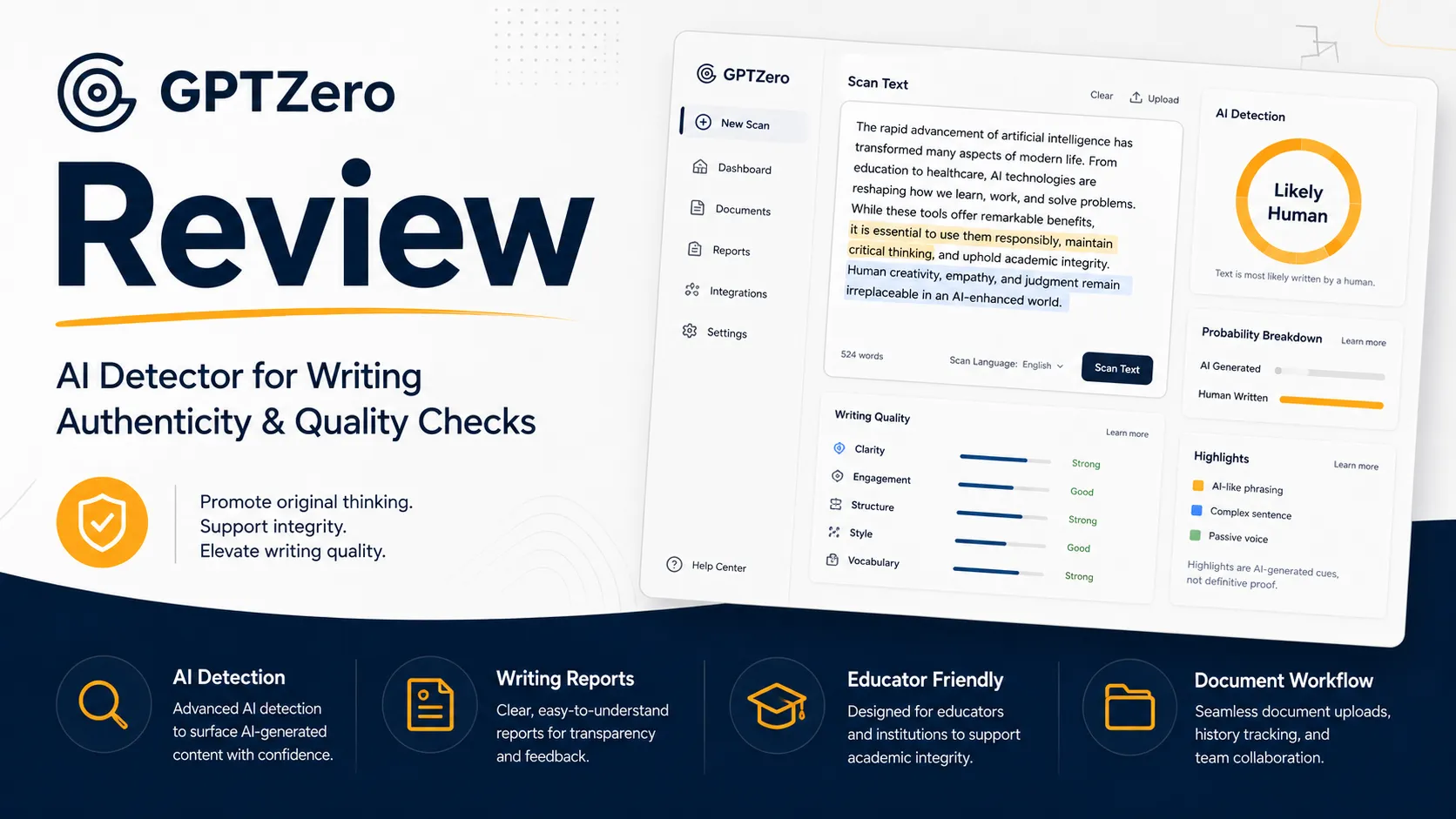
GPTZero is worth considering if you need an AI detection checkpoint that fits into a real writing, teaching, publishing, or review workflow. It is not the kind of tool I would judge by the score alone.
That is the most important buyer distinction here.
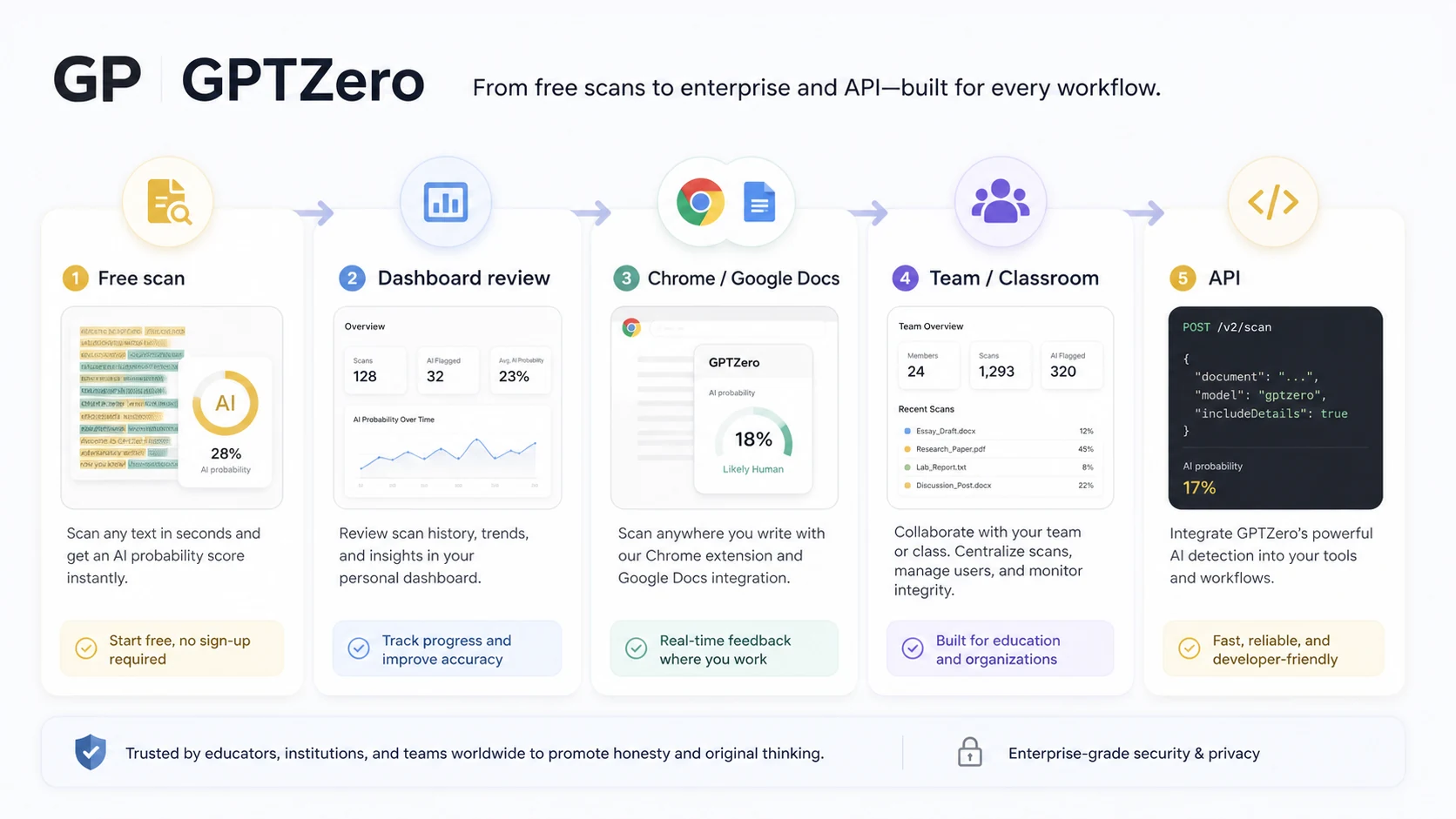
The product looks simple from the outside: paste text, run a scan, and see whether the writing appears AI-generated. But the better reason to look at GPTZero is broader. It now sits closer to a writing-authenticity workflow than a basic copy-paste checker, with AI detection, sentence-level review, Chrome and Google Docs support, writing reports, classroom routes, team plans, Zapier, and API access.
I would be careful if you are buying it for one-off reassurance. AI detectors can be useful, but they should not become final proof of authorship, misconduct, originality, or writing quality. The safer use is to treat GPTZero as one signal inside a human review process.
The strongest reason to consider GPTZero is workflow depth. The free entry path lets cautious buyers test the detector before paying, and the paid paths can make sense for educators, publishers, teams, or developers who need repeated checks. The main caution is commercial: paid purchases are currently presented with non-refundable terms, while the live pricing calculator, annual billing, seat count, and API route can change the real cost.
Next step: If GPTZero already fits your review workflow, check the current buyer route before choosing a paid plan.
Review snapshot
| Review point | Practical take |
|---|---|
| Best for | Teachers, students, editors, publishers, and teams that need repeatable AI detection or writing-authenticity checks |
| Not ideal for | Buyers who want a detector score to act as final proof, or light users who only need rare checks |
| Main use case | Reviewing text for likely AI-generated passages, writing process context, classroom workflow, or content authenticity |
| Free path | Available as the safest first test before paid billing |
| Paid path | Better for repeated scans, team use, reporting, integrations, or API needs |
| Main strength | Broader workflow coverage than a simple paste-and-score detector |
| Main concern | Non-refundable purchase language and live pricing variables require careful checkout verification |
| Best alternatives to compare | Originality.ai, Copyleaks, Winston AI |
| Best next step | Test with a real document before moving to annual billing, team seats, or API access |
What is GPTZero?
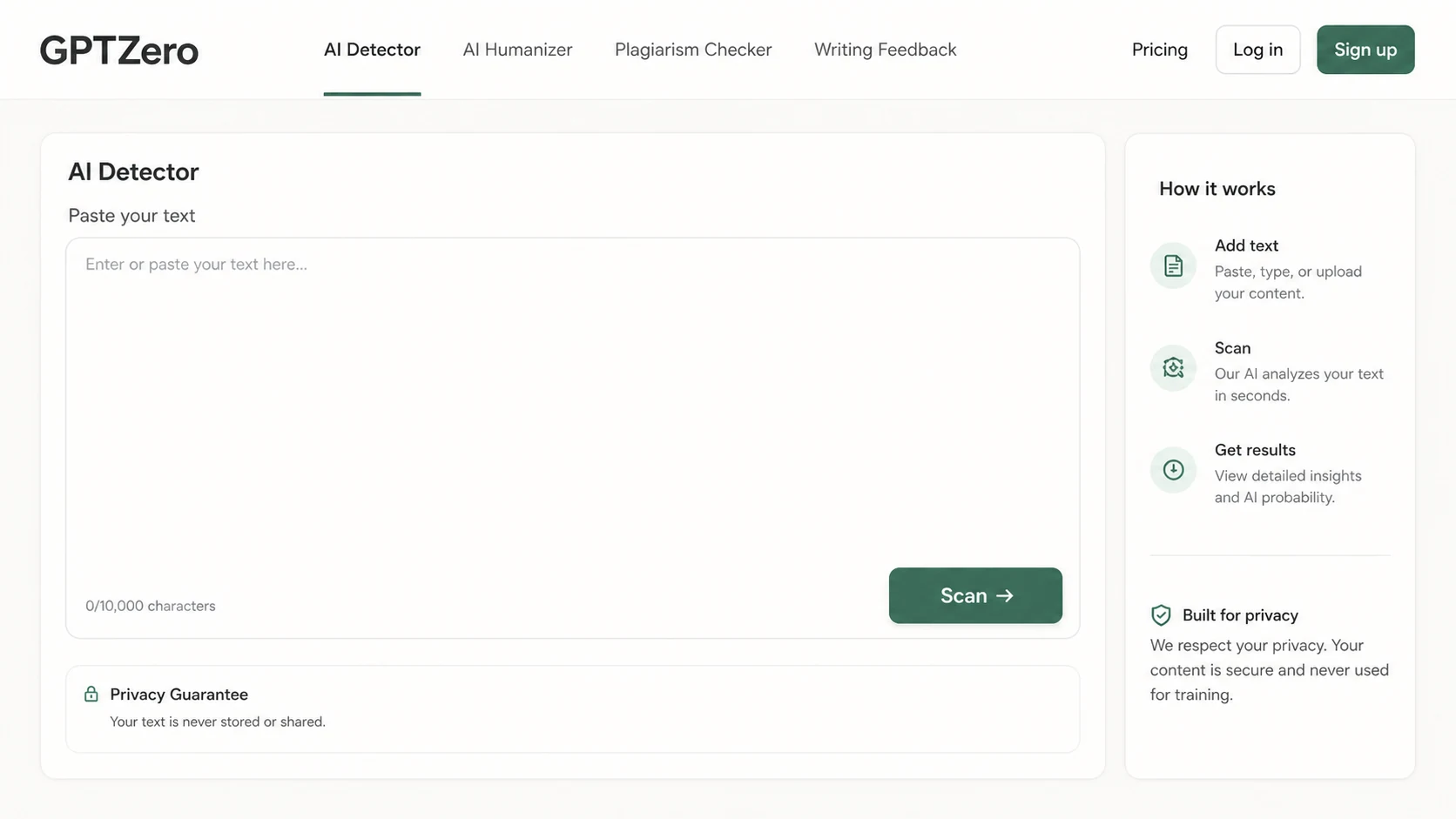
GPTZero is best understood as an AI detection and writing-authenticity platform for people who need to review text before trusting, publishing, submitting, grading, or operationalizing it.
It detects likely AI-generated content from major AI models and presents results in a way that can support a human reviewer. The public product positioning also goes beyond basic detection: GPTZero promotes writing reports, Google Docs workflow, Chrome extension support, plagiarism-related checks, classroom integrations, and developer API access.
The common misunderstanding is thinking GPTZero is only a score machine.
That is too narrow. A score can be useful, but the practical value is in the surrounding decision: what part of the text needs closer attention, whether the writing process looks credible, whether the report helps a teacher or editor ask better questions, and whether the result should trigger revision, conversation, or comparison with other evidence.
Our review approach compares public product pages, pricing details, terms, support documentation, workflow fit, buyer risk, and nearby alternatives. I do not treat a coupon, a headline accuracy claim, or a low starting price as proof that a product fits the buyer. With AI detection tools, the safer question is always: does this improve the decision process without replacing human judgment?
Who should use GPTZero?
Teachers and academic reviewers
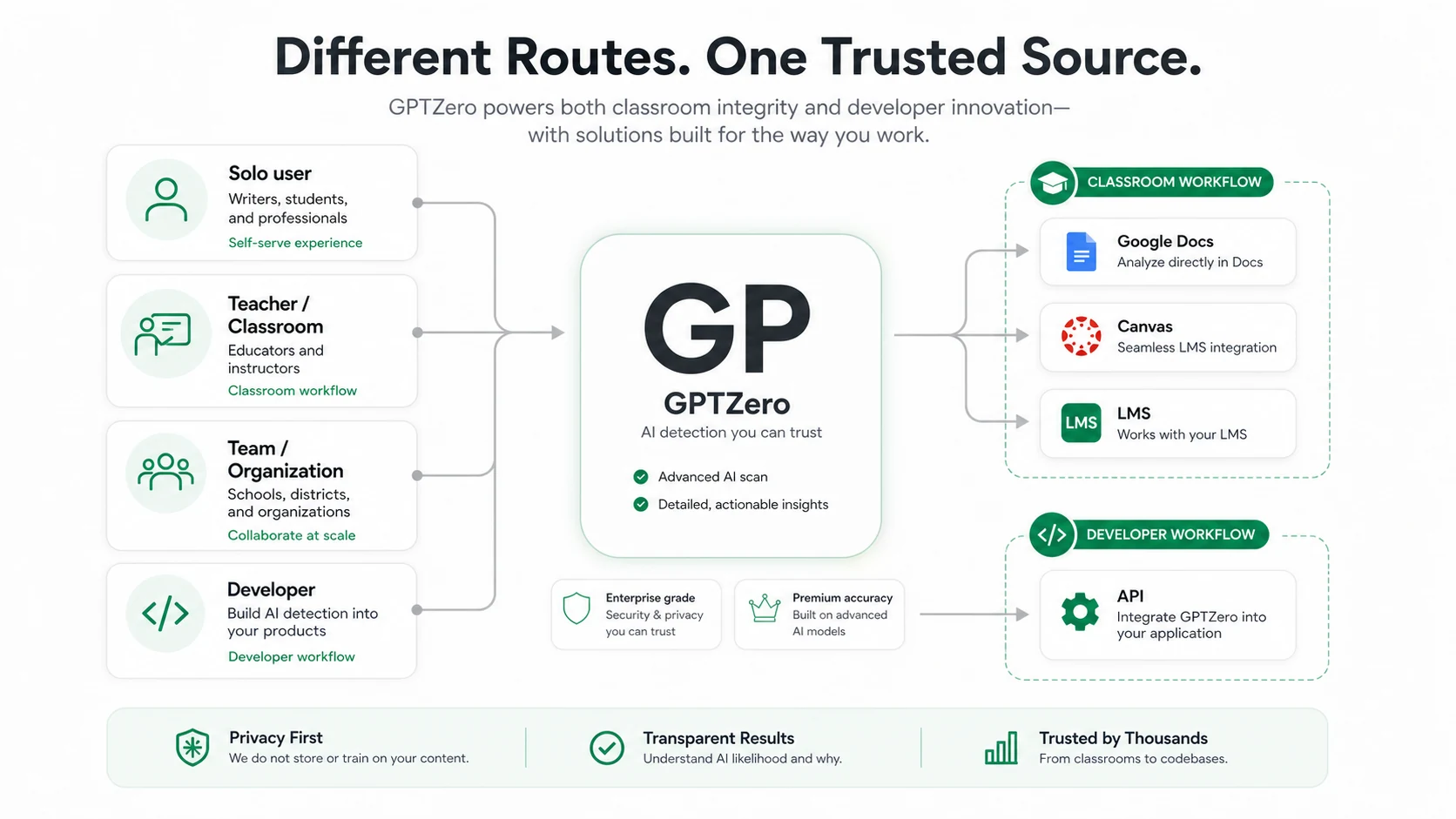
GPTZero is a natural fit for teachers who need a structured checkpoint for student work, especially when a simple gut feeling is not enough. The writing report, Google Docs workflow, and classroom positioning are more relevant here than a plain detector percentage.
The condition is important: the result should support a conversation or review process, not become an automatic accusation. Before paying, an educator should verify whether the workflow fits the actual classroom tools in use, such as Google Docs, Canvas, Google Classroom, or another LMS path.
Students and writers who want a safer self-check
Students and writers may use GPTZero to see whether a draft looks overly AI-assisted, too polished, or risky in a setting where originality matters. The free entry path makes this a reasonable first step.
The limit is that a detector score can create anxiety if the user treats it as absolute truth. A better use is to review highlighted passages, revise unclear or generic sections, and preserve the real writing process where possible.
Editors and publishers reviewing submitted content
GPTZero can help editors triage draft text before a deeper editorial pass. This is useful when a publisher receives freelancer drafts, AI-assisted articles, guest posts, or submissions where authenticity and originality matter.
The tool makes more sense when the editor already has a review workflow. If all you want is an occasional scan, the free path or a lighter plan may be enough. If you need recurring team review, compare GPTZero with the Originality.ai store guide before committing.
Teams that need seats, reports, or shared billing
GPTZero’s team path matters when several reviewers need a shared workflow. A team buyer should not evaluate the product like a solo user. Seat count, shared credits, reporting, plan limits, and admin expectations become the real decision.
This is where I would slow down before annual billing. Confirm the final seat-based price, workflow coverage, and cancellation terms before treating the plan as operationally safe.
Developers or platforms that need API access
GPTZero also has a developer route. That can matter for products, internal dashboards, LMS tools, or platforms that need AI detection inside another workflow.
API use is not the same buying decision as dashboard use. A developer should check subscription requirements, API keys, documentation, request volume, cost assumptions, and implementation needs before building anything around it.
Who should avoid GPTZero?
You should avoid GPTZero, or at least delay paying for it, if you expect any AI detector to act as final proof.
That applies especially in classrooms, hiring, legal review, academic discipline, or employment-sensitive settings. A detector result can be useful evidence, but a false positive can hurt a real person. GPTZero itself may be stronger than many casual detectors, but the category still requires caution.
You should also be careful if your use is very light. If you only need to check a few documents once in a while, the free detector may be enough. Paying for annual access before proving monthly use is the easy mistake.
A third group should pause: buyers who are shopping only because they saw a discount, annual savings message, or third-party coupon claim. Savings can make a good purchase cheaper. They cannot turn the wrong workflow into the right tool.
Large organizations with deep plagiarism governance, procurement, privacy review, or institution-wide rollout needs should compare GPTZero with the Copyleaks store guide. GPTZero may still be a fit, but the decision should be made around policy, integration, and review process, not just detection accuracy.
Finally, API buyers should avoid assuming that dashboard access equals integration readiness. API workflows need their own cost and technical check.
How GPTZero fits into a real workflow
A careful GPTZero workflow does not start with the score. It starts with the decision you need to make.
A teacher may need to decide whether a student’s writing deserves a follow-up conversation. An editor may need to decide whether a freelancer draft needs deeper revision. A publisher may need to decide whether AI-assisted text is ready for publication. A developer may need to decide whether AI detection belongs inside another product.
That changes how the tool should be used.
A practical workflow looks like this:
- Start with a real document, not a polished sample chosen only to make the tool look good.
- Run the AI detection check.
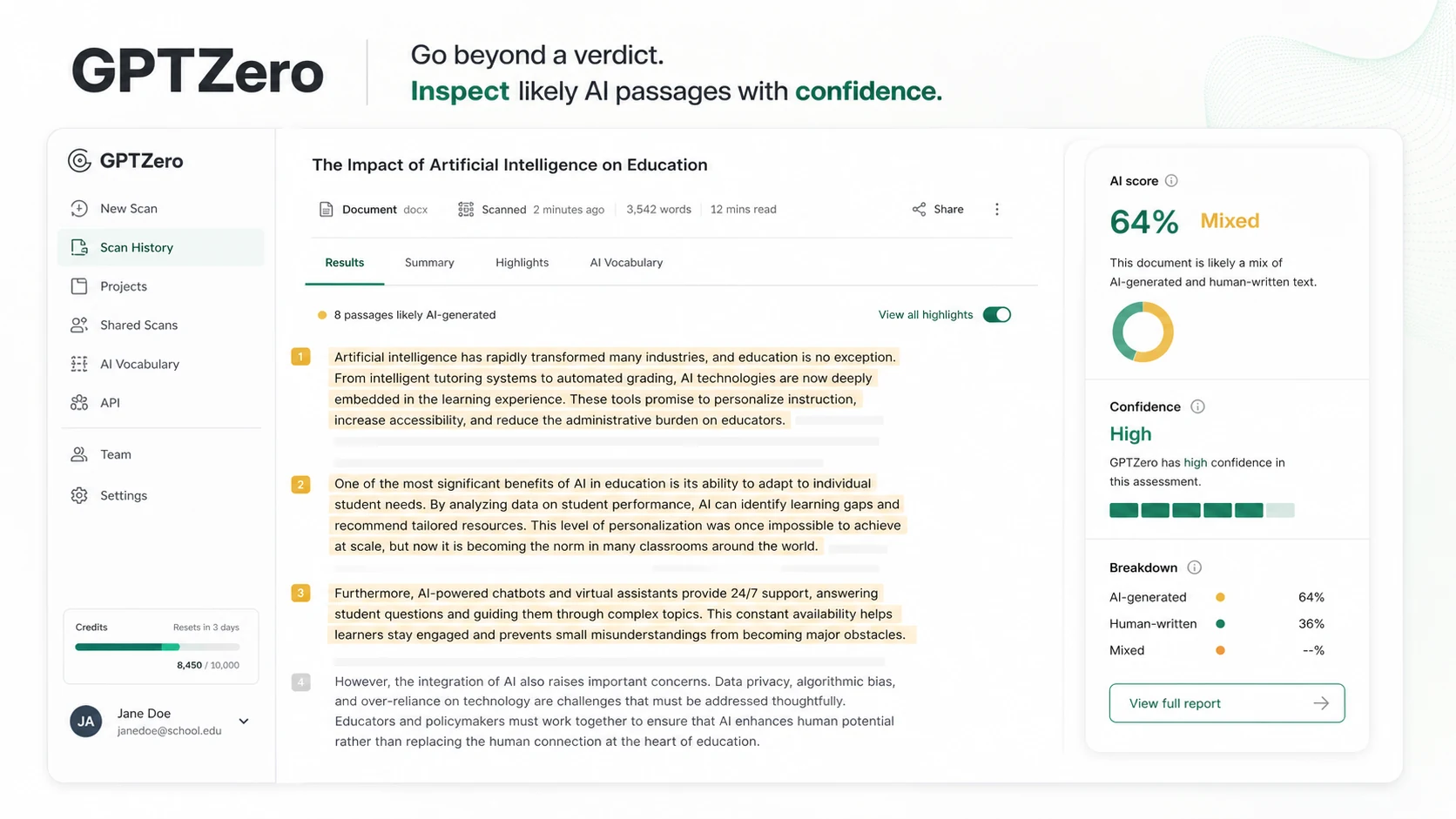
- Look at sentence-level highlights and report context, not only the overall score.
- Compare the result with your own judgment of the writing.
- Review writing process evidence when Google Docs or writing replay features are relevant.
- Decide whether to revise, ask questions, compare evidence, or take no action.
- Keep the final decision human.
The tool is most useful when it reduces uncertainty. It is weaker when it creates overconfidence.
That difference matters. A buyer who only wants a clean yes-or-no answer may become frustrated. A buyer who wants a structured review checkpoint is closer to the right use case.
Workflow check: If you plan to use GPTZero repeatedly, test it with the same kind of documents you actually review before choosing annual billing.
Real-world buyer scenarios
A teacher reviewing student essays
A teacher may use GPTZero to identify writing that deserves closer review, especially when the writing style suddenly changes or when a document includes unusual phrasing. The tool can help organize the review, but it should not replace a conversation with the student.
The key check is whether the report format helps the teacher act responsibly. If the result only creates suspicion without usable context, the workflow is incomplete.
A student checking a draft before submission
A student may use GPTZero to understand whether a draft looks too AI-assisted or whether the writing process evidence is strong enough. This can be useful when the student used AI for brainstorming, grammar help, or outline support and wants the final submission to remain authentic.
The mistake is trying to rewrite only for a detector. The better path is to revise for clarity, voice, accuracy, and proper attribution.
A publisher reviewing freelancer submissions
A publisher or content manager may use GPTZero as one checkpoint before editorial review. This is where sentence-level highlighting and report context matter more than a single percentage.
If the team also needs plagiarism detection, large-scale content governance, or recurring editorial workflows, it should compare GPTZero with Originality.ai and Copyleaks before deciding.
A developer building AI detection into another workflow
A developer or product team may care less about the dashboard and more about the API. GPTZero can be relevant here, but the buying risk shifts from “is the scan useful?” to “does the API cost, documentation, and request behavior fit our volume?”
I would not build a workflow around the API until the technical and pricing assumptions are verified with realistic usage.
Key features that actually matter
AI detection with highlighted results
The core feature is AI detection. GPTZero scans text and helps identify likely AI-generated passages.
The useful part is not just the score. The useful part is the location and context. Highlighted passages let a reviewer inspect the parts of a document that need attention instead of treating the entire piece as guilty or clean.
Buyer note: use the result as a review signal. Do not use it as a final verdict by itself.
Writing report and writing replay context
GPTZero’s writing report and replay-style features are important because they move the tool beyond a static pasted document. For educators and reviewers, process context can be more useful than a surface-level output score.
This matters when the buyer wants to understand how a document was created, edited, pasted, or revised. It is especially relevant in Google Docs workflows.
Buyer note: verify whether the writing report features are available in the plan and environment you expect to use.
Chrome and Google Docs workflow
The Chrome extension and Google Docs support reduce friction for users who review writing where it already lives. This is more valuable than it sounds.
Copy-paste checking can become annoying for teachers, editors, and students who work inside documents all day. A tool that stays closer to the writing process may get used more consistently.
Buyer note: extension value depends on actual workflow. If you only paste text occasionally, this may not justify upgrading.
Classroom and LMS paths
GPTZero positions itself for education workflows, including classroom and LMS-style use. That is important because schools and universities usually need more than a single-user dashboard.
The buyer should check the practical rollout path: who reviews the work, where assignments live, what reports are shared, and how students can respond if the tool flags their writing.
Buyer note: the more sensitive the academic decision, the more human process matters.
Team seats and shared billing
Team seats make sense when multiple people need consistent review access. For a small department, agency, or editorial team, shared billing and shared credits can be cleaner than separate accounts.
The risk is overbuying. Seat-based pricing can look manageable until the buyer adds users, changes billing interval, or moves to annual billing too early.
Buyer note: calculate real monthly use before choosing team seats.
API access
The API path matters for developers, platforms, and organizations that need AI detection inside another product or workflow. GPTZero provides a developer route and API documentation, but this should be treated as a separate buying decision.
Buyer note: check subscription access, API key setup, rate or usage assumptions, and expected volume before relying on it.
Pricing and plan value
GPTZero is not a product I would evaluate by headline price alone.
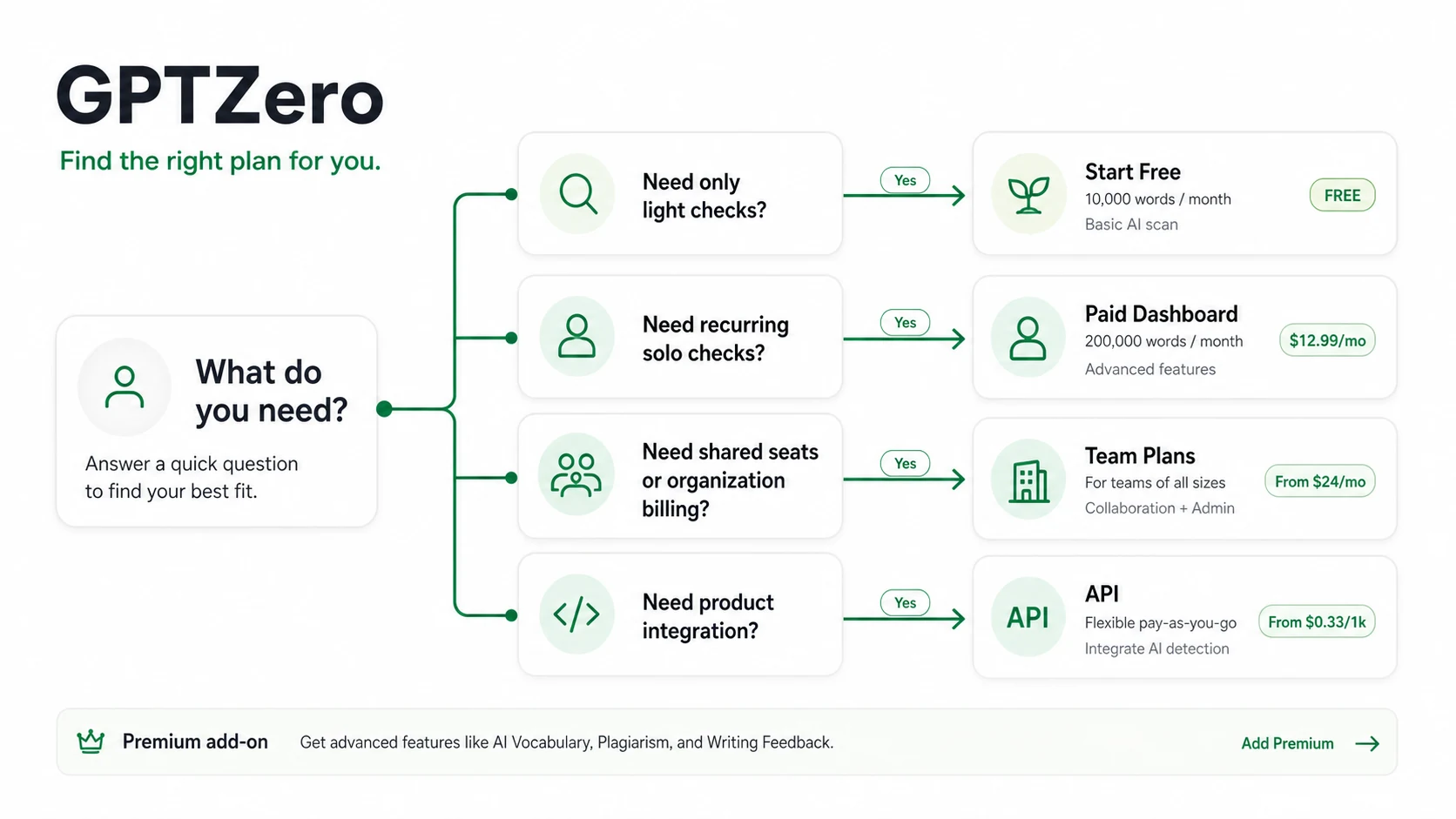
The current public pricing route starts with a free entry path, shows monthly and annual controls, promotes annual savings, includes team-plan language, and separates developer API use from ordinary dashboard buying. That creates several different buyer decisions under one brand.
For a light user, the free path may be enough to answer the first question: does GPTZero’s result format help me make a better review decision? If the answer is no, paying will not fix the mismatch.
For a recurring solo user, the paid dashboard question is about volume and report value. How many documents do you review each month? Do you need Chrome, Google Docs, plagiarism-related checks, writing reports, or larger limits? Will you actually use the tool enough to justify the plan?
For a team, the pricing question becomes seat count and shared workflow. A plan that looks simple for one user can become more complicated when several reviewers need access.
For a developer, dashboard pricing is not the main issue. API cost, subscription access, implementation work, and request volume become the real buying math.
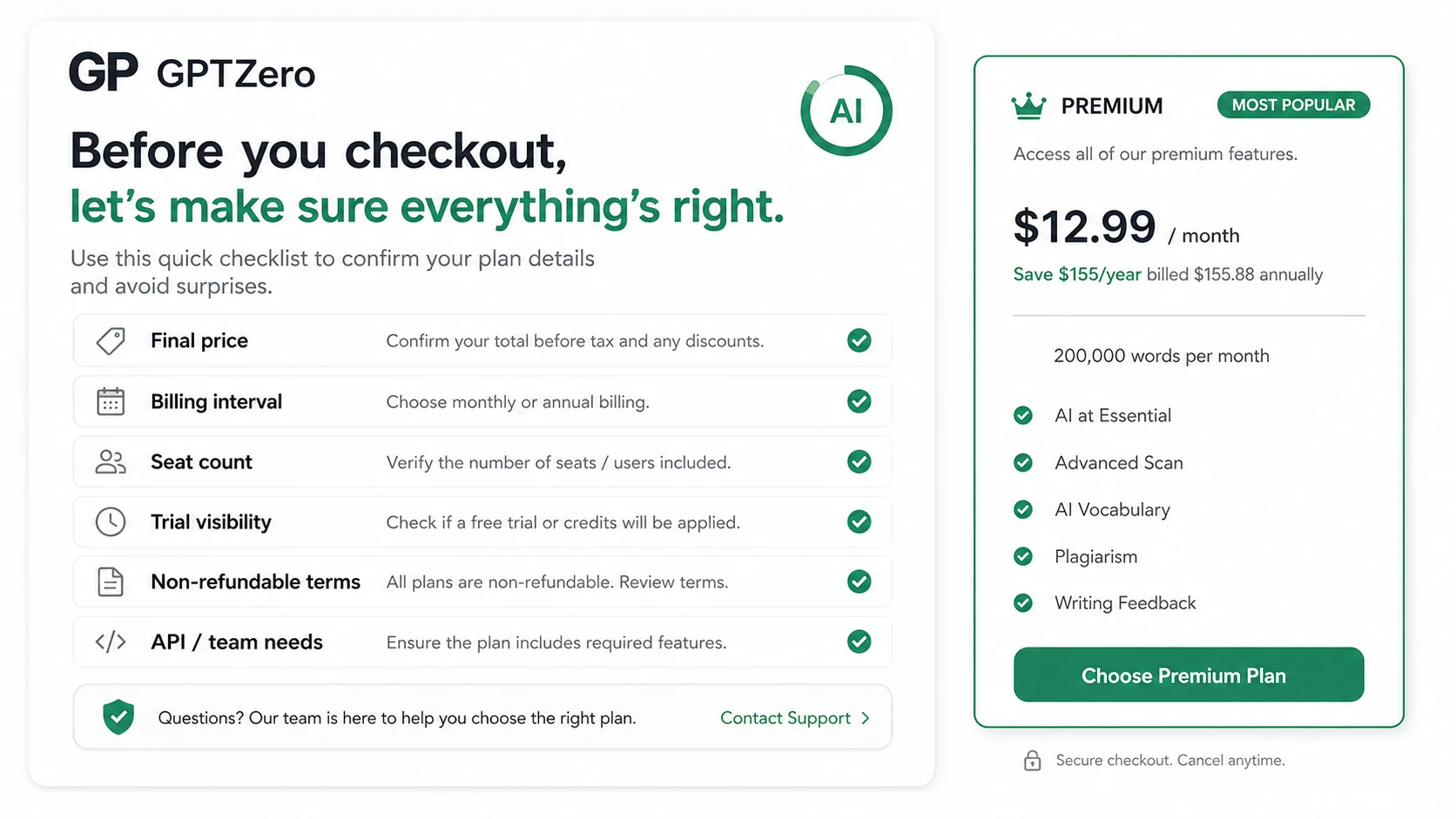
My pricing take is straightforward: start free when the use case is unproven, consider monthly before annual when volume is uncertain, and treat API or team rollout as a separate verification step.
The biggest caution is the non-refundable purchase language. When paid purchases are not flexible, the evaluation path before checkout becomes more important.
Pricing check: Before paying for GPTZero, verify the live plan, billing interval, seat count, trial visibility, and cancellation terms.
Free plan, trial, coupon, and checkout notes
GPTZero’s free entry path is the safest place for most buyers to begin.
A free detector is not proof that the paid plan is worth it. It is a test lane. Use it to see whether the scan result, highlighted passages, and workflow cues help with your actual documents.
The trial language also deserves attention. GPTZero’s terms mention an optional 7-day free trial for new users, but I would still verify whether that trial appears on the exact plan and checkout flow you are considering. Trial language can be conditional, and the live checkout is more important than old editorial copy.
The coupon path should be secondary. Third-party coupon claims may appear around the web, but GPTZero is better judged as a plan-fit decision than a coupon hunt. The more reliable savings logic is usually: start free, compare monthly and annual billing, verify whether team or API use is necessary, and only then check active offers.
If the product still fits your workflow, the GPTZero coupon page can help you check current offers before checkout. Just do not let the offer become the reason you buy.
Offer check: Use GPTZero’s coupon route only after the workflow, plan limits, and refund terms already make sense.
What I would check before buying GPTZero
If I were buying GPTZero for a real workflow, I would check these items before entering payment details:
- Whether the free detector is enough for my actual monthly use.
- Whether the plan includes the scan volume, document limits, reports, extension access, or plagiarism-related checks I expect.
- Whether the trial appears on the specific checkout path I am using.
- Whether monthly billing is safer than annual billing while the workflow is still unproven.
- Whether seat count changes the final price for a team.
- Whether API access requires a separate subscription or setup path.
- Whether the non-refundable purchase language is acceptable for my risk level.
The easy mistake is comparing only features. The better way is to compare decision risk. If the wrong plan is non-refundable, a slower evaluation is not hesitation. It is buyer protection.
A simple test before paying
Before paying, I would run a small test like this:
- Choose three real documents from your actual workflow.
- Include one clearly human-written draft, one AI-assisted draft, and one mixed or edited draft.
- Run the free detector or lowest-risk evaluation path.
- Look at highlighted passages, not only the overall score.
- Ask whether the result helps you make a better decision.
- Test the Chrome or Google Docs workflow if that is where you normally review writing.
- Decide whether paid limits, reports, team seats, or API access are genuinely needed.
This test is not about proving GPTZero is perfect. It is about proving whether GPTZero changes your next action in a useful way.
If it does, paying may make sense. If it does not, the paid plan is probably solving a problem you do not actually have.
Pros explained
The free path lowers buying risk
The free entry path is one of GPTZero’s better buyer protections. It gives users a way to test the core idea before moving into paid billing.
This matters because AI detection is a category where buyers can overreact quickly. A free check lets you slow down and evaluate whether the tool’s output is actionable.
It stops being enough when your workflow becomes repeated, team-based, or report-heavy.
GPTZero fits education and writing-authenticity workflows
GPTZero is not only built for generic content marketers. Its education positioning, Google Docs workflow, writing reports, and classroom-related features make it more relevant for teachers, students, and academic reviewers than many lightweight detectors.
This matters when the buyer needs process context, not just output scoring.
It stops being enough if an institution needs broader governance, procurement, policy, plagiarism infrastructure, or a different academic integrity stack.
The extension workflow can reduce friction
Chrome and Google Docs support can make GPTZero easier to use where writing actually happens. For frequent reviewers, friction matters. A detector that sits outside the workflow may be used less consistently.
This matters for teachers, editors, and writers who review documents repeatedly.
It stops being enough when the buyer only needs occasional paste-in checks.
The API path expands the use case
The developer path makes GPTZero relevant for platforms and internal tools that need AI detection built into another workflow.
This matters for software teams, LMS-related projects, content platforms, and internal review systems.
It stops being enough if API access, cost, or implementation details are not verified before rollout.
Cons explained
AI detection is still a signal, not final proof
This is the category-level caution that matters most.
Even when a detector is strong, the result should not be treated as final proof that a student cheated, a writer acted dishonestly, or a document is unsafe. False positives and mixed-writing cases can create real consequences.
Who should care most: educators, hiring teams, academic reviewers, and any buyer using results in a sensitive decision.
Non-refundable terms raise checkout risk
GPTZero’s terms currently make the evaluation step more important because paid purchases are presented as non-refundable. That does not make the product bad. It changes the buying risk.
Who should care most: annual buyers, team buyers, API buyers, and anyone unsure about monthly usage.
The safer path is to test first, pay smaller if needed, and avoid annual billing until the workflow is proven.
Pricing can depend on seats, billing interval, and use case
GPTZero’s pricing should be evaluated through the live pricing page, not old screenshots or third-party summaries. Seat count, annual billing, team needs, and API use can shift the real cost.
Who should care most: teams and developers.
The fix is simple: build the exact use case before checkout. Solo dashboard use, classroom rollout, and API integration are different purchases.
Light users may not need to pay
Some buyers only need occasional checks. For them, a paid plan may be unnecessary, especially if the free path answers the basic question.
Who should care most: students, casual writers, and one-off users.
The better test is usage frequency. If you are not scanning content repeatedly, do not upgrade just because the product looks polished.
Green flags and red flags
Green flags
- You need AI detection regularly, not just once.
- You care about highlighted passages and review context, not only the final percentage.
- You work in Google Docs, Chrome, classroom, publishing, or team review workflows.
- You can test the free path before paying.
- You know whether your real need is dashboard access, team seats, LMS workflow, or API integration.
Red flags
- You plan to treat GPTZero as final proof of authorship or misconduct.
- You are buying only because annual savings or an offer looks attractive.
- You have not checked the non-refundable purchase language.
- You need API access but have not reviewed the developer path.
- You only scan documents occasionally and may not need a paid plan.
GPTZero vs alternatives
GPTZero sits in a competitive but messy category. The right alternative depends on the buyer’s job, not the feature list.
Originality.ai vs GPTZero
Originality.ai is usually the stronger comparison for publishers, agencies, and SEO teams that need recurring originality checks across content operations. If your workflow is mainly editorial production, the Originality.ai store guide may be the more useful comparison.
GPTZero may still make more sense if your buyer job is education-style detection, writing authenticity, Google Docs workflow, or a free first check.
The tradeoff is workflow center: Originality.ai feels closer to publisher operations, while GPTZero feels closer to detection, writing process, and education-facing review.
Copyleaks vs GPTZero
Copyleaks is the stronger comparison when plagiarism checking, LMS workflows, API use, governance, or institutional review are central. For schools, organizations, or compliance-heavy buyers, the Copyleaks store guide is worth checking before choosing GPTZero.
GPTZero may still be the better fit for buyers who want a more direct AI detection and writing-authenticity workflow with free entry and Google Docs support.
The tradeoff is scope: Copyleaks can feel broader, while GPTZero may feel more focused for AI detection and writing process review.
Winston AI vs GPTZero
Winston AI is worth comparing if you want a simpler detector-and-report workflow without leaning as heavily into GPTZero’s writing replay, education positioning, or API route. The Winston AI store guide may be useful if you prefer a cleaner review experience.
GPTZero may still be stronger if Chrome, Google Docs, classroom use, writing reports, or developer access matter.
The tradeoff is simplicity versus workflow depth.
Detection-first tools vs humanizer tools
GPTZero is a detection-first and authenticity-review tool. It should not be compared as a direct replacement for humanizer or rewriting tools unless the buyer’s real job is detection and review.
If your goal is to improve an AI-assisted draft, GPTZero can show where the draft may need attention. It should not be treated as a one-click writing improvement tool.
That distinction protects the buyer from choosing the wrong category.
Trust, refund, and buyer-risk notes
My confidence is strongest around GPTZero’s product role, category fit, and workflow direction. The public product pages make the AI detection, writing report, Chrome, Google Docs, classroom, and API positioning clear enough to evaluate the use case.
I am more cautious around live pricing, trial visibility, checkout conditions, and long-term plan value. Those can change faster than editorial copy.
The biggest trust note is not that GPTZero is risky by default. It is that the buyer should avoid turning a probabilistic tool into an absolute authority. That matters in education, publishing, hiring, and any setting where a person may have to defend their work.
The second trust note is commercial. Non-refundable purchase language changes how quickly I would move from free use to paid use. I would not choose annual billing until GPTZero had already proven useful in the real workflow.
The third trust note is technical. API access is useful, but it deserves its own verification step. Developers should not assume the dashboard plan, API subscription, cost model, and implementation requirements are all the same thing.
Finally, use coupon and offer pages in the right order. First decide whether GPTZero fits. Then verify the plan. Then check current offers. Reversing that order is how buyers end up with a cheaper version of the wrong purchase.
Final verdict
I would consider GPTZero if AI detection is part of a repeated workflow and you need more than a basic score. It makes the most sense for teachers, students, editors, publishers, teams, and developers who can point to a real review process where GPTZero helps them make better decisions.
I would skip the paid plan if you only need occasional checks, if the free path is enough, or if you expect the detector to provide final proof. That is too much weight to put on any AI detection tool.
I would compare GPTZero with Originality.ai if your workflow is closer to agency or publisher content checks. I would compare it with Copyleaks if plagiarism, LMS, API, or governance depth matters more. I would compare it with Winston AI if you want a simpler detector-report experience.
The safest next step is to test GPTZero with real documents first. If the result changes your next action in a useful way, then check the live pricing, trial visibility, non-refundable terms, and current offer route before paying. If the score only creates anxiety without improving the decision, GPTZero may be interesting technology, but it is not yet a necessary purchase.