Quick verdict
Novita AI is worth a serious look if your buying decision is technical.
That is the first filter I would apply.
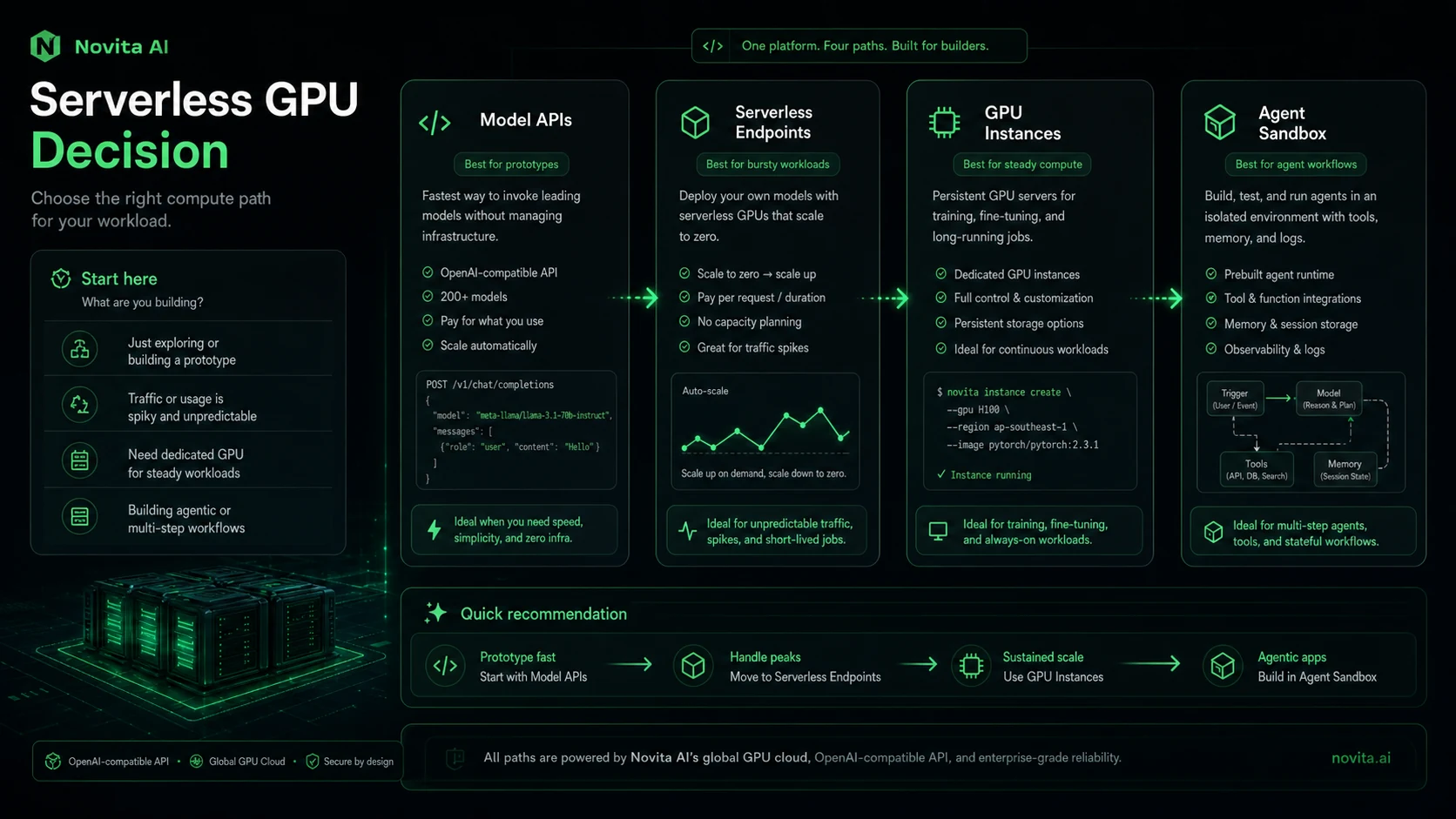
This is not a polished end-user writing app where the main question is whether the interface feels nice. Novita AI is closer to an AI infrastructure and developer API platform: model APIs, OpenAI-compatible LLM calls, image and video generation, serverless endpoints, GPU resources, and agent sandbox/runtime paths.
That can be valuable.
It can also become expensive or messy if you treat the pricing page like a normal SaaS subscription page. With Novita AI, the real buyer question is not “is there a cheap plan?” The question is: can your team estimate the workload, control usage, manage API keys, and prove that the platform works for the exact AI feature you plan to ship?
For my money, Novita AI makes the most sense when a developer or startup team wants to test several AI infrastructure paths without stitching together too many vendors at the start. It is weaker for non-technical buyers who simply want a finished AI assistant, content tool, or design app.
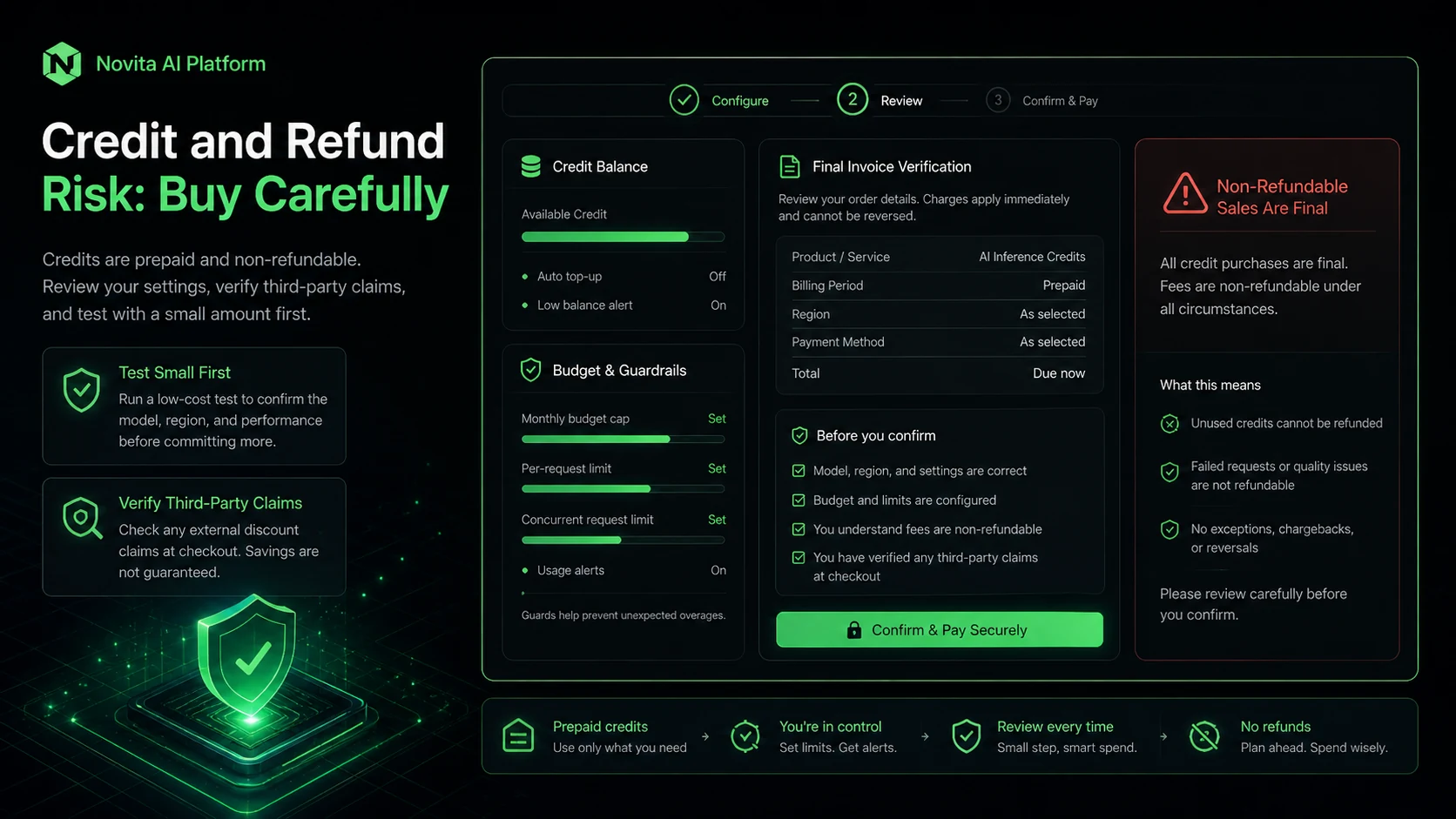
I would be careful with larger credit purchases. Public pricing is usage-based, the terms use strict refund language, and real costs can change depending on token volume, media settings, retries, endpoint runtime, GPU mode, and whether the workload moves from testing to production.
A discount can help. It should not be the reason you buy.
Next step: If Novita AI still fits your developer workflow, verify the current pricing and start with a small workload test before adding meaningful credits.
Review snapshot
| Review point | Practical take |
|---|---|
| Best for | Developers, AI app builders, startup teams, and technical buyers testing model APIs or infrastructure |
| Not ideal for | Non-technical users who want a finished AI assistant or simple no-code productivity tool |
| Main use case | Calling models, generating media, deploying serverless inference, using GPU resources, or testing agent sandbox workflows |
| Pricing model | Usage-based by model, task type, endpoint, sandbox, or GPU resource |
| Main strength | Broad developer infrastructure coverage from one platform |
| Main concern | Usage cost, refund strictness, production reliability, and operational control need real testing |
| Best first step | Run one small real workload, not a toy prompt |
| Alternatives to compare | Replicate, Fal.ai, Runpod, Lambda Labs, OpenRouter, plus simpler app-style tools if you do not want infrastructure |
What is Novita AI?
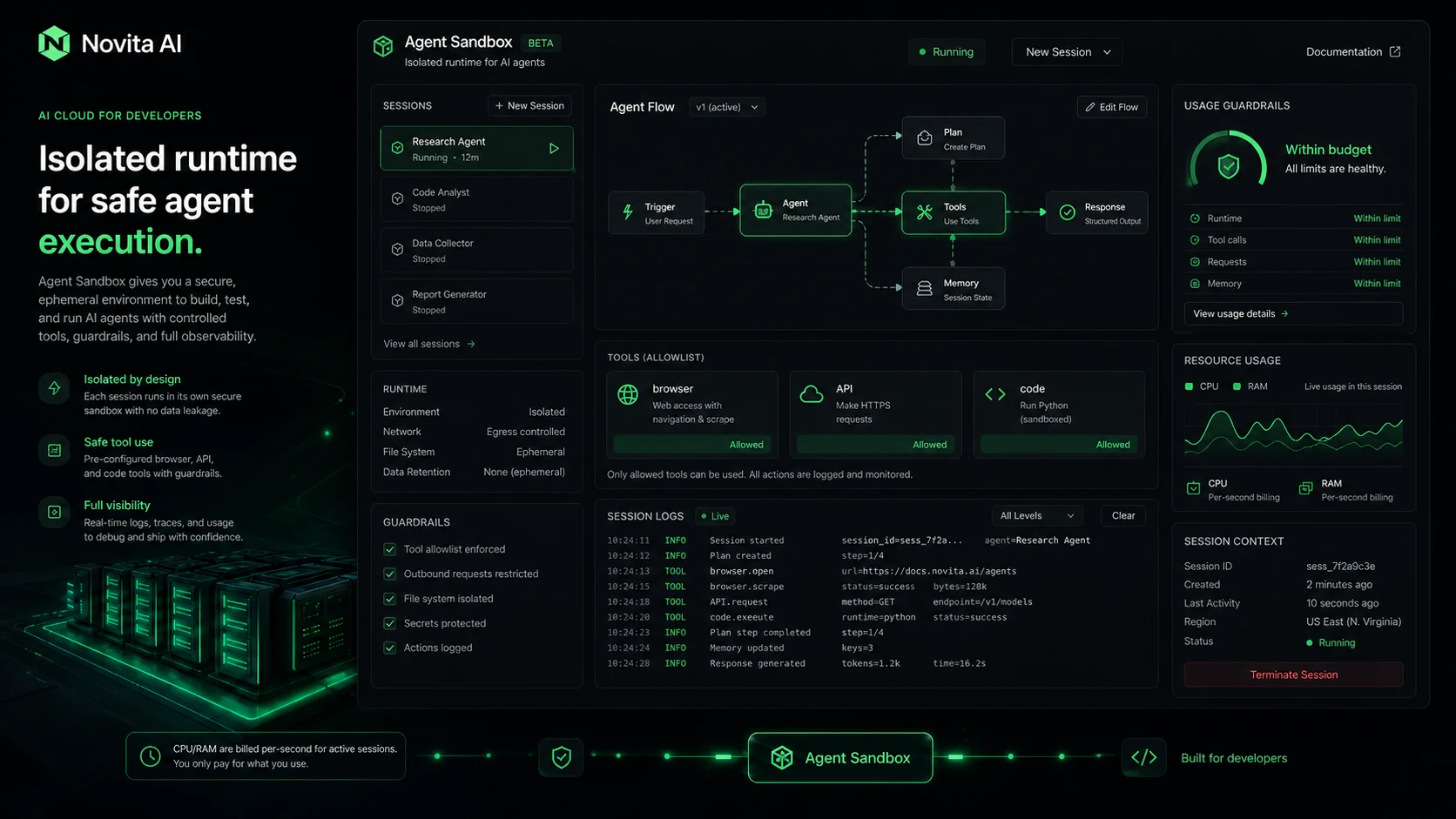
Novita AI is an AI and agent cloud for developers. Its public positioning is built around access to many AI models through one API, secure agent sandboxes, and GPU resources for teams that want to ship AI features without managing every infrastructure layer alone.
That positioning matters because Novita AI is easy to misunderstand.
If you compare it to a normal AI writing tool, it will feel too technical. If you compare it to a raw cloud GPU provider, it may feel more packaged. The better comparison is somewhere between hosted model APIs, inference platforms, GPU infrastructure, and newer agent runtime tooling.
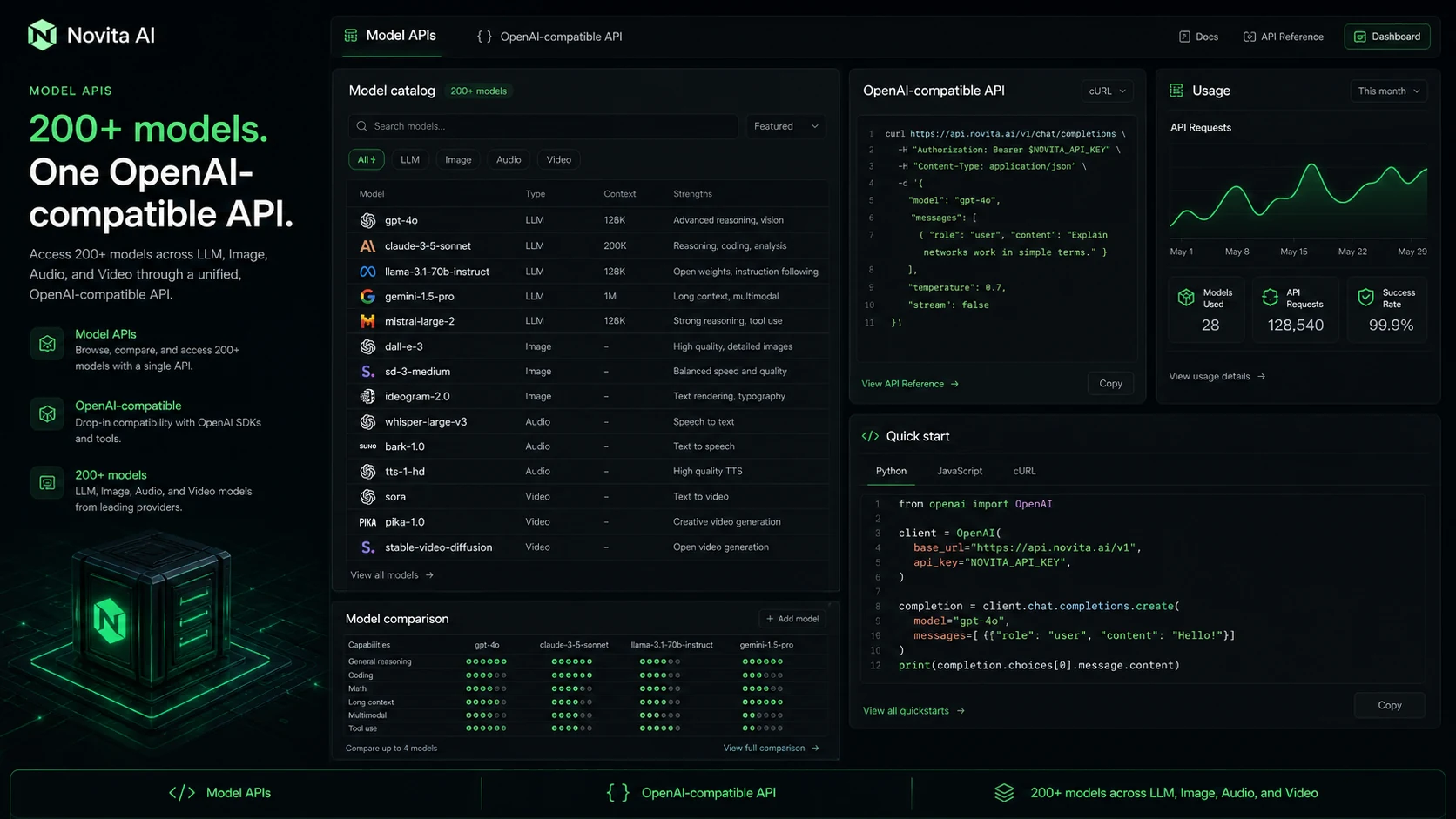
The official documentation points buyers toward OpenAI-compatible APIs and model APIs for LLM, image, audio, and video workloads. The pricing page exposes model APIs, serverless endpoints, dedicated endpoints, agent sandbox, and GPU options rather than one simple subscription ladder.
That is both the appeal and the caution.
The appeal is flexibility. A developer can test chat completions, media generation, serverless inference, GPU-backed workloads, or agent infrastructure from the same broader ecosystem.
The caution is that flexibility shifts responsibility back to the buyer. You need to know the workload. You need to understand billing units. You need to know who owns API keys, logs, retry behavior, spending limits, and production monitoring.
Novita AI is not a “click once and forget it” product. It is a builder platform.
Who should use Novita AI?
Novita AI makes the most sense for a developer or technical team that already has a product idea, not just curiosity about AI.
A startup building an AI feature may use Novita AI to test LLM calls, image generation, or video generation before committing to one model stack. In that case, the value is not just the model catalog. The value is the ability to test output quality, latency, cost, and integration fit with a real feature.
An AI app builder may use the OpenAI-compatible path to reduce integration friction. If your codebase already expects OpenAI-style chat completion patterns, compatibility can make the first test easier. I would still verify parameter support, model behavior, rate limits, and observability before assuming it is a drop-in production replacement.
A media-generation product team may find Novita AI useful if the product depends on image, video, or multimodal generation. But this is where cost discipline matters. Media outputs can become expensive faster than a quick pricing scan suggests, especially if users retry generations, increase resolution, lengthen outputs, or run batch jobs.
An AI agent team may look at Novita AI because of its agent sandbox and runtime positioning. That is interesting, but I would not treat it as a casual add-on. Code execution, browser-like actions, sandbox sessions, storage, and per-second usage need security and spending rules before production.
A team with bursty inference needs may also consider serverless endpoints. That can make sense when traffic is uneven and fixed compute is wasteful. The tradeoff is that serverless infrastructure still needs configuration, worker behavior checks, runtime cost estimates, and failure-handling tests.
Who should avoid Novita AI?
I would not recommend Novita AI as the first stop for a non-technical buyer.
If you want a browser assistant, an AI writing workspace, a social content generator, a slide maker, or an all-in-one no-code app, Novita AI is probably the wrong kind of tool. You may spend more time thinking about API keys and usage units than doing the work you actually wanted done.
I would also be careful if nobody on your team owns cost monitoring. Usage-based platforms can feel cheap in a small test and then surprise you when prompts grow, outputs get longer, users retry tasks, video jobs become heavier, or background processes run longer than expected.
Novita AI is also not ideal if you need a generous refund safety net before paying. The official terms say all sales are final and no refund will be issued. That does not mean the platform is bad. It means your first paid test should be small and deliberate.
Regulated teams should slow down too. If your application handles sensitive customer data, legal documents, medical data, financial information, private user files, or enterprise secrets, you should review privacy, security, data handling, and compliance fit before connecting real production data.
And if your workload is narrow, compare narrower providers first. A focused LLM router, image-generation API, GPU cloud, or hosted inference platform may be cleaner than a broad platform if you already know exactly what you need.
How Novita AI fits into a real workflow
A good Novita AI evaluation does not start with the homepage.
It starts with one workload.
For example, a team building an AI image feature should not ask, “Does Novita AI have image models?” That is too broad. The better test is: “Can this platform generate the exact style, size, speed, and reliability our app needs at a cost we can tolerate?”
A team building an LLM feature should not only check whether the API is OpenAI-compatible. The better test is: “Can our prompts, output length, error handling, logging, latency target, and monthly volume work on this provider without creating hidden cost or reliability issues?”
A team testing serverless endpoints should ask whether worker runtime, startup behavior, scaling, GPU choice, and billing match expected traffic.
A team testing agent sandbox should ask who controls execution, what data flows through the sandbox, how long sessions run, what storage is involved, and what happens when an agent makes repeated calls.
That is the practical workflow:
- Pick one real use case.
- Choose the exact model, endpoint, or infrastructure path.
- Run a small test with realistic inputs.
- Measure output quality, latency, errors, retries, and cost.
- Decide whether this path can scale.
- Only then add more credits or move toward production.
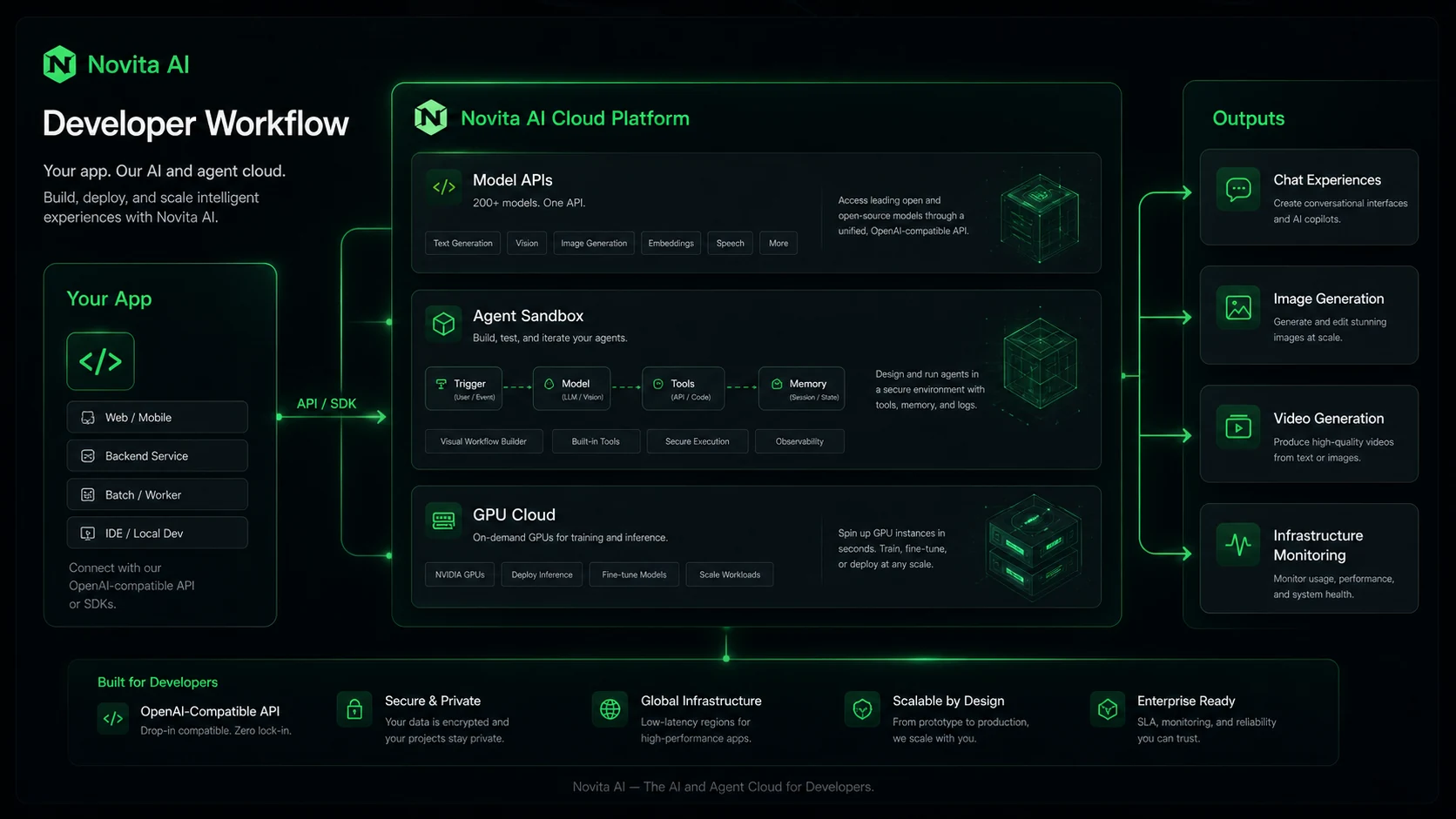
Workflow check: Before treating Novita AI as production infrastructure, use the current platform route to test one realistic API, media, GPU, or agent workload.
Key features that actually matter
The feature list is broad, but not every feature matters to every buyer.
The first meaningful feature is model API access. Novita AI gives developers a path to call multiple models without building every hosting layer themselves. For teams still comparing model behavior, that can reduce setup friction.
The second is OpenAI-compatible API support. This can matter if your application already uses familiar OpenAI SDKs or chat completion patterns. It does not remove the need for testing. Compatibility can reduce integration pain, but model behavior, parameters, streaming, error handling, and provider-specific limits still need verification.
The third is media generation coverage. Image, audio, and video APIs can be useful for products that need generation built into the user experience. The buyer-risk is cost. Media tasks usually have more visible settings than text calls: resolution, duration, frames, quality, model type, and retries can all change economics.
The fourth is serverless GPU and endpoint infrastructure. This matters when a team needs inference capacity but does not want to maintain fixed GPU resources for every workload. It can be efficient, but the buyer must understand worker runtime, scale behavior, and billing.
The fifth is GPU instances. This is more relevant when workloads are heavier or more predictable. A team that understands compute requirements may benefit. A team that does not understand GPU usage can burn credits quickly.
The sixth is agent sandbox/runtime positioning. This is interesting because agent workflows are moving beyond simple chat. But I would treat this as an advanced buyer path. Agent execution needs safety boundaries, observability, and cost monitoring, not just a signup button.
Pricing and plan value
Novita AI pricing should be read like infrastructure pricing, not like a normal monthly SaaS plan.
The public pricing page is usage-based across model APIs and GPU resources. It includes model/API categories, serverless endpoints, dedicated endpoints, agent sandbox, and GPU paths. It also presents batch inference as an introductory discount path for supported models.
That can be attractive for a technical buyer. You are not forced into one simple plan that may not match your workload. You can test the exact route you need.
But this is also where buyers can overestimate value.
A low per-token rate is not the same as a low monthly bill. A cheap image generation rate is not the same as cheap product usage if users retry outputs. A serverless endpoint can be efficient for bursty traffic, but runtime and worker behavior still matter. A GPU instance may be powerful, but idle time or long jobs can change the economics quickly.
The safest pricing approach is to estimate backward from the workload:
| Cost input | Why it matters |
|---|---|
| Model choice | Different models can have different input/output rates and output behavior |
| Prompt and output length | LLM cost depends on real token usage, not a sample prompt |
| Media settings | Image and video cost can change with model, size, duration, and retries |
| Endpoint mode | Serverless, dedicated, and GPU modes can charge differently |
| Runtime | Workers, sandbox sessions, and GPU usage can turn time into cost |
| Retries and failures | Real applications often retry, regenerate, or fail more than test demos suggest |
| Growth volume | A cheap pilot can become expensive after user traffic increases |
Pricing check: If the platform still fits, compare the live pricing page with one realistic workload before choosing credits or infrastructure mode.
Check Novita AI pricing Check current offers Read store guide
Free access, credits, coupon notes, and checkout caution
Novita AI is not the kind of product where I would chase a coupon before understanding usage.
The better savings path is controlled testing.
If the current console shows trial credit or a small-start path, use it to test the actual workload. Do not waste the test on a toy prompt if your real application will generate long responses, high-resolution images, video outputs, agent sessions, or GPU-backed jobs.
If a public coupon route exists, treat it as a checkout-test path. It may be useful, but the only discount that matters is the one reflected on the final checkout screen or credit purchase flow. Do not build a cost model around a third-party discount claim.
Refund caution matters here. The official terms say all sales are final and no refund will be issued. That pushes the buyer toward smaller first tests, clear workload estimates, and careful recharge settings.
Before checkout, I would check:
- whether credits expire or have usage rules
- whether automatic recharge or top-up is enabled
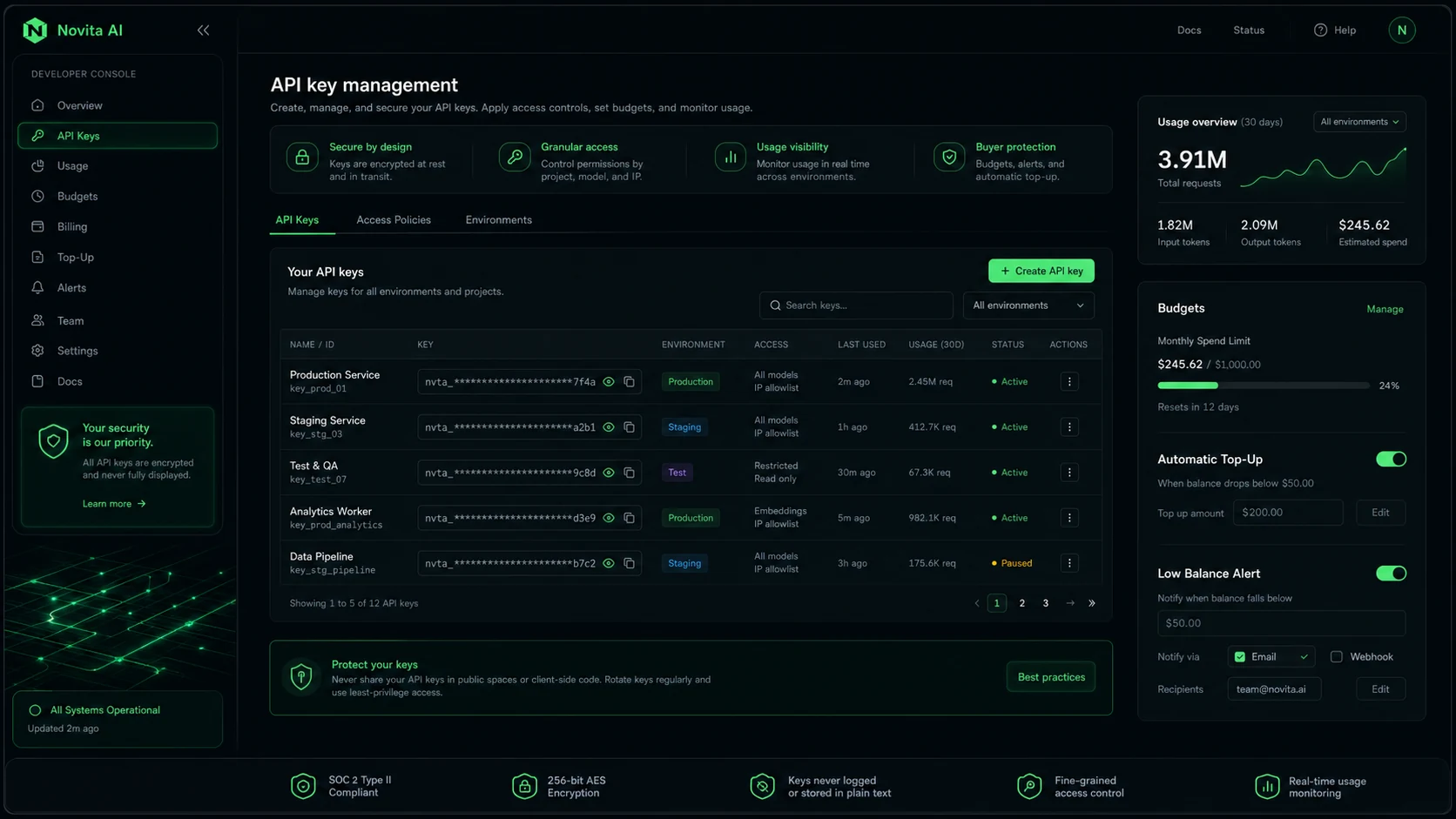
- who can create and rotate API keys
- whether spending alerts exist for your workflow
- whether batch inference or cache pricing applies to your actual model
- whether serverless or GPU runtime can surprise the budget
- whether any offer appears in the final checkout amount
The cheapest-looking route is not automatically the safest one.
What I would check before buying Novita AI
The first thing I would check is the exact workload category.
“AI API” is too vague. Are you building an LLM chat feature? A text-to-image feature? A video workflow? A batch inference job? A serverless GPU endpoint? A dedicated endpoint? An agent sandbox feature? Each path has different cost and risk.
The second thing I would check is unit economics. Take one realistic user action and price it. Then multiply it by expected monthly usage. Then add retries, failures, output regeneration, longer prompts, and growth. This is where usage-based pricing becomes real.
The third thing is latency and reliability. A model can be affordable and still be a poor fit if response time, error handling, or availability does not match your app.
The fourth is integration depth. OpenAI-compatible APIs can help, but production use still needs logging, observability, rate-limit handling, fallback behavior, and secrets management.
The fifth is data handling. Any team handling sensitive data should review privacy, terms, and internal compliance needs before sending real user inputs into a third-party AI infrastructure path.
The sixth is refund and recharge behavior. With strict refund language, I would not add large credits until the team has measured a real workflow.
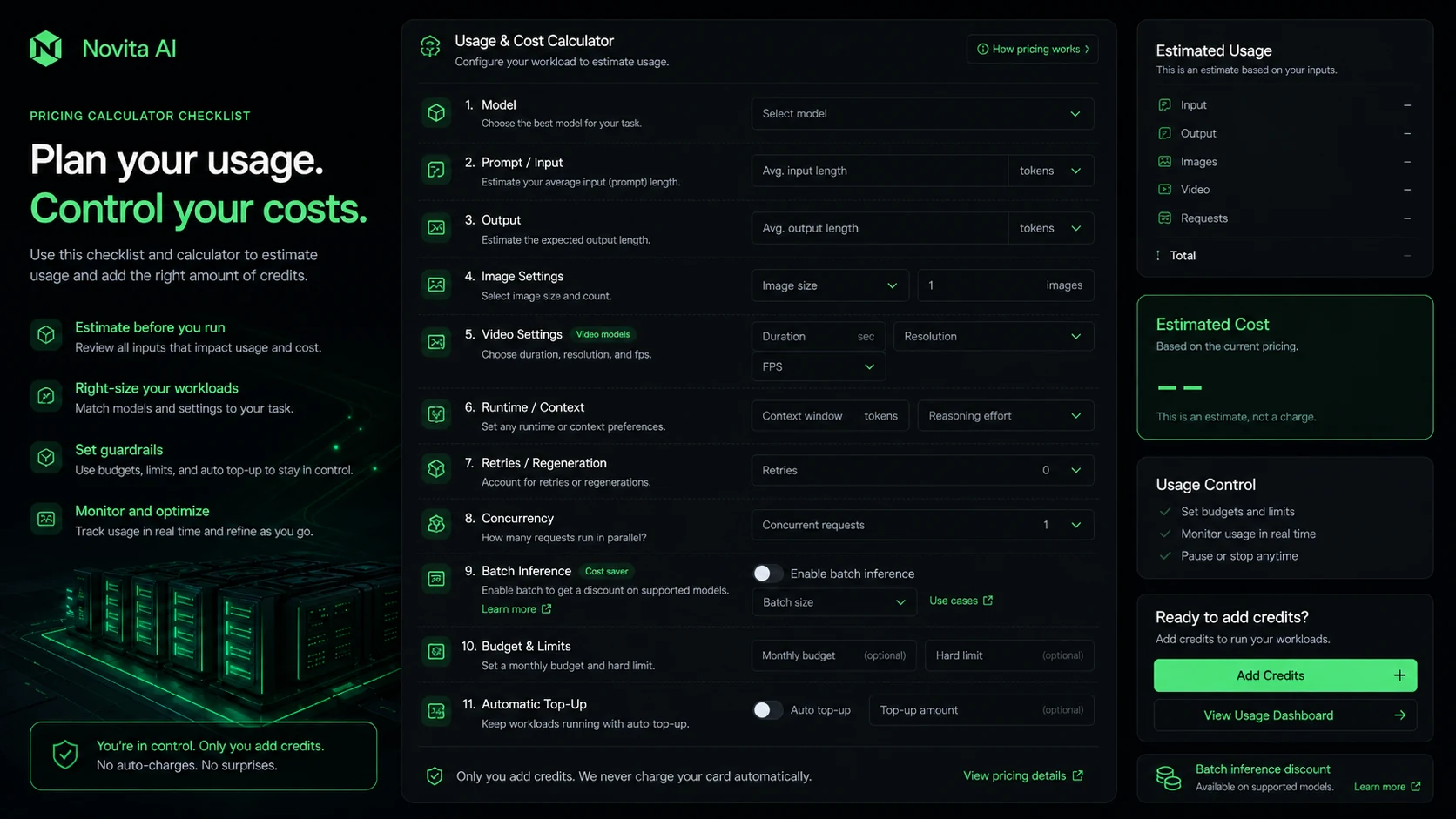
A simple test before paying more
If I were evaluating Novita AI for a real product, I would not begin with a large plan or credit purchase.
I would run a contained test:
- Pick one production-like task.
- Use realistic input size.
- Use the model or endpoint you would actually ship.
- Run enough attempts to see typical output, not just the best result.
- Track latency, errors, retries, and cost.
- Test key rotation and basic logging.
- Estimate monthly cost from observed usage.
- Compare that number against at least two alternatives.
For an LLM feature, this might mean 100 realistic requests with expected prompt and output lengths.
For image generation, it might mean testing the exact model, style, resolution, and retry pattern your users would trigger.
For video generation, it should include duration and failure/retry assumptions.
For agent sandbox usage, it should include session length, storage, repeated tool calls, and security boundaries.
This kind of test is not glamorous. It is also where you find out whether Novita AI is actually a good fit.
Pros and cons explained
The biggest strength of Novita AI is range. It gives technical buyers a broad path across APIs, media generation, serverless endpoints, GPUs, and agent infrastructure. That can reduce early vendor sprawl when a team is still discovering the right stack.
The OpenAI-compatible API path is another strength. It can make the first integration feel less foreign, especially for teams already using OpenAI-style SDKs or request patterns.
The pricing model can also be a strength when usage is uneven. A prototype, internal tool, or early-stage feature may benefit from usage-based economics instead of fixed infrastructure.
But the same pricing model is also the main weakness.
Usage-based pricing rewards teams that measure. It punishes teams that guess.
The refund policy is another caution. When fees are final, the buyer has to be more disciplined before paying. This is not the place to make a big credit decision because the homepage sounds promising.
The platform also has a technical learning curve. For the right buyer, that is fine. For a non-technical buyer, it is a warning sign.
Green flags and red flags
Green flags
Novita AI has a clear developer-first position. It is not pretending to be a simple productivity app while hiding an infrastructure product underneath.
The documentation covers OpenAI-compatible APIs and multiple model categories, which helps technical buyers evaluate integration paths.
The pricing page exposes usage-based categories instead of forcing buyers into a vague “contact sales” path for everything.
The platform also has third-party discovery signals, including Product Hunt presence and ecosystem integrations, which suggest it is not an invisible vendor with no public footprint.
Red flags
Strict refund language is the biggest commercial red flag. Buyers should assume they need to test carefully before paying.
Usage complexity is the second. LLM, media, endpoint, sandbox, and GPU pricing can all behave differently.
Production uncertainty is the third. Public pages can confirm features, but only your own test can confirm latency, reliability, output quality, failure handling, and cost for your actual use case.
The fourth red flag is buyer mismatch. If someone is comparing Novita AI to a simple AI writing assistant, they are probably already in the wrong buying category.
Novita AI vs alternatives
Novita AI should be compared against infrastructure and API providers first.
Replicate is usually a cleaner comparison if the buyer wants hosted model inference and a familiar marketplace-style path for running models. It may feel simpler for teams that want to experiment with models without thinking as much about a broader GPU and agent platform.
Fal.ai is a strong comparison for creative and media-generation workloads where speed, image/video generation, and developer-friendly APIs are the main decision points.
Runpod is a more direct comparison when the buyer mostly cares about GPU infrastructure and wants more control over compute. Lambda Labs can also enter the conversation for teams comparing GPU cloud options.
OpenRouter is a better comparison when the workload is mainly LLM routing across model providers, rather than media generation, GPU instances, or agent sandbox infrastructure.
Inside the current DealBestDaily route graph, I would treat 1min.AI and Aikeedo as contrast checks, not direct alternatives.
1min.AI is more relevant if the buyer wants a finished all-in-one AI app experience and does not want to manage APIs, credits, or infrastructure.
Aikeedo is more relevant if the buyer wants a self-hosted AI SaaS starter kit rather than an external model API and GPU infrastructure platform.
That distinction matters. Novita AI is not competing mainly on convenience for casual users. It is competing on whether a technical team can build, test, and scale AI workloads with enough control.
Trust, refund, and operational risk
Novita AI has enough official documentation to make a serious evaluation possible. That is a positive sign.
But production trust is not created by documentation alone.
For a technical platform, trust comes from testing the actual path: API behavior, latency, downtime handling, billing behavior, key management, logs, error messages, support expectations, and how quickly your team can debug problems.
The refund policy deserves special attention. When the terms say all sales are final, the buyer should not treat credits like a reversible experiment. Start small, document the test, and avoid enabling larger spending until the workload is proven.
Security and data handling also need buyer-side review. If your use case involves private customer data, user-generated content, internal files, source code, or regulated workflows, do not rely on a general marketing page. Read the privacy and terms pages, then decide whether the platform fits your internal requirements.
Review methodology and evidence confidence
This review treats Novita AI as a developer and infrastructure platform, not a normal productivity app.
The highest-confidence facts are the official positioning, documentation, pricing categories, and refund language. Those are public, current buyer-facing sources.
The medium-confidence layer is how Novita AI compares with adjacent providers. That depends heavily on workload: model APIs, creative generation, GPU compute, LLM routing, or agent runtime.
The limited-confidence layer is production performance. No public review can safely promise your latency, cost, reliability, or output quality. Those need your own test workload.
So the practical judgment is cautious but not negative.
Novita AI has a real use case. It also has real buyer responsibility.
Final verdict
Novita AI is a serious option if you are building AI features and need model APIs, media generation, serverless endpoints, GPU resources, or agent sandbox infrastructure from one developer-focused platform.
I would consider it if your team can test one real workload, monitor usage, manage keys, and compare total cost before scaling.
I would skip it if you want a simple no-code AI tool, do not have a technical owner, or need a generous refund window before trying paid usage.
The safest path is clear: use the Novita AI store guide to confirm the buyer route, check the current Novita AI offers only after workflow fit is clear, and use the direct route to visit Novita AI when you are ready to test one realistic workload.
Do not judge the platform by the lowest visible unit price.
Judge it by whether your real workload still looks affordable, reliable, and manageable after a controlled test.