Quick verdict
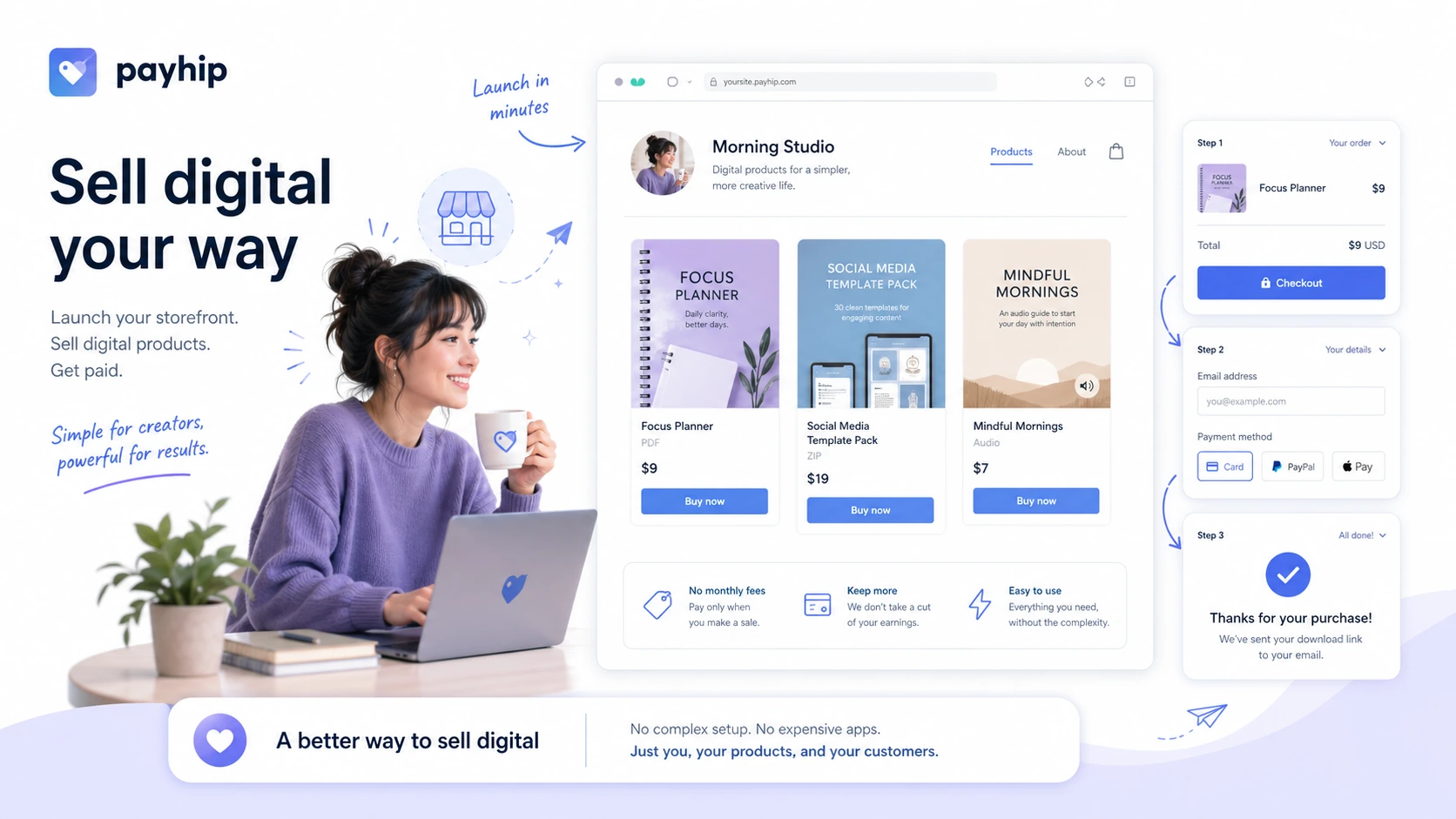
Payhip is one of those tools that looks almost too simple at first glance: free storefront, unlimited products, all features included, and no credit card needed to start.
That is the good part.
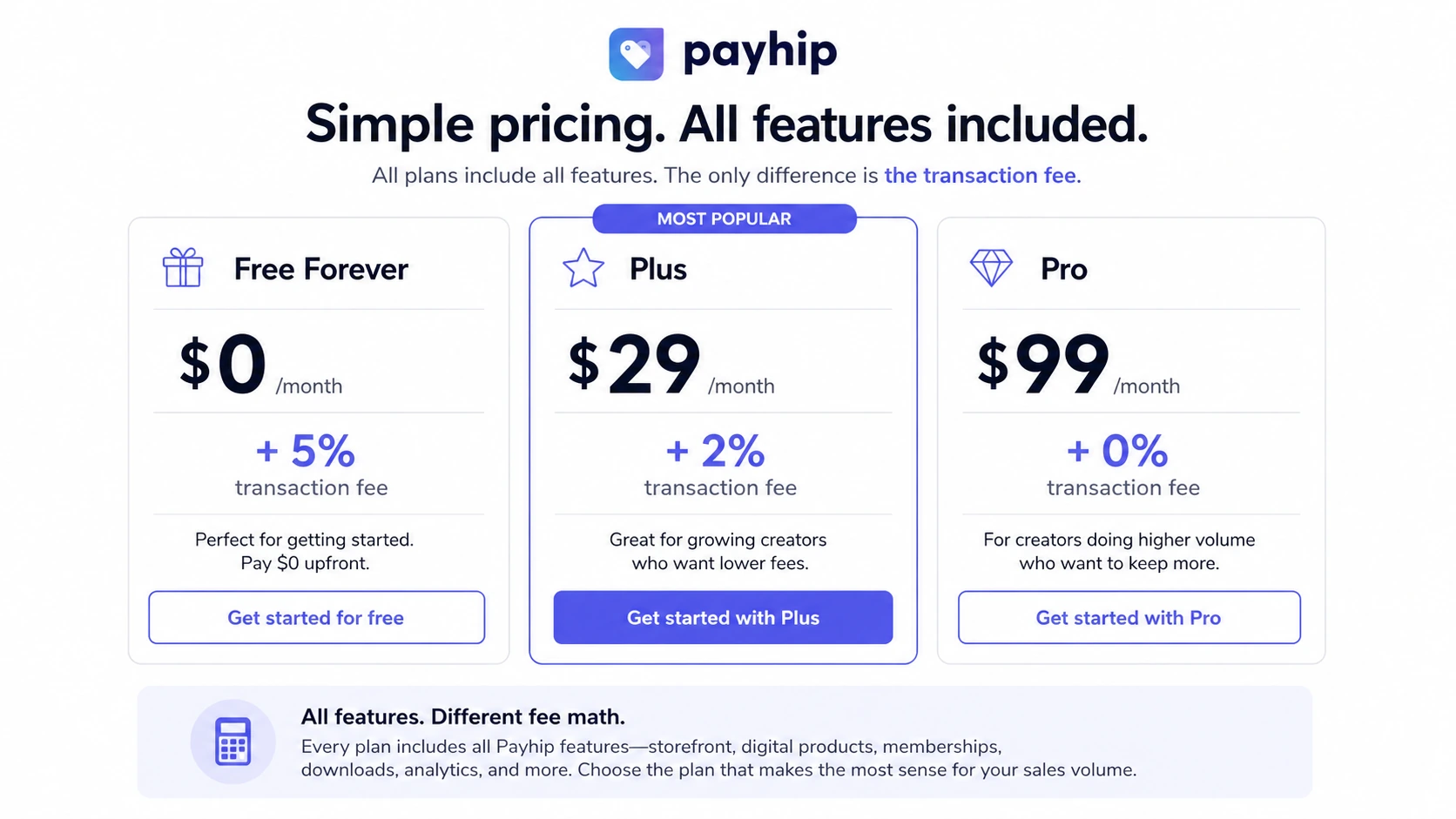
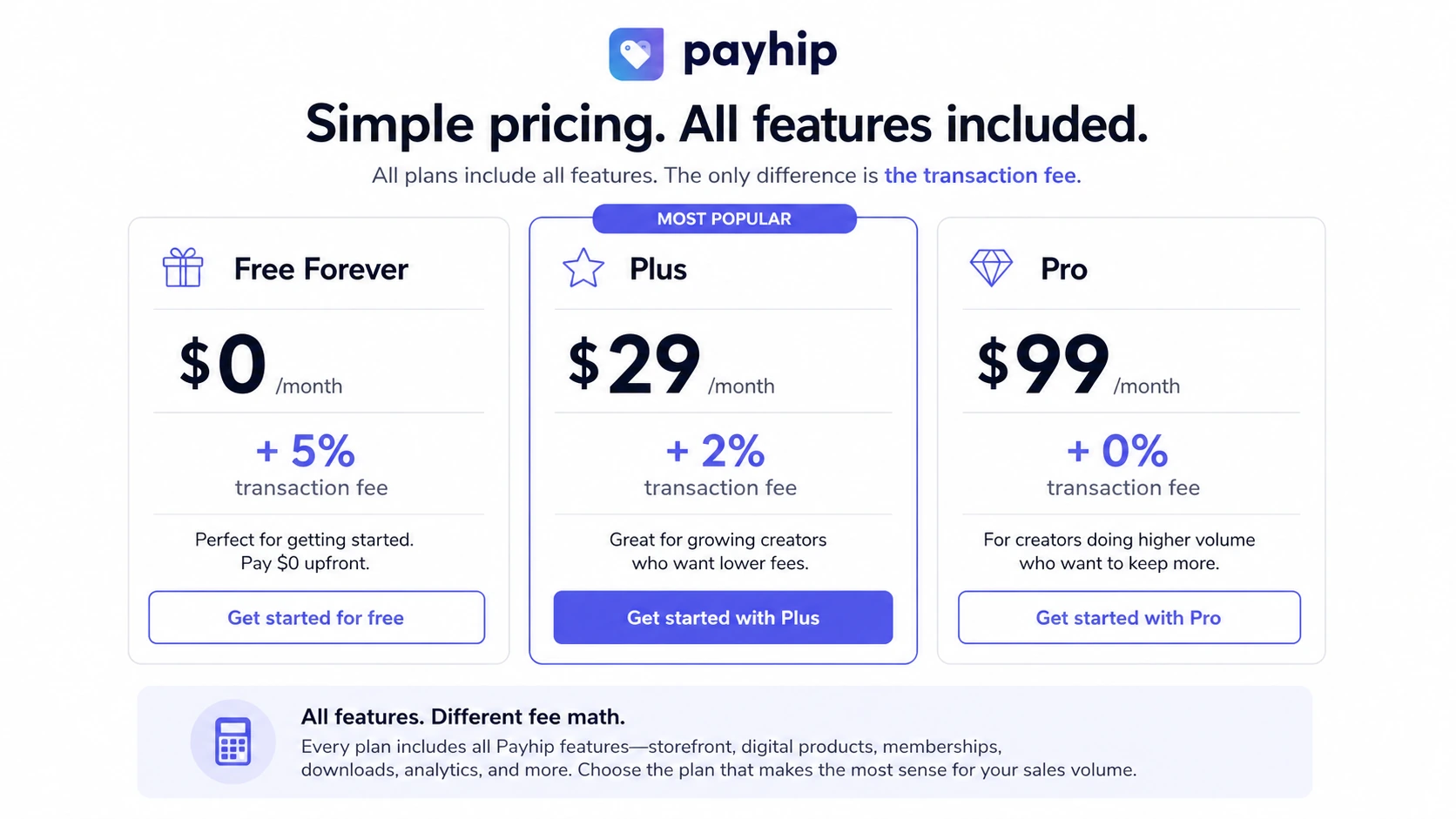
The part I would check more carefully is the fee model. Payhip is not really a “free ecommerce platform” in the way a new seller might casually hear that phrase. The Free Forever plan has no monthly subscription, but Payhip still takes a 5% platform transaction fee when you sell. Plus lowers that Payhip fee to 2% for $29 per month. Pro removes the Payhip transaction fee for $99 per month. Payment processor fees from PayPal or Stripe still sit outside that calculation.
So the real Payhip question is not “Is it free?” The better question is: how much will you sell, and when does a paid plan save more than it costs?
I would consider Payhip if you are a creator selling ebooks, templates, presets, software files, courses, coaching, memberships, or a small physical-product catalog and you want a clean way to launch without building a full Shopify-style store. I would be more cautious if you need advanced ecommerce operations, multiple staff workflows, complex inventory, or a deep course platform.
The safest path is to start with the Free plan, test a real product page and checkout flow, then upgrade only when the transaction-fee math justifies it.
Next step: If Payhip fits your creator-store workflow, verify the current pricing and fee path before choosing a paid tier.
Review snapshot
| Review point | Practical take |
|---|---|
| Best for | Creators selling digital downloads, courses, memberships, coaching, and simple direct products |
| Not ideal for | Large ecommerce teams, advanced inventory operations, or sellers needing deep staff/admin workflows |
| Main use case | Launching a creator storefront without paying monthly before sales exist |
| Pricing model | Free at $0/month plus 5%; Plus at $29/month plus 2%; Pro at $99/month with no Payhip platform transaction fee |
| Free path | Free Forever plan, not a short free trial |
| Main strength | All features and unlimited products/revenue across plans make early testing practical |
| Main concern | Seller economics depend on transaction fees, processor fees, volume, and refund expectations |
| Direct alternatives | Marketsy for a different creator-store path |
| Adjacent routes | Lasso for affiliate displays and link monetization, not Payhip-style product selling |
| Best next step | Start free, calculate fee break-even, then upgrade only when sales volume supports it |
What is Payhip?
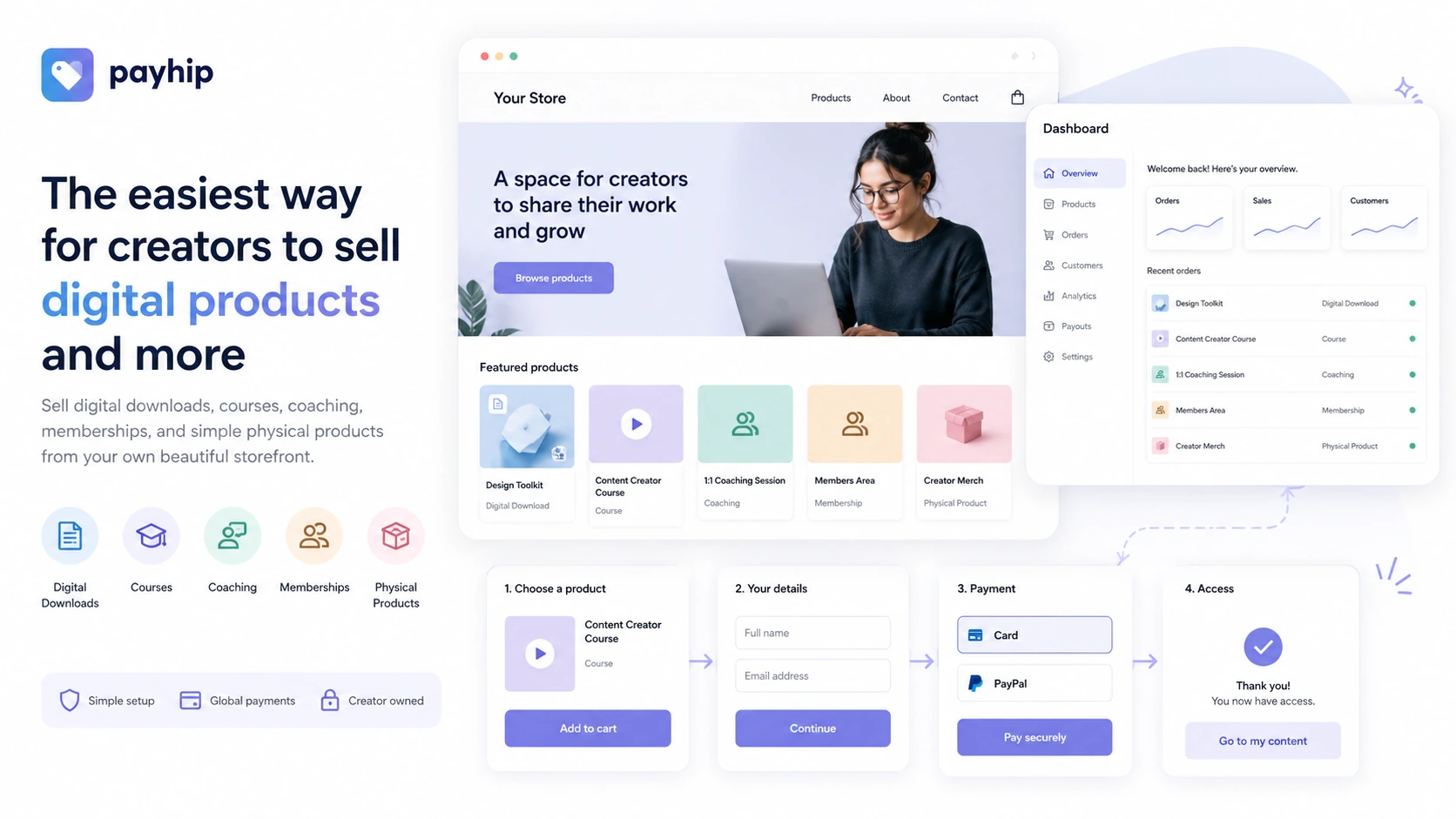
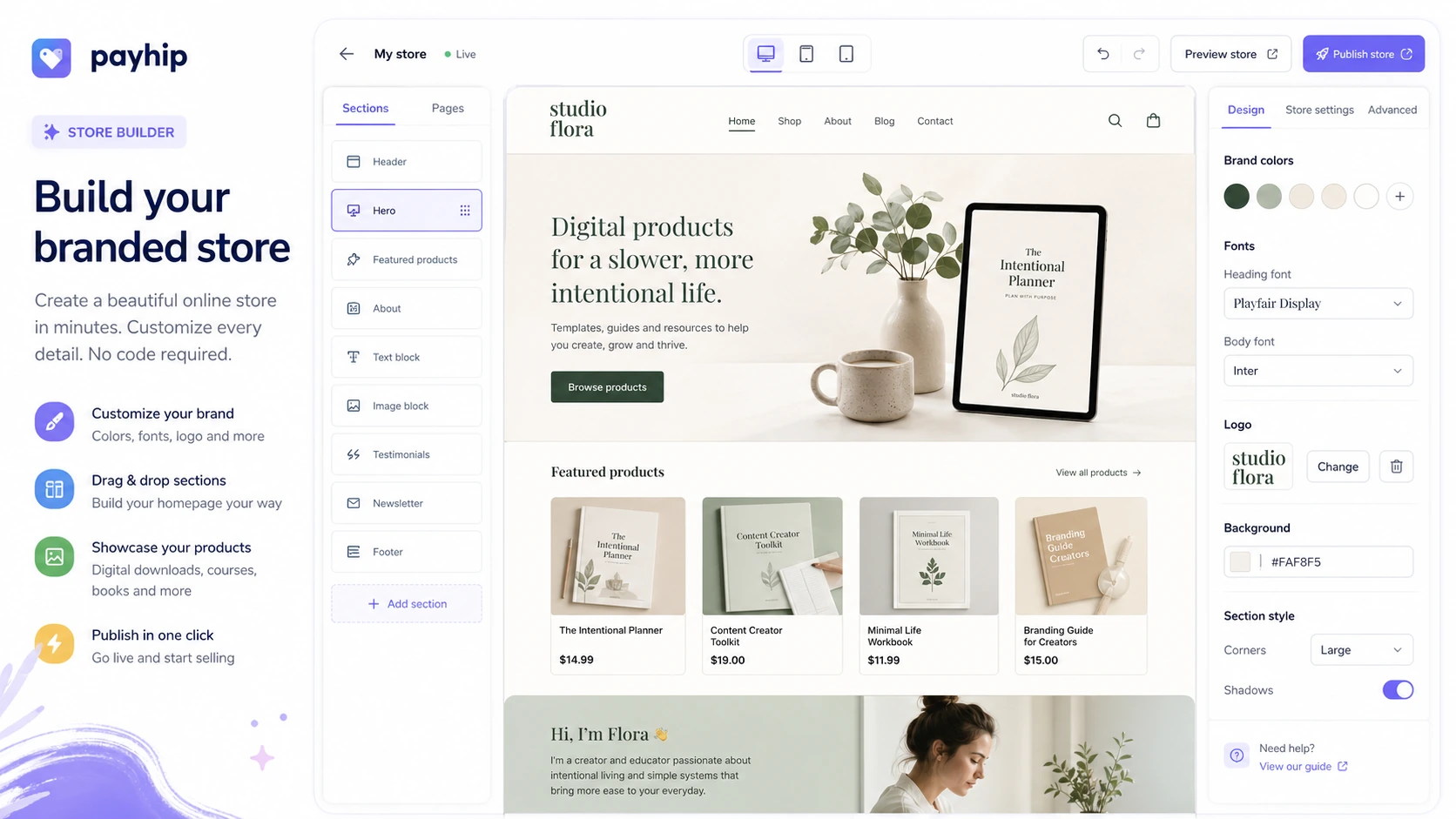
Payhip is a hosted creator-commerce platform for selling digital downloads, online courses, coaching, memberships, and simple physical products from one storefront.
That makes it different from a pure payment link tool. It is also different from a full ecommerce platform built for deep inventory, warehousing, complex staff roles, and large catalogs. Payhip sits in the middle: more complete than a basic checkout button, lighter than a full store operations stack.
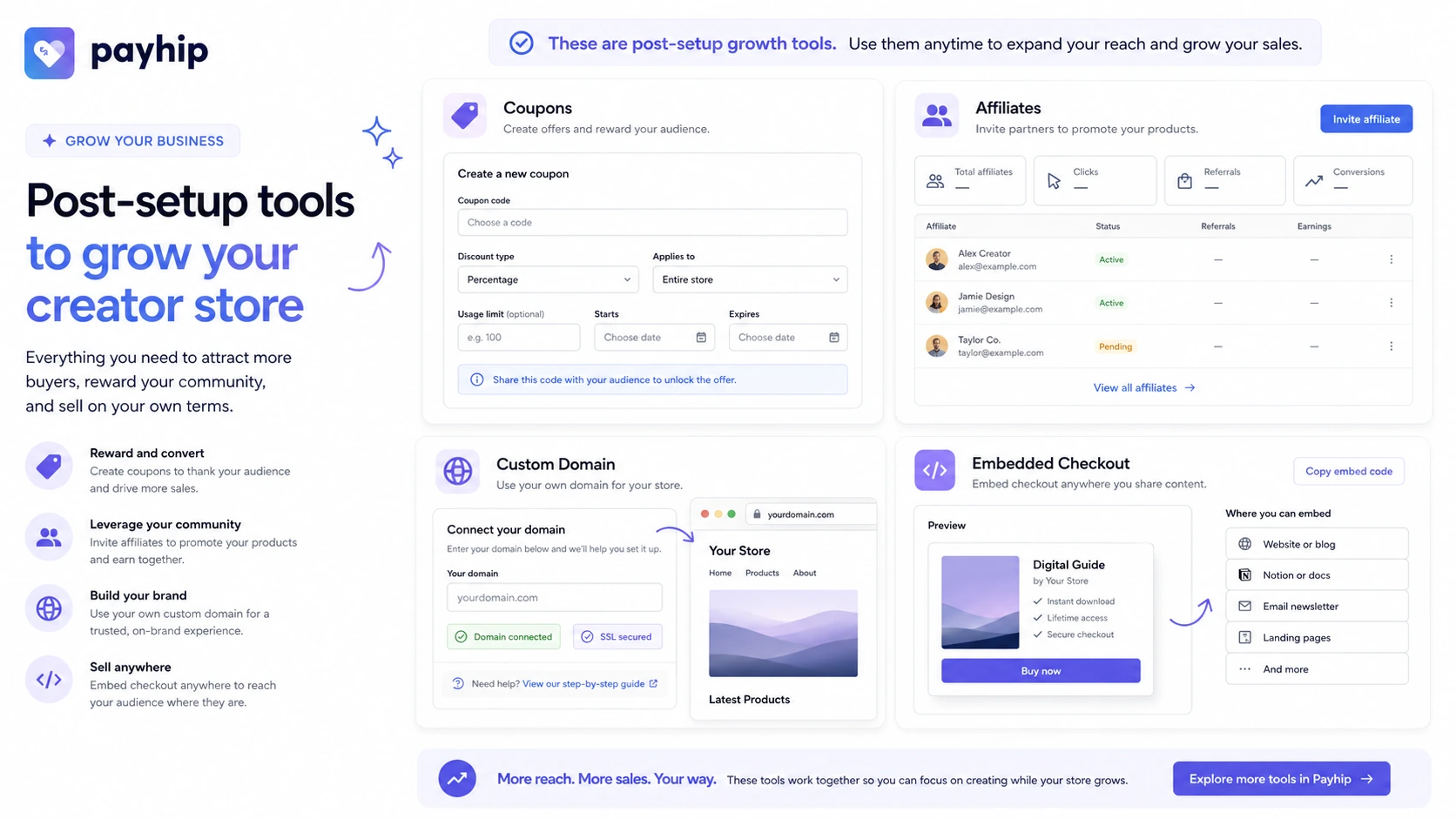
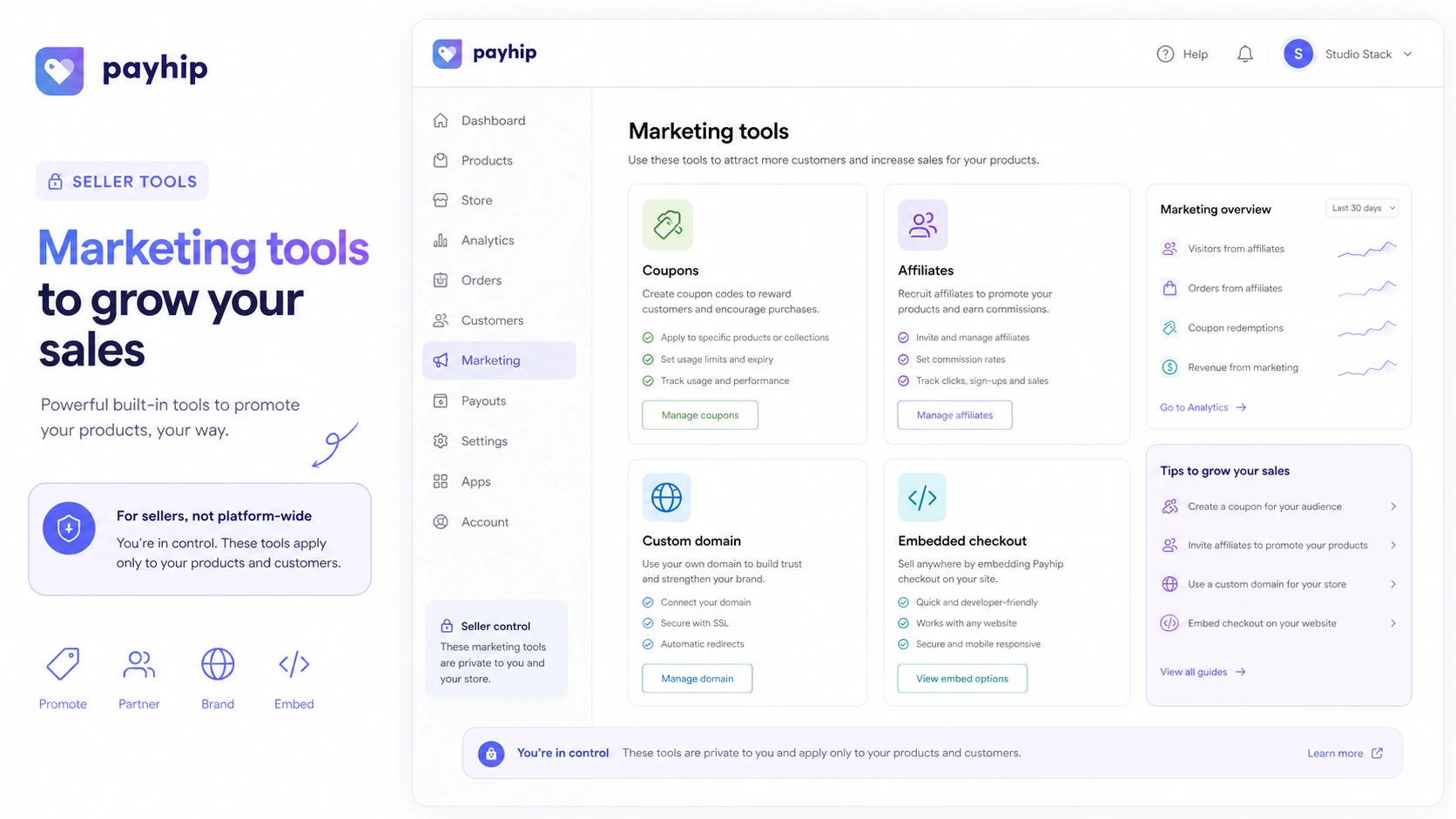
The public product positioning is straightforward. Payhip gives sellers a storefront, product pages, digital delivery, course and membership support, coupons, affiliate tools, custom domains, embedded checkout, payment processing through providers like PayPal or Stripe, and a pricing model that lets sellers start without a monthly bill.
That last point is the hook.
But I would not judge Payhip only by the free starting price. The better review lens is workflow fit. Does Payhip help you publish a product, collect payment, deliver access, handle basic promotions, and learn whether your audience actually buys? If yes, the Free plan is genuinely useful. If you already run a serious commerce operation, the simplicity may start to feel like a ceiling.
Our review approach compares public product pages, pricing details, help documentation, buyer workflow fit, fee structure, refund expectations, and nearby alternatives. We do not treat a low monthly price or a free plan as proof that the platform is the right long-term store.
Who should use Payhip?
Payhip makes sense for digital product creators who want to sell ebooks, templates, presets, design files, audio, video, software downloads, spreadsheets, Notion templates, or similar products without building a custom checkout stack.
It also fits solo educators and course sellers who want to test a course, coaching product, or membership before moving into a heavier learning platform. I would still check whether Payhip’s course and membership tools are deep enough for your delivery style, but for early validation, the simplicity can be a strength.
Payhip can work well for audience-led creators who already have traffic from YouTube, newsletters, social media, SEO, communities, or a personal brand. In that case, Payhip does not need to generate the audience by itself. It just needs to turn interest into a clean purchase and delivery flow.
It is also worth considering for small sellers who care about EU and UK digital VAT handling. Tax handling can be a surprisingly important buying reason if you sell digital products internationally and do not want to manage every VAT detail manually.
Finally, Payhip is a strong fit for low-risk commerce validation. If you have not proven demand yet, paying monthly for a more complex platform can be premature. Payhip’s Free plan lets you test the product, page, price, and audience response first.
Who should avoid Payhip?
I would be careful with Payhip if you need a full ecommerce operations platform. If your store depends on advanced inventory, multi-location fulfillment, large team permissions, complex merchandising, in-depth customer segmentation, or a heavily customized checkout experience, Payhip may feel too narrow.
Payhip may also be the wrong first choice if your main business is not selling your own products. For example, if your revenue model is affiliate content, product boxes, link management, and comparison tables, a tool like Lasso is a more relevant adjacent route. It solves a different job.
High-volume sellers should slow down before staying on Free. The 5% Payhip fee can be a fair tradeoff during validation, but it becomes expensive if revenue grows and you do not upgrade. The mistake buyers make here is assuming the plan with the lowest monthly fee is always the cheapest plan.
I would also avoid relying on Payhip if your product refund policy, tax setup, or payment gateway situation is unclear. Payhip can host the storefront and facilitate the sale path, but seller-side responsibility still matters. Before a real launch, you need clear refund wording, payment setup, tax settings, and support expectations.
And if your course or membership is already complex, with cohorts, community layers, certificates, deep lesson controls, and advanced student management, compare specialist course platforms before making Payhip the long-term home.
How Payhip fits into a real workflow
The best Payhip workflow starts before the store is built.
A creator should first decide what they are selling, who it is for, what the buyer receives, and what promise the product page can safely make. Payhip cannot fix a vague offer. It can only make a clear offer easier to sell.
A realistic workflow looks like this:
- Choose one product to validate first.
- Create the product file, course, coaching offer, membership, or physical item details.
- Build a Payhip product page or storefront.
- Connect payment and delivery settings.
- Write a clear refund policy and support expectation.
- Test checkout with a small audience.
- Use coupons, affiliates, embeds, or custom domains only after the product page is clear.
- Review sales volume and decide whether Free, Plus, or Pro makes economic sense.
This is where Payhip is useful. It removes enough setup friction that a creator can test real demand quickly. It is weaker if the seller expects the platform itself to create demand, replace marketing, or behave like a mature enterprise ecommerce backend.
Real-world buyer scenarios
The ebook or template creator
This is probably the cleanest Payhip use case. You have a digital product, a simple sales page, and an audience that might buy. Payhip can host the product page, collect payment, and deliver the file without asking you to build a full store.
The risk is assuming launch mechanics equal demand. Payhip can make the checkout easier, but the offer still needs a reason to exist.
The course creator testing a first paid offer
Payhip can make sense if you are testing a simple course or coaching product and do not want to commit to a more specialized LMS from day one. The Free plan gives you room to validate the audience before choosing a paid tier.
The check here is depth. If your course needs advanced student management, assignments, cohorts, community, and certification, Payhip may be a starting point rather than the final platform.
The creator with a growing catalog
Payhip is interesting for creators who start with one product and later add templates, memberships, coaching, or bundles. Because the pricing page presents all features across plans, you are not forced into a paid plan just to test a broader catalog.
The practical question is organization. As the catalog grows, check whether Payhip’s storefront and product management still feel clean enough.
The seller with steady monthly revenue
Once sales become predictable, the buying decision changes. Staying on Free may cost more than Plus. Staying on Plus may cost more than Pro. At that point, Payhip becomes a math problem.
This is where I would open a spreadsheet before upgrading. Estimate monthly sales, compare the Payhip fee difference, include processor fees, then choose the tier that leaves more profit.
Key features that actually matter
Free Forever plan with all features
The strongest Payhip feature is not a flashy tool. It is the pricing structure. All plans list all features, unlimited products, and unlimited revenue, so new sellers can test Payhip without being blocked by artificial feature gates.
Buyer note: Free is best for validation, not necessarily for long-term cost efficiency.
Digital product and storefront support
Payhip supports digital downloads, courses, coaching, memberships, and physical products. That range matters because many creator businesses do not stay in one format forever.
Buyer note: The broader product support is useful, but you should still check whether each product type is deep enough for your exact delivery needs.
Coupons and affiliate tools
Payhip includes seller-side coupons and affiliate program tools. This can help creators run launch discounts, audience promotions, or partner campaigns.
Buyer note: Do not confuse this with a Payhip platform coupon for your seller account. These are tools you can use for your own buyers.
Custom domain and embedded checkout
A hosted storefront is useful, but many creators eventually want the store to feel like part of their own brand. Custom domain and embed options help bridge that gap.
Buyer note: Check the current setup steps before launching a public campaign, especially if trust and brand consistency matter.
VAT, payments, and automation support
Payhip’s digital VAT support, payment integrations, webhooks, Zapier connection, and public API can make it more useful than a basic payment button.
Buyer note: Automation is real, but not unlimited. Check exact webhook events, API coverage, and payment availability before designing a custom backend around Payhip.
Pricing and plan value
Payhip’s pricing is unusually transparent, but the value depends on your numbers.
At the time of review, the public pricing page presents:
| Plan | Monthly price | Payhip platform transaction fee | Practical fit |
|---|---|---|---|
| Free Forever | $0/month | 5% | Testing, first products, uncertain sales volume |
| Plus | $29/month | 2% | Sellers whose revenue makes lower fees worth the monthly cost |
| Pro | $99/month | 0% Payhip fee | Higher-volume sellers who can justify removing the Payhip platform fee |
The key detail is that all plans list all features, unlimited products, and unlimited revenue. That is buyer-friendly because you are not forced to pay just to unlock core storefront tools.
But it also means plan choice is mostly fee math.
The Free plan is attractive when revenue is unknown. If you sell nothing, you pay no monthly Payhip subscription. If you sell a little, 5% may be acceptable as the cost of validation. Once revenue grows, the 5% fee may become more expensive than paying $29 per month for Plus. At higher volume, Pro may become the better route.
The mistake is upgrading for status instead of economics. A new seller does not need Pro to feel serious. A steady seller should not stay on Free just because $0/month feels safe.
Also remember that PayPal or Stripe processing fees still apply. Payhip’s plan fee is only one part of the total cost.
Pricing check: If Payhip still looks like the right store platform, compare the current Free, Plus, and Pro economics before upgrading.
Free plan, trial, coupon, and checkout notes
Payhip does not need a traditional free trial because the Free Forever plan is the test path.
That is a meaningful difference. A short trial can pressure a seller to rush the setup. Payhip’s free path gives you room to build a product page, connect payment, test checkout, and see whether the audience responds before paying a monthly platform fee.
I would treat the coupon path as secondary here. Payhip’s own platform value is mostly about plan economics, not public coupon hunting. Payhip also gives sellers coupon tools for their own storefronts, but that is different from a verified discount on Payhip’s own paid plans.
A safer checkout order looks like this:
- Start with Free if the store is unproven.
- Run a real product or launch test.
- Review monthly sales after demand is clearer.
- Compare Free, Plus, and Pro fee math.
- Check the Payhip coupon page only after the platform fit makes sense.
A discount can improve a purchase, but it should not be the reason you choose a storefront.
What I would check before buying Payhip
If I were choosing Payhip for a real creator store, I would check these points before upgrading:
- Expected monthly sales: Estimate revenue before deciding whether 5%, 2%, or 0% Payhip fees make sense.
- Payment processor fees: Include PayPal or Stripe costs in the total math.
- Payment availability: Confirm your country, payout path, and buyer payment methods are supported.
- Refund policy wording: Write your own product refund policy clearly because product refunds are seller-managed.
- VAT and tax settings: Check digital EU and UK VAT handling if you sell internationally.
- Automation needs: Verify webhooks, Zapier, and API coverage before promising a custom backend.
- Long-term platform fit: Compare Payhip with a fuller ecommerce system if catalog, inventory, or staff needs are growing.
A simple test before paying
Before paying for Plus or Pro, I would run a small Payhip test like this:
- Publish one real product on the Free plan.
- Set up payment, delivery, refund wording, and support contact details.
- Send a small amount of real traffic from an email list, social post, community, or existing website.
- Track product-page views, checkout attempts, completed purchases, support questions, and refunds.
- Calculate how much Payhip’s 5% fee actually costs at that sales level.
- Compare that amount with the Plus and Pro monthly fees.
- Upgrade only when the lower transaction fee clearly beats the subscription cost.
This test is simple, but it answers the question that matters: does Payhip help you sell something real?
If the answer is no, a paid plan will not fix the offer. If the answer is yes, the plan upgrade becomes a business calculation rather than a guess.
Pros explained
The first major pro is low-friction validation. Payhip lets sellers start without monthly cost pressure, which is valuable when demand is uncertain. For a creator testing a first product, that matters more than having every advanced ecommerce feature.
The second pro is broad creator product support. Digital downloads, courses, coaching, memberships, and physical products can all live in the same general workflow. That gives creators room to start simple and expand the catalog.
The third pro is clear plan economics. Because all plans list all features, the upgrade question is easier than with tools that hide core features behind higher tiers. You mostly compare monthly subscription cost against transaction-fee savings.
The fourth pro is seller-side growth tools. Coupons, affiliates, custom domains, embeds, VAT handling, webhooks, Zapier, and API support can cover a lot of practical creator-commerce needs without building a separate stack.
The final pro is simplicity. For many creators, simplicity is not a weakness. It is the reason the first product actually gets launched.
Cons explained
The biggest con is that Free is not fee-free. A 5% platform fee can be reasonable during validation, but it becomes expensive if sales grow and the seller forgets to revisit plan economics.
The second con is limited fit for advanced ecommerce operations. Payhip can sell products well enough for many creators, but it is not where I would start for a complex inventory-heavy store with staff permissions, deep merchandising, and large operational requirements.
The third con is refund responsibility. Buyers purchasing through a Payhip seller generally need to deal with the seller’s own refund policy. Sellers should not treat Payhip as a central refund department for their products.
The fourth con is automation boundaries. Webhooks, Zapier, and API support are useful, but technical sellers should verify exact coverage. Do not design a custom fulfillment system around assumptions.
The fifth con is platform fit as the business grows. Payhip may be perfect for the first product and still become limiting later. That is not a failure. It just means the seller should reassess as the business becomes more complex.
Green flags and red flags
Green flags for Payhip:
- You have one or more digital products ready to sell.
- You want to validate demand before paying monthly.
- You prefer a hosted storefront over building ecommerce from scratch.
- You need basic coupons, affiliates, custom domain, or embedded checkout.
- You can calculate when transaction-fee savings justify Plus or Pro.
Red flags:
- You are choosing Payhip only because “free” sounds attractive.
- You have no product, no audience, and no launch plan.
- You need advanced inventory, team operations, or enterprise ecommerce controls.
- You have not written a clear refund policy for your own buyers.
- You plan to build custom automation before checking API and webhook coverage.
The green flags are mostly about clarity. The red flags are mostly about assumptions.
Payhip vs alternatives
Payhip should be compared by buyer job, not by feature list alone.
Marketsy vs Payhip
Marketsy is the more relevant direct comparison if the buyer is evaluating creator-store or digital-product selling paths inside the DealBestDaily ecosystem.
The tradeoff is positioning. Payhip is easier to understand as a direct creator storefront with clear transaction-fee math. Marketsy may be worth checking if the seller wants a different storefront, product discovery, or creator-commerce route. I would compare both if the main job is selling your own products rather than managing affiliate links.
Lasso vs Payhip
Lasso is not a Payhip replacement.
This distinction matters. Lasso is more relevant for publishers, bloggers, and affiliate creators who need product boxes, link management, displays, and affiliate monetization. Payhip is for selling your own products directly.
If you sell an ebook, template pack, course, or membership, Payhip is the closer fit. If your site monetizes by recommending other products through affiliate links, Lasso is the adjacent route.
Full ecommerce platform vs Payhip
A full ecommerce platform can be better if you need deeper inventory, staff workflows, apps, custom checkout logic, and mature store operations.
Payhip may still win when the product catalog is simple and the seller wants speed. I would not overbuild a store before proving demand. But I also would not force Payhip into an operation that already needs full ecommerce depth.
Specialist course platform vs Payhip
Payhip can handle course and membership selling, but specialist platforms may be stronger if education delivery is the core business.
If your course is simple, Payhip may be enough. If you need advanced student management, community, assessments, certificates, cohorts, or learning analytics, compare dedicated course platforms before committing.
Trust, refund, and buyer-risk notes
The most important trust point with Payhip is that buyers and sellers should understand where Payhip’s responsibility ends.
For sellers, the pricing page is clear enough to make plan economics straightforward, but you still need to verify current pricing before upgrading. Public pricing can change, and your own revenue can change even faster.
For product buyers, refunds depend heavily on the seller’s policy. Payhip’s help documentation says buyers should contact the seller directly and that Payhip does not hold funds or issue refunds directly. That makes seller trust, product-page clarity, and refund wording important.
For creators, this means your storefront should not launch with vague policies. If you sell digital products, buyers may access the product immediately. That makes refund language more sensitive than it looks.
Data and automation risk should also be checked. If Payhip is part of a larger funnel, confirm payment flow, VAT settings, webhooks, Zapier actions, API endpoints, license-key handling, and subscription behavior before relying on it in a paid launch.
Finally, do not treat a coupon page as the core buying reason. Payhip’s strongest savings path is usually choosing the right plan at the right time, not chasing a temporary platform discount.
Final verdict
I would consider Payhip if you are a creator who wants to sell a real product soon and does not want platform cost to slow down the first launch.
That is where Payhip is strongest. It gives you a practical storefront, checkout, product delivery, coupons, affiliates, and enough commerce tools to validate the business before overbuilding the system.
I would skip Payhip if your real need is advanced ecommerce operations, complex inventory, deep staff control, or a specialized course platform. In that case, Payhip may feel clean at first and limiting later.
I would compare Payhip with Marketsy if the main question is creator-store fit. I would compare it with Lasso only if your monetization model is actually affiliate publishing rather than selling your own products.
The safest next step is simple: start with Free if the store is unproven, run a real product test, calculate transaction-fee impact, and move to Plus or Pro only when the numbers make the decision obvious.