
Payhip Pricing, Plans & Creator Store Fit
Payhip is a creator-commerce platform for selling digital downloads, online courses, coaching, memberships and physical products from a hosted storefront. Its biggest appeal is not a fancy enterprise feature set. It is the low-friction path: start for free, publish products quickly, use PayPal or card payments, and only pay Payhip more when sales volume makes the lower transaction fee worthwhile.

Fit → price → checkout
Use these routes after the official-site check: coupon first, review for fit, compare if unsure.
Payhip pricing snapshot
Fast commercial checks before pricing, coupons, or a deeper review.
Payhip product tour
The product tour should help buyers see Payhip as a practical storefront and checkout platform, not just a low-price tool. Focus on the store setup flow, product management, pricing math and growth features that affect the first real launch.
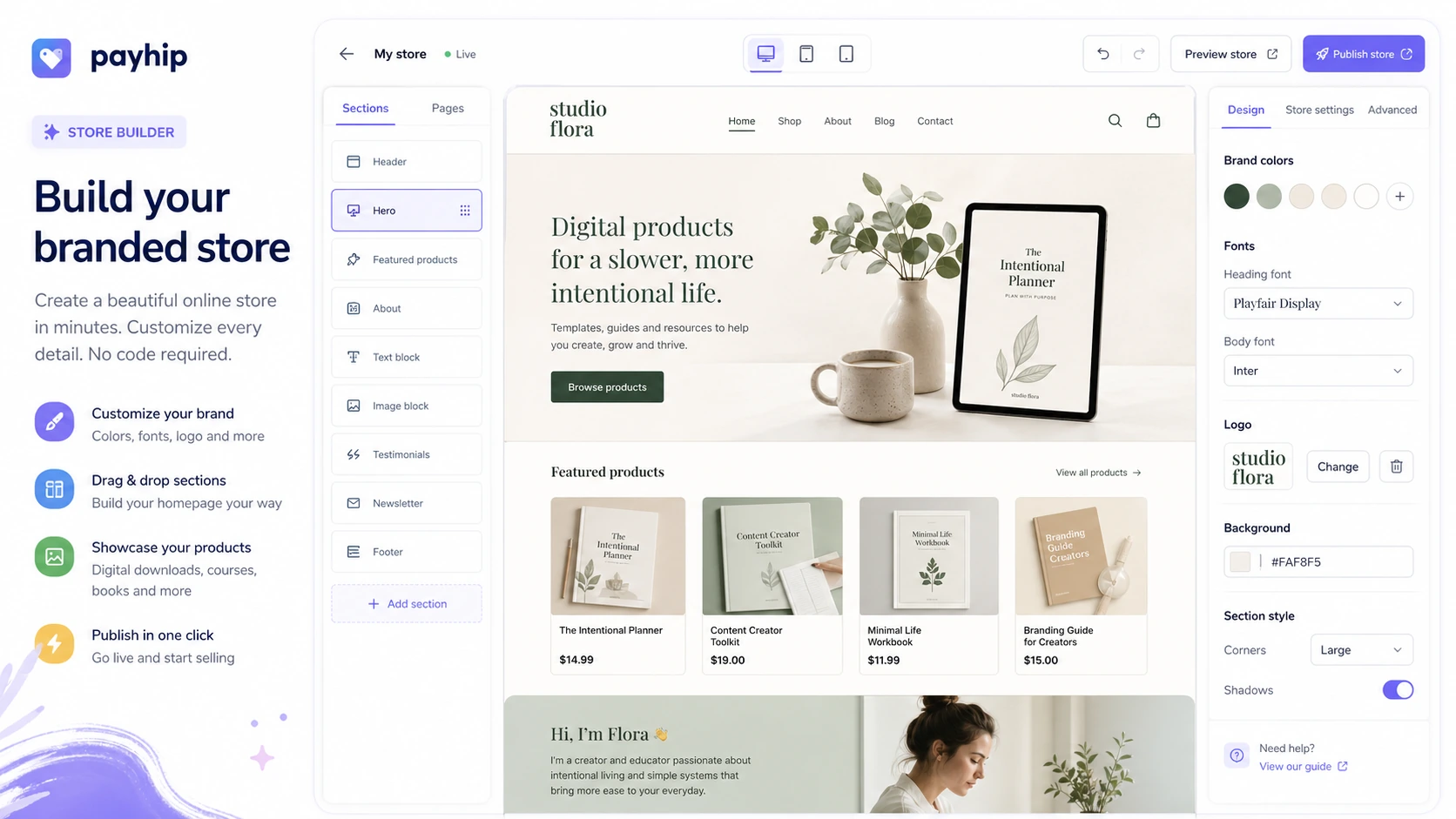
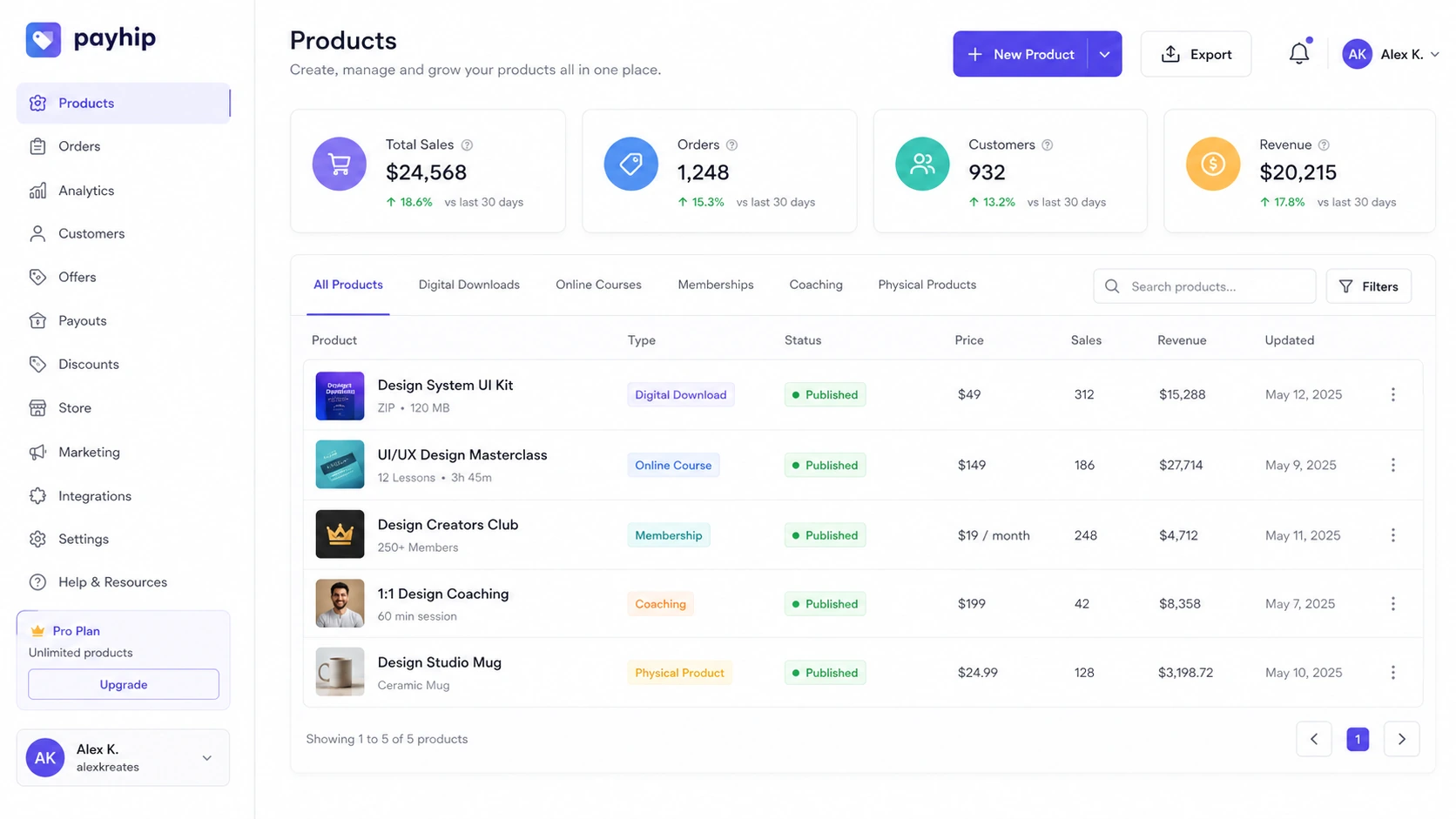
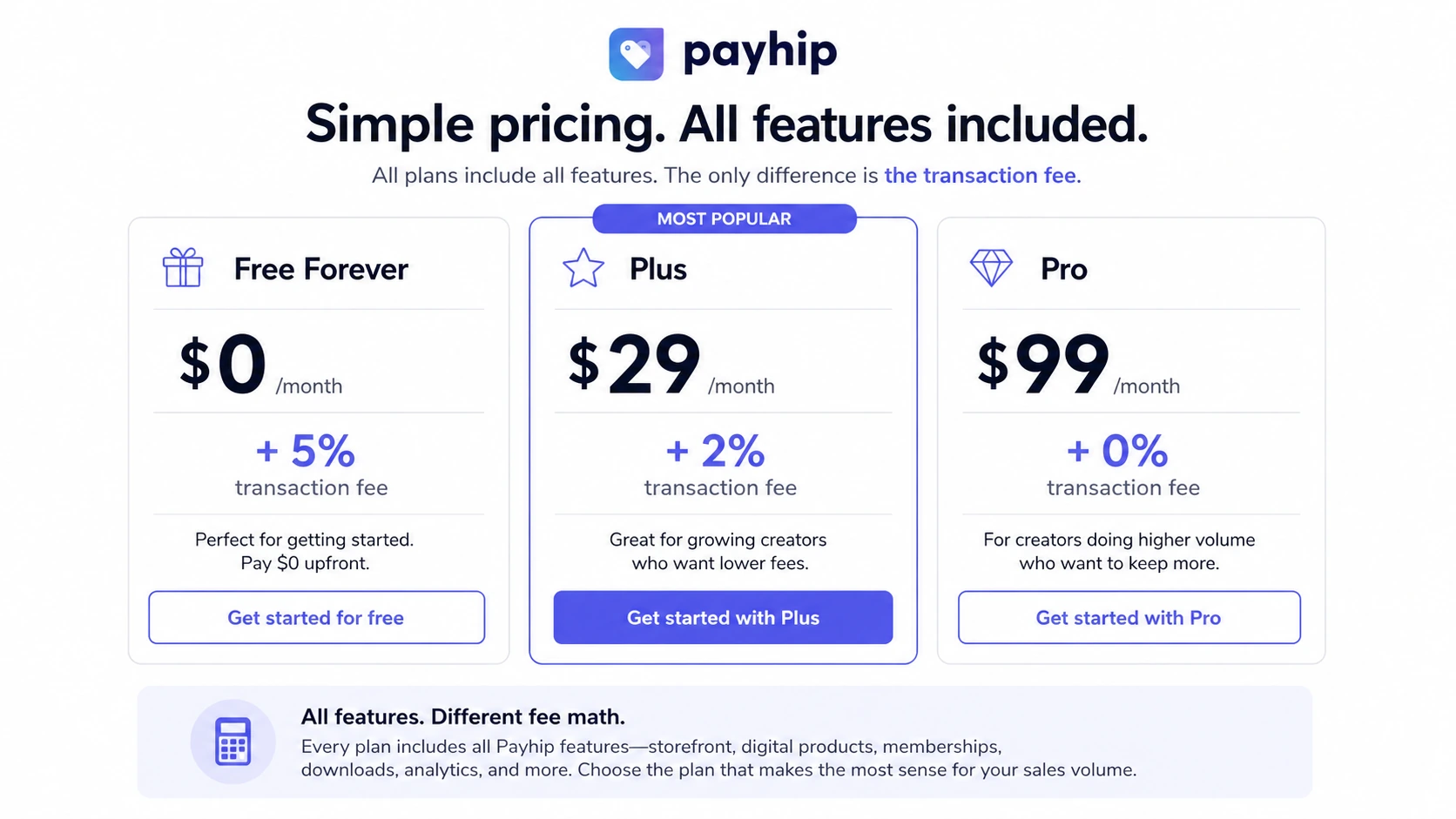
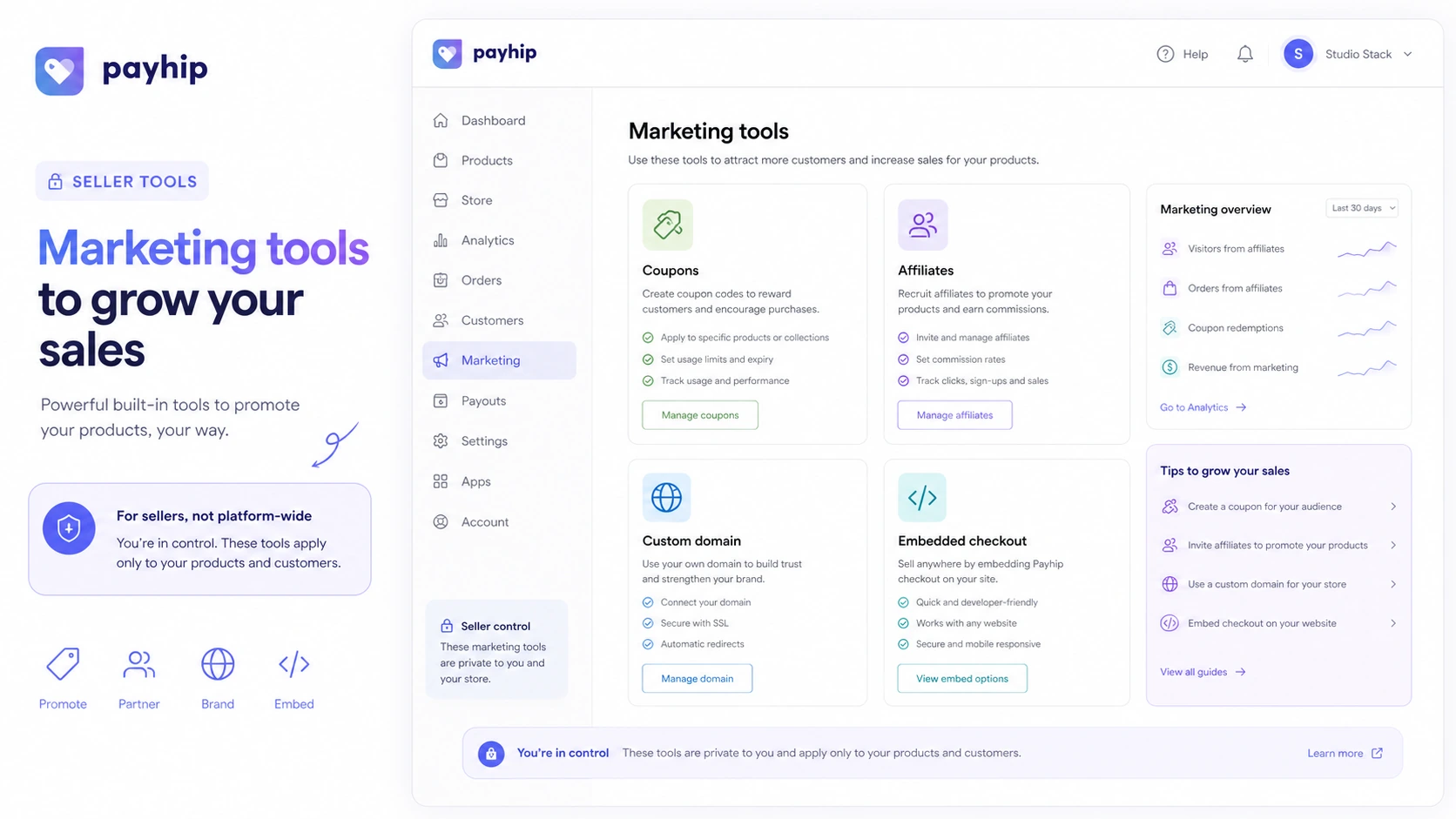
Payhip is best read as a direct-sales storefront for creators, not as a generic ecommerce platform. The appeal is simple: publish products quickly, take payments, deliver files or access, and keep the monthly cost low until revenue proves the store is worth scaling. The buying risk is also simple. A free plan can feel perfect until the 5% Payhip fee starts taking more than a paid plan would have cost.
What Payhip actually does
Payhip gives creators a hosted way to sell digital downloads, courses, coaching, memberships and physical products. A seller can use a Payhip storefront, connect a custom domain, or embed Payhip checkout into an existing site. That makes it a strong fit for creators who already have an audience and need a practical commerce layer, not a full design-heavy ecommerce project.
- Sell digital downloads such as ebooks, templates, files, music or software.
- Add courses, coaching, memberships or physical products when the catalog grows.
- Use a hosted Payhip storefront or embed checkout on an existing site.
Pricing is mostly transaction-fee math
Payhip's pricing is unusually easy to read. The Free plan has no monthly subscription and charges a 5% Payhip transaction fee. Plus costs $29 per month and lowers the Payhip fee to 2%. Pro costs $99 per month and removes the Payhip transaction fee. Since all plans list all features, the commercial decision is mostly about how much you sell and how predictable that revenue is.
- Free is better for testing or inconsistent early revenue.
- Plus can make sense when lower transaction fees save more than the monthly fee.
- Pro is mainly for sellers with enough volume to justify the $99 monthly cost.
Product setup is broad enough for most creators
Payhip is not limited to one product type. The official site positions it for files, courses, coaching, memberships and physical products. For many creator businesses, that is enough to start with an ebook or template pack and later add a paid community or course. The practical checkpoint is whether Payhip's course and membership tools are deep enough for your delivery style.
- Good for files, downloads and simple digital product catalogs.
- Useful for creators testing courses or recurring membership access.
- Worth comparing against specialist course platforms when lessons, communities or certification become complex.
Taxes, payments and refunds need a closer check
Payhip's VAT handling is one of the stronger reasons to look at the platform, especially for digital products sold into the EU or UK. The pricing page also notes that PayPal and Stripe still charge their own standard processing fees. Refund expectations are more nuanced. Payhip says sellers set and manage their own product refund policies, so a buyer of a Payhip store product should contact the seller directly.
- Check payment gateway availability for your country.
- Understand PayPal or Stripe fees in addition to Payhip fees.
- Publish a clear seller refund policy if you sell digital products.
Marketing tools help after the offer is clear
Payhip includes seller-side tools such as coupons, affiliate programs, custom domains, embeds and marketplace exposure. These are useful only after the offer itself is clear. A coupon will not rescue a weak product page, and an affiliate system will not create demand if the seller has no audience or partner channel.
- Use coupons for launch promotions, audience discounts or limited campaigns.
- Use affiliate tools when trusted partners can send qualified buyers.
- Use a custom domain when brand trust matters more than a quick temporary storefront.
Automation is useful, but not unlimited
Payhip provides webhooks, Zapier support and a public API that official help describes around coupons and license keys. That is enough for many creator workflows, such as triggering email automation after a purchase or managing software license access. It is not the same as an enterprise commerce API covering every possible resource, so technical buyers should check the exact endpoints before planning a custom workflow.
- Webhooks cover paid, refunded and subscription events.
- Zapier can connect Payhip to many external apps.
- The public API should be checked against the exact automation the seller wants.
Safest next step before checkout
The safest Payhip path is to start with the pricing page, not a coupon hunt. If you have no sales yet, the Free plan is usually the cleanest test. If you already sell consistently, calculate whether Plus or Pro saves more than it costs. Then read the review page for workflow fit and open the coupon or offer route only after Payhip already looks like the right platform.
- Choose Free for validation and low-risk launch testing.
- Choose Plus or Pro only after fee math supports the upgrade.
- Compare alternatives if you need stronger course hosting, full ecommerce operations or affiliate-link management.
Best savings path from this store page
This is the clearest savings route to check once the product already looks like a fit.
Payhip Plus lowers the platform transaction fee to 2% while keeping the same broad feature access, unlimited products, and unlimited revenue. It makes sense when sales volume is high enough to justify the monthly cost.
Pro at $99/month with no Payhip transaction fee
Get started free with no credit card required
Use comparison routes when the category fit is still open
Use these comparison routes when the product still looks plausible, but the category fit is not fully settled.
Marketsy deserves a closer look if the buyer wants a creator-store workflow with a different storefront and product discovery angle.
Lasso is not a Payhip replacement. It is more relevant when the goal is affiliate display, product boxes and link monetization rather than selling your own products.
Verification points worth checking before you click out
Where this store usually fits best in the workflow
Payhip fits creators who want to sell ebooks, templates, presets, files or other downloadable products without building a separate ecommerce stack first.
Payhip can work for early course or membership experiments when the seller wants simple checkout and access delivery before moving into a specialized learning platform.
Payhip is useful when a seller wants a branded storefront, custom domain and embedded checkout without paying monthly before sales arrive.
The Free plan is practical for validating offer, price and audience response before paying for a lower transaction-fee tier.
Practical checkpoints before and after signup
- Clarify whether you are selling digital downloads, courses, memberships, coaching or physical products.
- Check whether Payhip's storefront model is enough or whether you need a larger ecommerce platform.
- Compare Payhip against at least one checkout-first and one full-store alternative.
- Estimate monthly revenue and calculate the difference between 5%, 2% and 0% Payhip transaction fees.
- Remember that PayPal or Stripe fees still apply on every Payhip plan.
- Do not upgrade to a paid plan until sales volume supports the math.
- Prepare the product page, refund policy, tax settings, payment gateway and custom domain before announcing the store.
- Use coupons or affiliates only after the offer and checkout path are clear.
- Test checkout flow before sending paid traffic or affiliate partners.
- Review sales volume after the first real launch period.
- Upgrade only if lower transaction fees beat the monthly subscription cost.
- Recheck whether course, membership or automation needs have outgrown the simple Payhip workflow.
Fast-read signals for workflow fit and buying friction
Questions readers usually ask before choosing this store
What is Payhip best for?
Payhip is best for creators and solo sellers who want to sell digital products, courses, memberships, coaching or simple physical products without building a full ecommerce system first. It is especially useful when you want a free starting point and can tolerate transaction fees while validating demand.
Is Payhip really free?
Payhip has a Free Forever plan at $0 per month, but it charges a 5% Payhip transaction fee on that plan. Payment processor fees from PayPal or Stripe still apply. Free is useful for testing, but sellers with steady revenue should compare whether Plus or Pro would reduce total cost.
Does Payhip have a free trial or annual savings?
The public pricing page presents a Free Forever plan rather than a traditional free trial. At the latest check, it listed monthly Free, Plus and Pro options and did not show a standard annual savings path. The safer buyer move is to verify the current pricing page before upgrading.
Does Payhip offer public coupons?
A reliable public Payhip platform coupon was not verified. Payhip provides coupon tools that sellers can use for their own stores, but that is different from a confirmed discount for Payhip's own paid plans. Plan selection and transaction-fee math are the safer savings route.
What should I verify before choosing Payhip?
Verify current pricing, PayPal or Stripe processing fees, payment availability in your region, refund policy expectations, EU or UK VAT handling, custom domain needs and whether Payhip's course, membership, API or automation features match your workflow.
Choose the next route that matches what you still need to decide
The strongest next click depends on whether you still need product judgment, a savings route, or a broader category comparison.