Quick verdict
Instant Proxies is worth a look if you need cheap private datacenter proxies and already know the job those proxies need to do.
That last part matters more than the price.
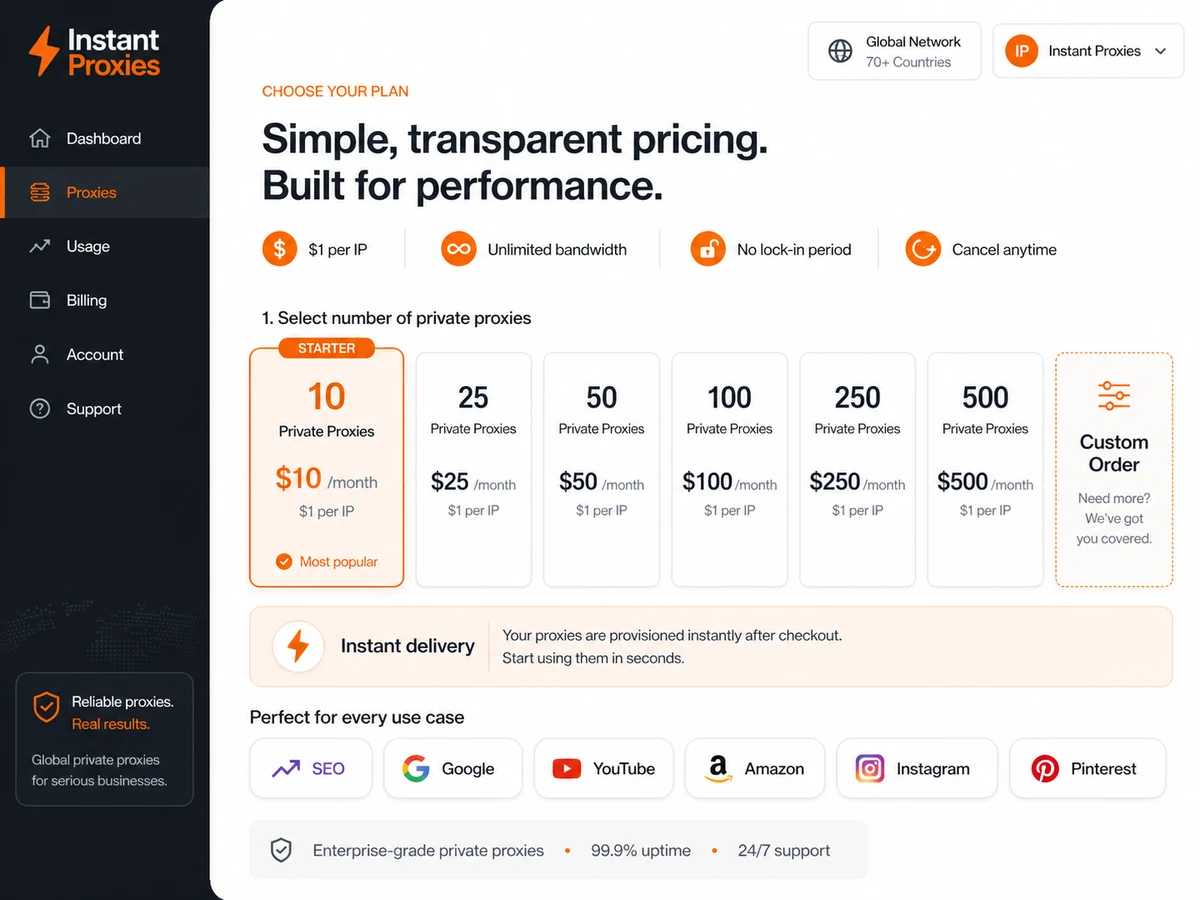
The headline offer is easy to understand: private HTTP/HTTPS proxies sold at $1 per IP, with a $10 monthly entry plan for 10 proxies. For buyers who need a small, controlled pool for SEO checks, public-data research, browser testing, or a platform-specific proxy workflow, that simplicity can be useful. You are not trying to decode a credit table or negotiate an enterprise data contract.
But I would not judge Instant Proxies by the low monthly price alone. Proxy buying is one of those categories where the cheapest plan can still be a bad purchase if the IPs do not work for your target site, your authentication setup does not fit, or you actually need residential, mobile, ISP, rotating, or API-managed proxy infrastructure.
The strongest reason to consider Instant Proxies is narrow value: simple private datacenter proxies, unlimited bandwidth positioning, a public availability checker, IP-authenticated access, and monthly plan sizes that are easy to understand. The main caution is equally narrow: this is not a broad proxy network for every data job, every location need, or every compliance-sensitive workflow.
For my money, the safest path is to run the availability check for the exact purpose first, start with the smallest plan that gives you enough working proxies, and only scale if the pool performs in your real workflow.
Next step: If Instant Proxies fits your intended proxy workflow, verify the current availability and buyer route before choosing a plan size.
Review snapshot
| Review point | Practical take |
|---|---|
| Best for | Buyers who need affordable private datacenter proxies for a defined task |
| Not ideal for | Residential, mobile, ISP, rotating, enterprise, or API-heavy proxy workflows |
| Main use case | Small SEO checks, public-data research, browser privacy testing, and controlled proxy experiments |
| Starting price | Public pricing shows $10/month for 10 private proxies, or $1 per IP |
| Free plan / trial | No traditional free plan or free trial is clearly listed; use the availability checker before payment |
| Main strength | Simple per-IP pricing and a test-before-purchase flow |
| Main concern | Proxy fit depends on target site, location, subnet, authentication, and intended usage pattern |
| Direct alternatives | ProxyEmpire, ProxyScrape, Bright Data / Luminati-style proxy platforms |
| Best next step | Test availability, confirm IP authentication, then start with the smallest workable plan |
What is Instant Proxies?
Instant Proxies is a private datacenter proxy provider. In plain language, it sells proxy IPs that sit between your device, browser, software, or workflow and the websites you access.
The product is positioned around quick delivery, private HTTP/HTTPS proxies, unlimited bandwidth, availability testing, IP authentication, and low per-IP pricing. The official site also frames the service around use cases such as browsing, SEO, Google, YouTube, Craigslist, Amazon, Instagram, Facebook, Pinterest, and other platform-specific proxy tasks.
The important word is datacenter.
Datacenter proxies are usually faster and cheaper than residential or mobile proxies, but they are not the same thing. They do not look like ordinary consumer home or mobile connections. That can be perfectly fine for some workflows. It can also be the reason they fail for others.
So the real buying question is not “Are these proxies cheap?” They are. The better question is “Are cheap private datacenter proxies the right proxy type for this target and this task?”
Our review approach compares public product pages, pricing details, support documentation, terms, network status signals, buyer workflow fit, and nearby proxy alternatives. We do not treat a low per-IP price or a coupon path as proof that the product fits the buyer.
Who should use Instant Proxies?
Instant Proxies makes the most sense for buyers who can define the job before checkout.
A small SEO operator may find it useful for controlled checks where a simple private proxy pool is enough. The key condition is that the target workflow must tolerate datacenter IPs, and the buyer should test the relevant purpose before paying.
A public-data researcher may consider it when the workload is modest, legal, and repeatable. This is not a magic way around site rules. It is a proxy layer, and the buyer still needs to respect target-site terms, rate limits, and data-use boundaries.
A browser privacy tester may use it to route browser activity through private proxies for specific location or identity-separation tests. In that situation, location availability and IP authentication matter more than the broad “private proxy” label.
A small team may also consider Instant Proxies if one person can manage the setup from a control panel and the connection IPs are stable. If the team has many changing users, rotating office networks, remote workers, or a need for username/password credentials, the setup can become less comfortable.
The best buyer is not the person hunting for the cheapest proxy in the abstract. It is the buyer who already knows the target workflow, can run the availability check, and is comfortable starting small.
Who should avoid Instant Proxies?
I would be careful with Instant Proxies if you need residential, mobile, or ISP proxies. Those are different proxy categories, and they exist because many target workflows need more realistic network identity, broader geo-targeting, or more resilient access patterns than datacenter proxies can provide.
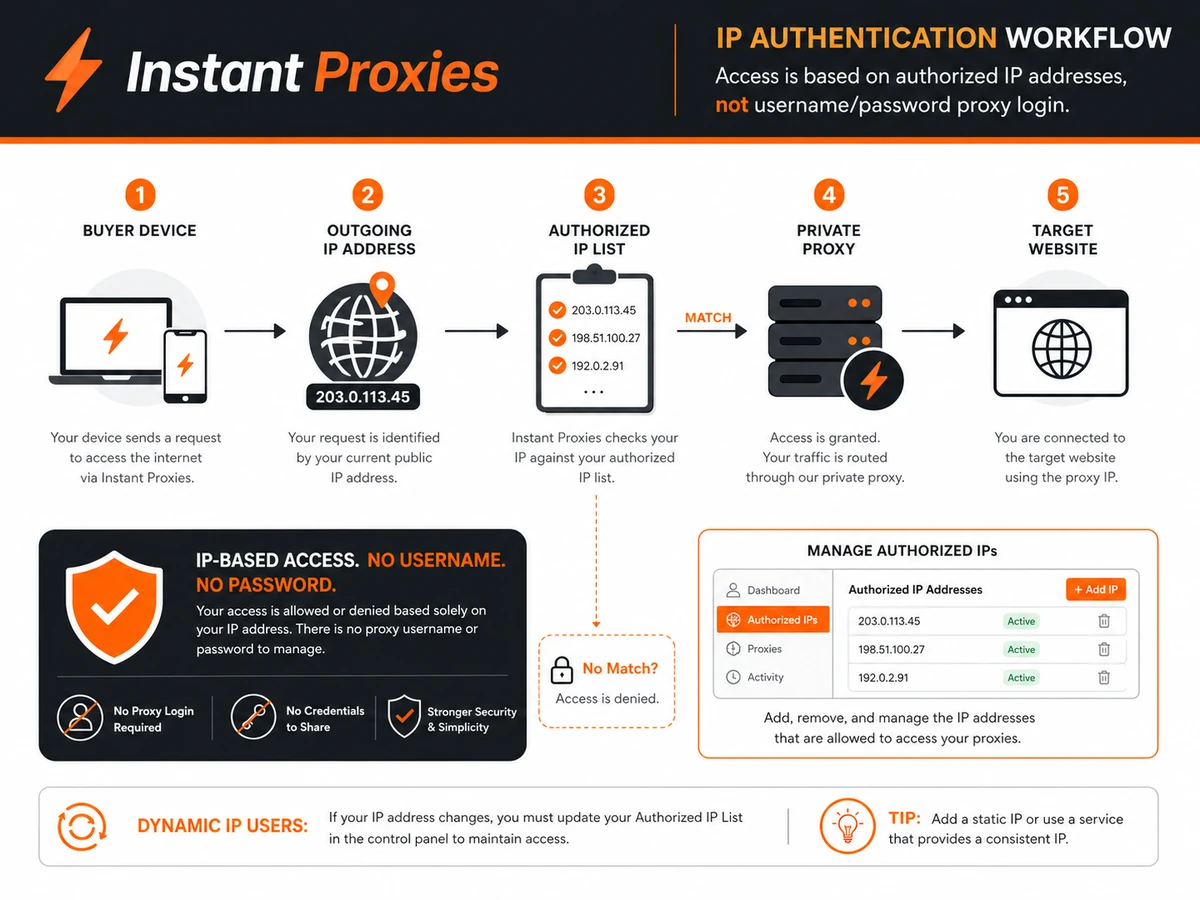
I would also avoid it if username and password authentication is mandatory for your setup. Instant Proxies publicly states that its proxies work through IP authentication and that username/password access is not available. That can be fine for stable environments, but awkward for dynamic home IPs, travel connections, rotating VPN setups, or teams with many changing networks.
Enterprise buyers should slow down too. If you need role-based access, procurement review, a formal SLA, audit trails, API-driven proxy management, large-scale compliance support, or advanced scraping infrastructure, Instant Proxies is probably too simple as the main platform.
Finally, avoid buying it only because the per-IP price looks low. The easy mistake here is thinking a $10 starter plan makes the risk irrelevant. It does not. A cheap proxy pool that fails the target use case is still wasted time.
How Instant Proxies fits into a real workflow
A sensible Instant Proxies workflow starts before payment.
First, define the exact task. Are you checking search results, testing a browser setup, routing a small research workflow, or using a specific platform? Vague use cases lead to bad proxy purchases.
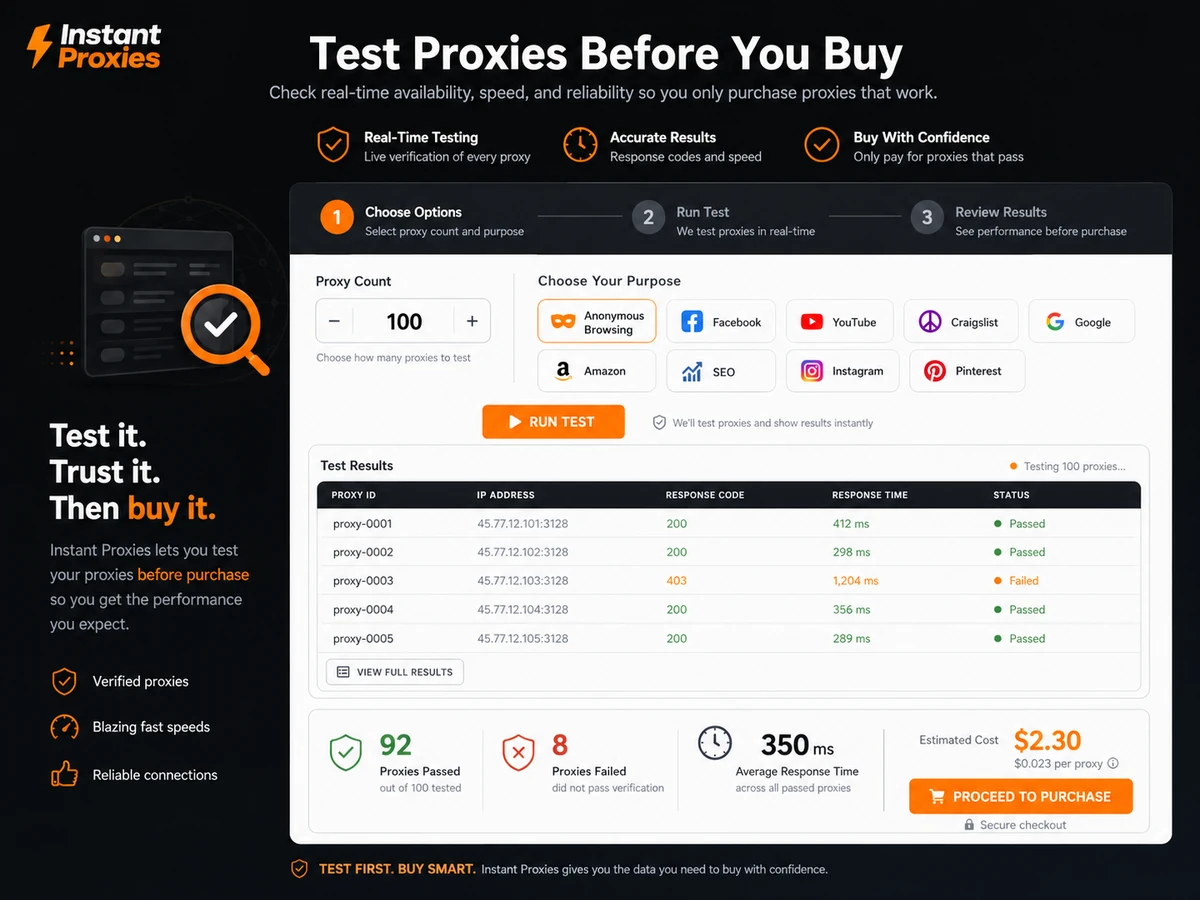
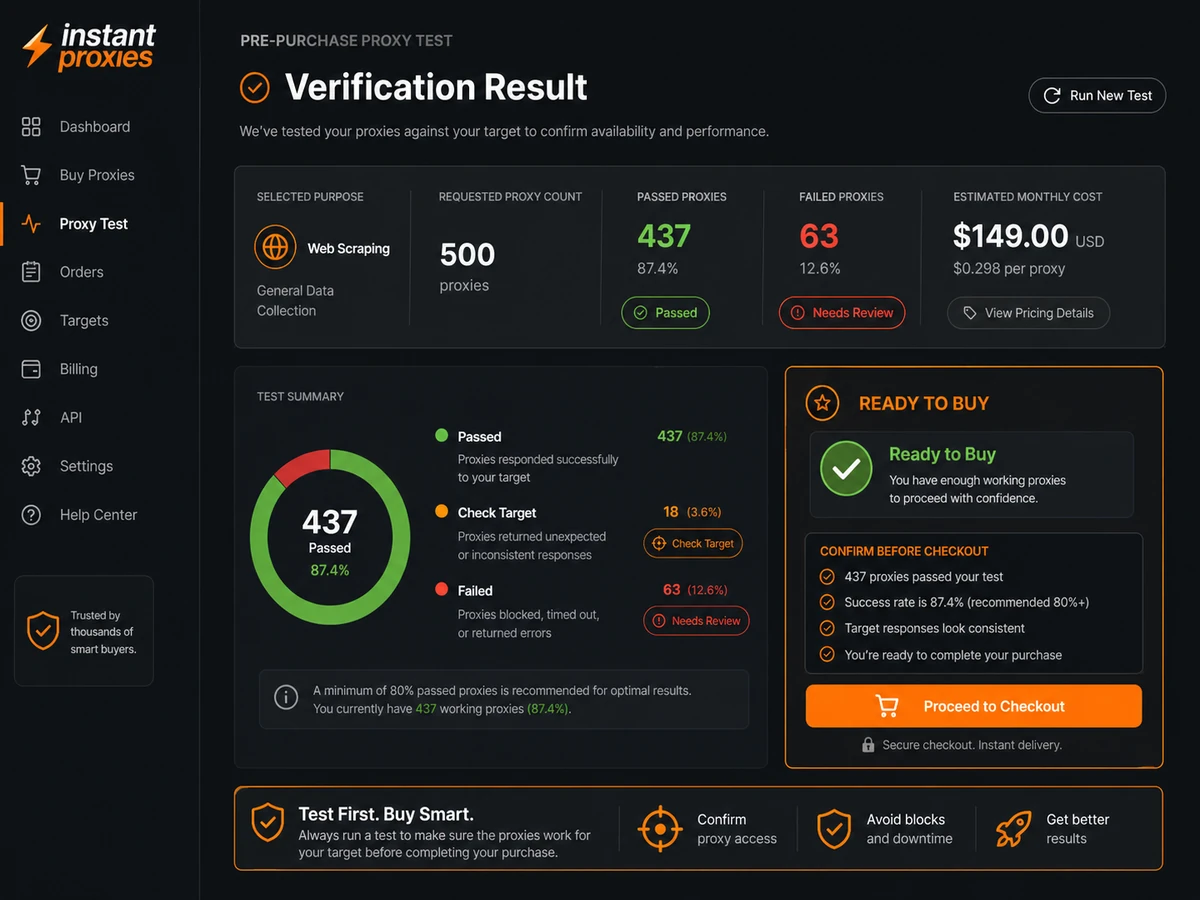
Second, run the availability checker for that stated purpose. This is one of the more important buying steps because it turns the purchase from “cheap proxies” into “enough proxies passed for my intended use.”
Third, decide the minimum proxy count. If 10 proxies are enough to test, there is usually no reason to start with 100. Proxy buying should be scaled from evidence, not optimism.
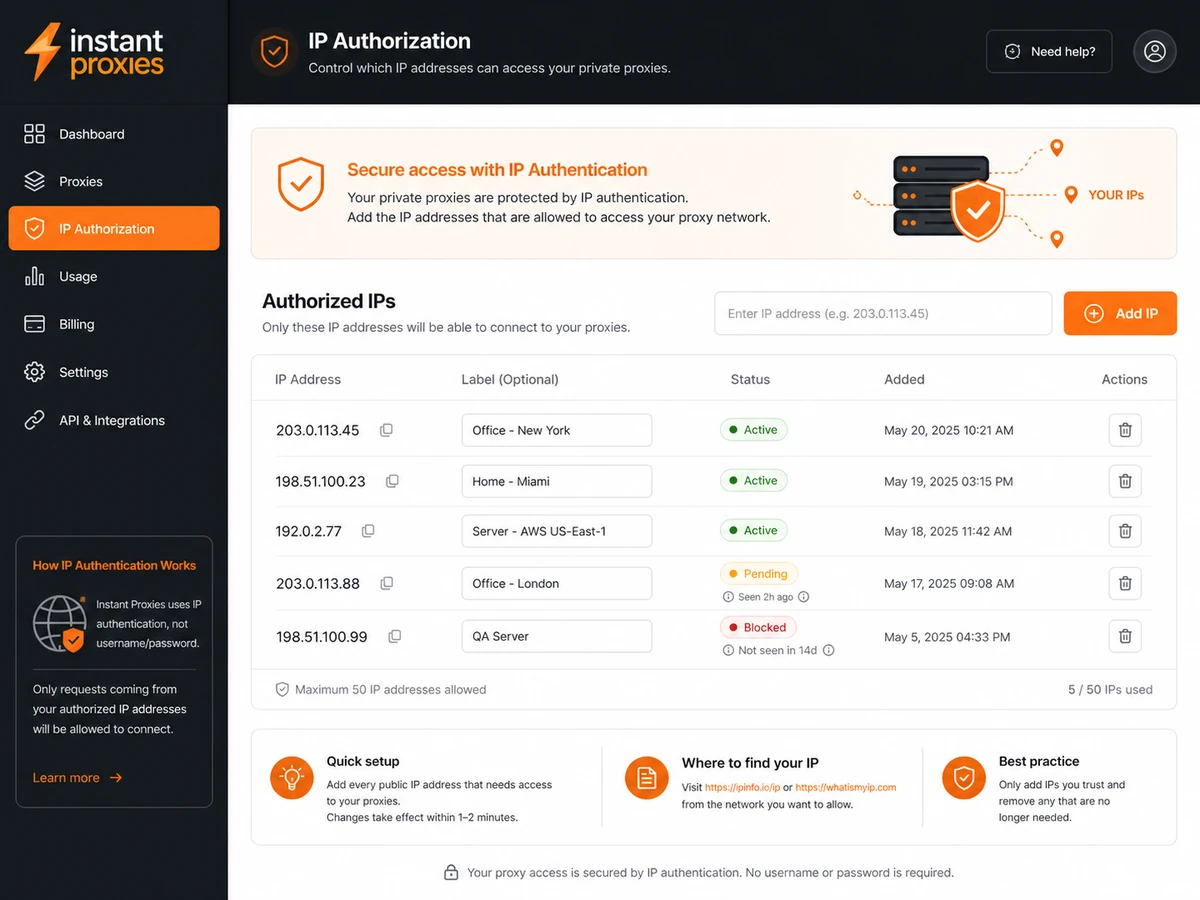
Fourth, confirm authentication. Instant Proxies uses IP authorization, so the buyer needs to authorize the outgoing IP address in the control panel. If your internet connection changes often, this deserves attention before payment.
Fifth, run a small real workload. Do not judge proxy quality by a dashboard alone. Judge it by whether your browser, app, checker, or compliant research process actually works.
Sixth, monitor performance and renewal fit. If the task grows, upgrade. If the task fails or the pool is too large, downgrade or cancel through the support/customer process before the next billing cycle.
Workflow check: If your task depends on specific target-site behavior, test availability first and avoid scaling the proxy count until the setup works in practice.
Real-world buyer scenarios
A solo SEO operator might use Instant Proxies for small SERP checks or tool workflows where private datacenter IPs are acceptable. This is a reasonable fit if the workload is limited and the availability check passes. It becomes weaker if the target search or platform behavior is sensitive to datacenter IPs.
A small data researcher may use it for public-data workflows where cost and repeatability matter. The caution is that proxies do not remove the need to follow site rules, robots policies where applicable, rate limits, and legal boundaries. If the workflow is high-volume or business-critical, a broader provider with more controls may be safer.
A browser privacy tester may use Instant Proxies to separate sessions or test how websites respond from different proxy locations. This can make sense when the buyer understands HTTP/HTTPS proxy setup and is comfortable with IP authorization. It makes less sense if the buyer expects a VPN-like consumer app experience.
A buyer comparing proxy providers on price may start here because the offer is simple. That is fair, but price-only comparison is dangerous in this category. The better test is whether Instant Proxies has the right proxy type, locations, stability, and authentication model for the real job.
Key features that actually matter
$1-per-IP private datacenter pricing
The pricing model is the clearest part of the product. A buyer can understand the entry point quickly: 10 proxies for $10 per month, with larger plan sizes available.
Buyer note: Simple pricing is useful, but it does not answer whether datacenter proxies will work for the target use case.
Availability checker
The availability checker is important because proxy suitability varies by purpose. A proxy can be cheap and private but still wrong for a specific target, location, or workflow.
Buyer note: I would treat the availability checker as part of checkout, not as a nice extra.
IP authentication
Instant Proxies uses IP authentication rather than username and password credentials. This can be clean for buyers with stable IP addresses and less convenient for dynamic setups.
Buyer note: Confirm your outgoing IP situation before paying, especially if you work from home, travel often, use VPNs, or share access with a team.
Unlimited bandwidth positioning
Unlimited bandwidth can be attractive for recurring tasks where the buyer does not want to think in gigabytes. Still, performance can degrade when too many threads or heavy usage patterns are involved.
Buyer note: Test realistic concurrency instead of assuming “unlimited” means every workload will perform equally well.
Public network status
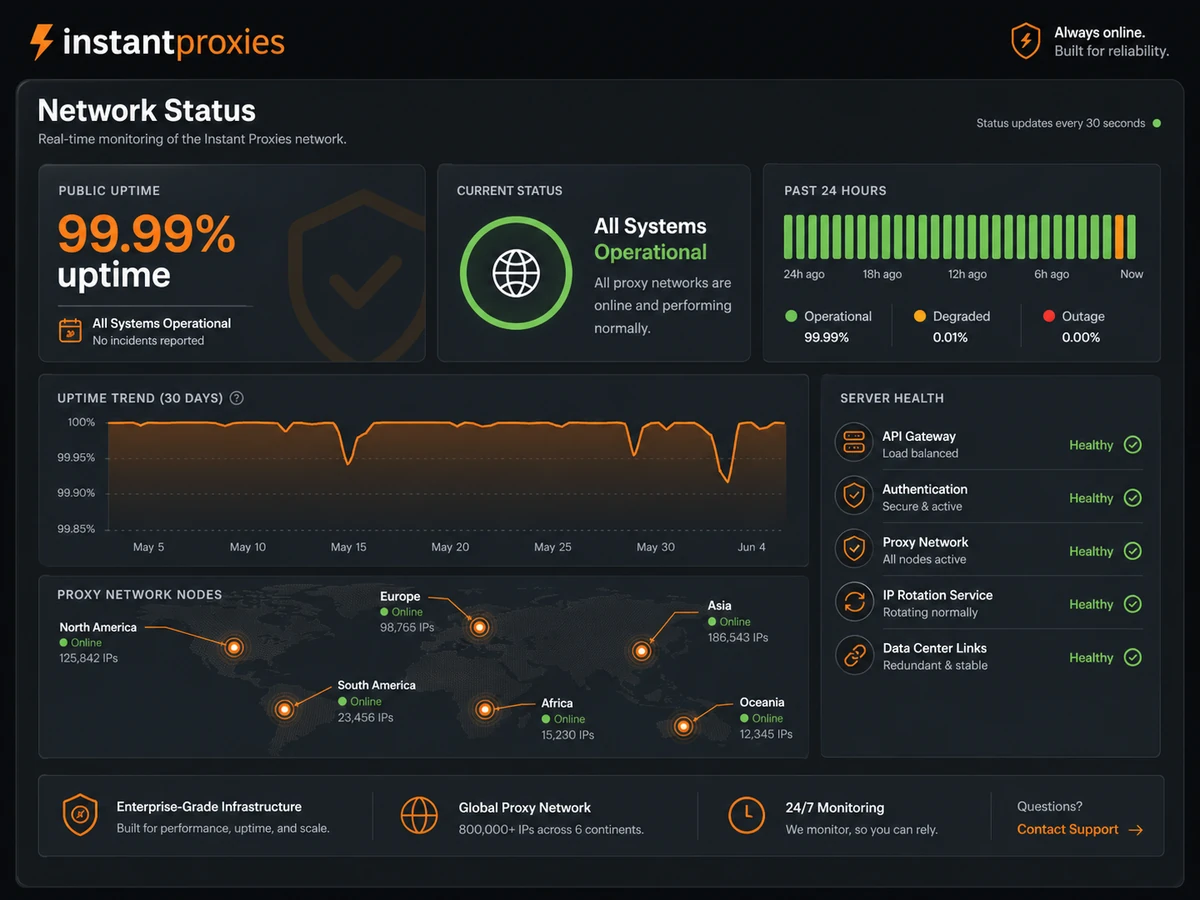
The network status page gives buyers a basic way to inspect uptime and proxy availability trends. That is better than relying only on marketing language.
Buyer note: Use the status page as one signal, not a guarantee that your exact target site will work.
Pricing and plan value
Instant Proxies is easy to understand on price. Public pricing shows proxies at $1 per IP, with a $10 monthly entry plan for 10 private proxies. Larger plan sizes appear to follow the same per-IP logic, including 25, 50, 100, 250, and 500 proxy options, plus a custom order route.
That simplicity is the main value proposition.
If you need a small private datacenter proxy pool, the starter plan is the natural first test. I would not jump to a bigger order unless you already know the workload requires more IPs, more cities, more subnets, or more separation.
There is no clear public free plan or traditional free trial. Instead, the product pushes buyers toward testing proxies for their purpose before purchase. That is not the same as using the proxies freely, but it is still a useful qualification step.
The pricing risk is not hidden complexity. It is buying the wrong proxy type or wrong plan size. If datacenter proxies are enough, the price can look attractive. If the target requires residential, mobile, ISP, rotating sessions, wider geography, or advanced management, the cheap plan becomes less relevant.
Annual billing is not the main issue here because the public offer is monthly and no-lock-in oriented. The bigger buyer check is renewal discipline: use the smallest pool that works, monitor whether the proxies keep fitting the task, and avoid paying for a larger plan out of habit.
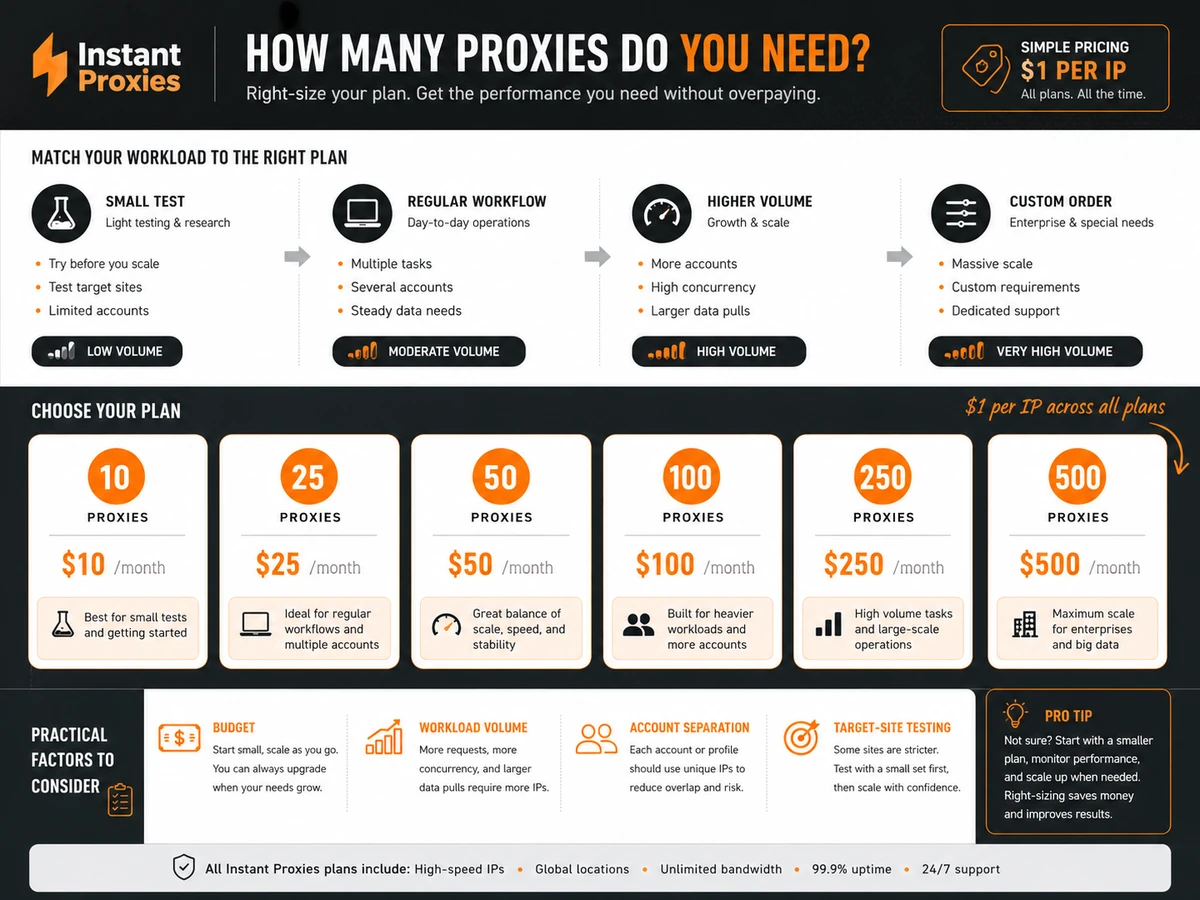
Pricing check: If the starter plan looks attractive, confirm proxy availability and authentication fit before treating the $1-per-IP price as the best deal.
Free plan, trial, coupon, and checkout notes
Instant Proxies does not appear to offer a traditional free plan or free trial. The safer evaluation path is the availability checker, the smallest paid plan, and careful monitoring during the first week.
The coupon question should stay secondary. The public pricing is already simple, and the real savings path is more about not overbuying than finding a dramatic discount. A reported coupon path or current offer can help, but it should not be the reason you buy a proxy pool that has not been tested for the target purpose.
Before checkout, I would verify four things:
- enough proxies pass for the exact purpose
- IP authentication works with your network
- the current refund language still matches your risk tolerance
- the plan size is small enough for a controlled first test
If those checks do not pass, the better move is not to hunt harder for a coupon. It is to compare alternatives.
What I would check before buying Instant Proxies
If I were buying Instant Proxies for a real workflow, I would check these items first:
- Purpose fit: Does the availability checker show enough working proxies for the exact target use case?
- Proxy type: Are private datacenter proxies acceptable, or do you actually need residential, mobile, ISP, or rotating proxies?
- Authentication: Can your setup work with IP authorization instead of username and password credentials?
- Plan size: Is the 10-proxy starter plan enough for a small test before scaling?
- Locations and subnets: Do the available cities and subnet mix matter for your task?
- Refund terms: Does the current guarantee language cover the situation you are worried about?
- Renewal process: How will you cancel, downgrade, or request fresh proxies if the workflow changes?
A simple test before paying
Before choosing a larger plan, I would run a small test like this:
- Pick one real target workflow, not a vague category.
- Use the availability checker for that purpose.
- Start with the smallest plan if enough proxies pass.
- Set up IP authorization from the network you actually use.
- Run a realistic but controlled workload.
- Track failures, blocks, speed issues, and setup friction.
- Decide whether to keep, scale, refresh, downgrade, or compare alternatives.
This test does not prove the proxies will work forever. Proxy reliability can change over time. But it gives you a better signal than comparing pricing tables alone.
Pros explained
The first pro is pricing clarity. Many proxy providers make buyers compare bandwidth, proxy type, rotation logic, geo-targeting, and plan limits at the same time. Instant Proxies keeps the entry point simple: $1 per IP and a low monthly starter plan.
The second pro is the availability checker. In this category, a test-before-purchase signal is genuinely useful because a proxy that works for one purpose may fail for another.
The third pro is the fit for small controlled tasks. If the buyer only needs a modest private datacenter proxy pool, Instant Proxies avoids the weight of a larger enterprise proxy platform.
The fourth pro is public reliability visibility. The network status page is not a full SLA, but it gives buyers something concrete to check before and during use.
Cons explained
The first con is category narrowness. Instant Proxies is mainly a private datacenter proxy provider. That is not a weakness for the right buyer, but it is a real limitation for anyone who needs residential, mobile, ISP, or advanced rotating proxy workflows.
The second con is authentication fit. IP authentication can be simple in a stable environment and frustrating in a dynamic one. Buyers should not assume it works like username/password proxy credentials.
The third con is refund complexity. The FAQ presents a 7-day money-back guarantee, but the terms describe conditions around use-case failure, replacement attempts, uptime, support timing, and billing disputes. That does not make the guarantee useless. It means buyers should read it before relying on it.
The fourth con is lack of broader platform depth. This is not the provider I would start with for complex data operations, formal compliance review, API-heavy infrastructure, or large-team proxy governance.
Green flags and red flags
Green flags:
- The buyer has a narrow, defined proxy use case.
- Datacenter proxies are acceptable for the target workflow.
- The availability checker shows enough working proxies.
- The buyer can work with IP authentication.
- The starter plan is enough for a controlled first test.
Red flags:
- The buyer needs residential or mobile IP behavior.
- The setup requires username and password authentication.
- The target platform is strict about datacenter proxy traffic.
- The buyer wants enterprise controls, API management, or formal procurement.
- The purchase is motivated only by a coupon or low monthly price.
Instant Proxies vs alternatives
Instant Proxies should be compared against proxy providers based on the buyer job, not only the cheapest visible price.
ProxyEmpire vs Instant Proxies
ProxyEmpire is the stronger comparison if you need broader proxy coverage, especially residential, mobile, or more flexible geo-targeted proxy options. It may be a better fit when target-site reliability matters more than the lowest per-IP datacenter price.
Instant Proxies may still make more sense if your job is small, datacenter-friendly, and price-sensitive. Compare the ProxyEmpire store guide if you are unsure whether datacenter proxies are enough.
ProxyScrape vs Instant Proxies
ProxyScrape is a useful adjacent comparison for buyers who want to evaluate different proxy access styles rather than commit immediately to a simple private datacenter plan.
Instant Proxies is easier to understand if you just want private datacenter proxies by count. ProxyScrape may be better when the buyer wants a broader proxy mix or a different access model. Compare the ProxyScrape store guide if the category fit is still unclear.
Bright Data / Luminati-style platforms vs Instant Proxies
Bright Data, formerly associated with the Luminati name, is a more enterprise-style route for buyers who need large proxy networks, advanced data collection infrastructure, stronger controls, and broader targeting options.
Instant Proxies is not trying to be that. It is the simpler, cheaper, narrower choice. Compare the Luminati Proxy store guide if your workflow is larger than a basic private datacenter proxy pool.
Webshare-style budget proxy routes vs Instant Proxies
Webshare-style providers are another adjacent route when the buyer wants flexible budget proxy infrastructure with dashboard controls and broader proxy plan choices. I would compare this kind of provider if the main question is not just “How cheap is one private proxy?” but “Which budget proxy dashboard gives me the most usable setup?”
Instant Proxies wins on simplicity. It becomes weaker when the buyer needs more account controls, proxy types, or self-service flexibility.
Trust, refund, and buyer-risk notes
There are a few trust signals worth noting. Instant Proxies publishes a public pricing page, a public FAQ, a network status page, and support documentation. The service also describes its network as publicly tracked and points buyers toward testing proxies for a chosen purpose.
But the buyer-risk layer is still real.
First, refund terms should be read carefully. The public FAQ mentions a 7-day money-back guarantee, while the terms add conditions around proxy fit, replacement attempts, uptime, support response, and billing issues. I would not treat the guarantee as no-questions-asked unless the current terms clearly support that.
Second, IP authentication is a practical setup risk. If your outgoing IP changes often, you may need to update authorization. That friction can matter more than the monthly price.
Third, datacenter proxy detection is a category risk. Some sites can detect or restrict datacenter traffic more easily than residential or ISP proxy traffic. If your target workflow is sensitive, test first and compare alternatives.
Fourth, support expectations matter. Proxy problems often need fast diagnosis: target issue, IP reputation, connection setup, authorization, location, or concurrent usage. Keep support tickets and test notes if you need help or need to discuss the guarantee.
Finally, use proxies responsibly. Do not treat a proxy provider as permission to ignore site terms, misuse accounts, overload services, or run unclear automation. A safe proxy purchase starts with a legitimate workflow.
Final verdict
Instant Proxies is a good candidate if you want a simple, low-cost private datacenter proxy plan and you can verify that the proxies fit your exact target use case before paying.
I would consider it for small SEO checks, browser testing, public-data research, or defined proxy workflows where datacenter IPs are acceptable and IP authentication is not a problem.
I would skip it if you need residential or mobile IPs, username/password authentication, formal enterprise controls, advanced API management, or a proxy setup that must survive strict target-site filtering.
I would compare it with ProxyEmpire if broader proxy types matter, ProxyScrape if you want a different proxy access style, and Bright Data / Luminati-style platforms if the workflow is large, technical, or enterprise-grade.
The safest next step is not to buy the biggest plan. It is to test the exact purpose, confirm IP authentication, start small, and only scale after the proxies work in the real workflow.