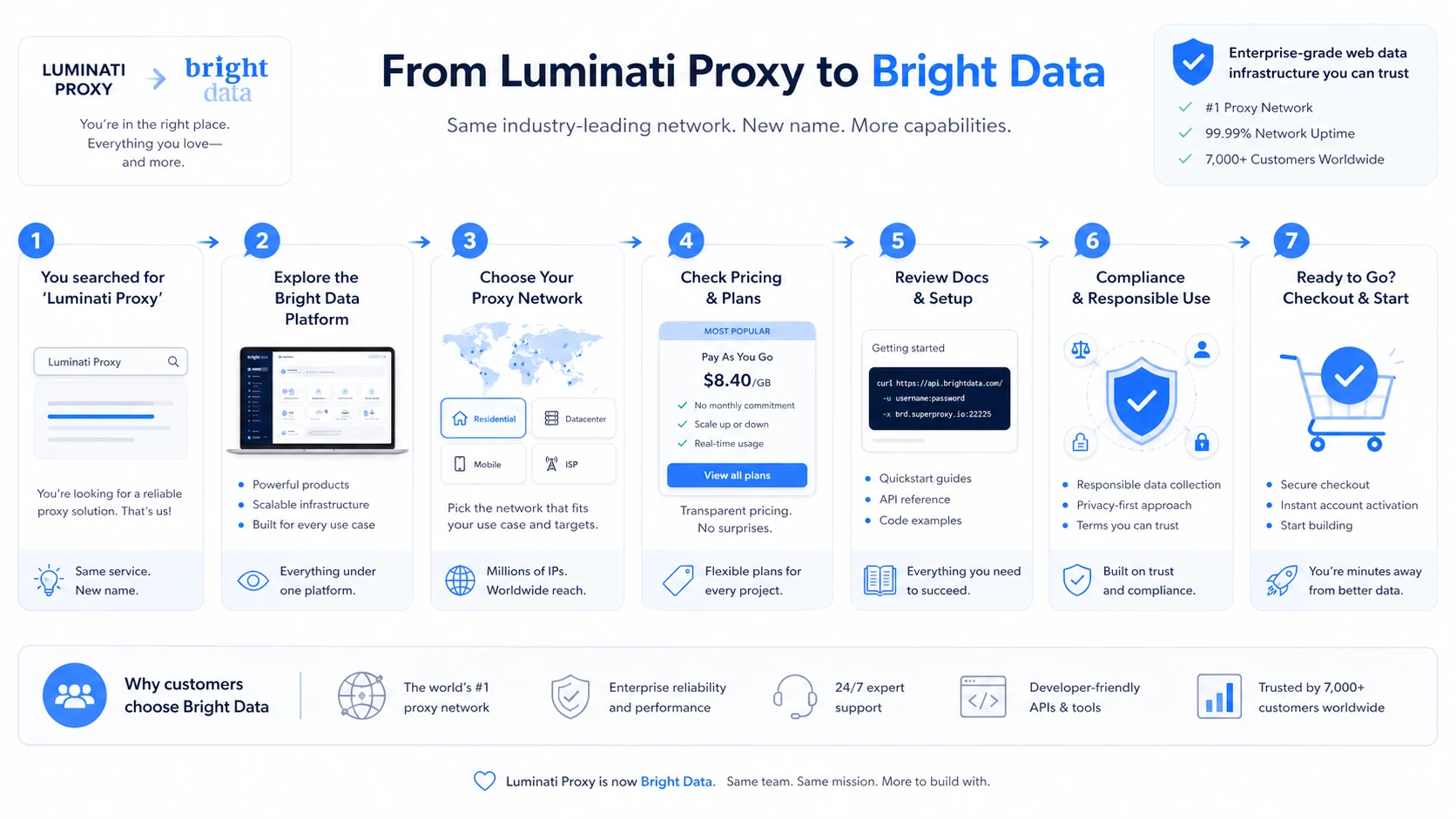
Quick verdict
Luminati Proxy is not really a lightweight proxy product anymore.
That is the first thing to get clear.
The old Luminati name now points buyers into Bright Data, a much broader web data infrastructure platform built around residential proxies, datacenter proxies, ISP proxies, mobile proxies, Proxy Manager, Web Unlocker, SERP API, Browser API, scraper products, datasets, and enterprise data workflows. That can be a strength if you are a serious data team. It can also be overkill if you only need a cheap proxy for one small task.
For my money, Bright Data makes the most sense when proxy reliability, geo-targeting, routing control, compliance review, and support depth have real business value. A market intelligence team, an SEO monitoring team, a developer building public web data pipelines, or a company with structured scraping requirements may find the platform worth evaluating. A casual buyer who wants one proxy list and a flat monthly bill will probably feel the setup and pricing model are heavier than expected.
The main strength is infrastructure depth. The main risk is buying before you understand the exact proxy type, usage model, acceptable-use boundary, KYC requirement, and refund language.
A discount or deposit match can reduce the first purchase, but it should not drive the decision. With proxy tools, the expensive mistake is not missing a coupon. The expensive mistake is choosing the wrong product path and burning bandwidth on a workflow that should have used a managed API, a cheaper datacenter proxy, or a simpler provider.
Next step: If Bright Data still fits your data workflow, verify the current proxy type, pricing path, and compliance requirements before adding a payment method.
Review snapshot
| Review point | Practical take |
|---|---|
| Current brand | Luminati Networks is now Bright Data |
| Best for | Data teams, developers, SEO teams, market intelligence teams, and businesses with repeatable public web data workflows |
| Not ideal for | Casual proxy shoppers, one-off users, or teams without a clear compliance process |
| Main use case | Proxy and web data infrastructure for public data collection, geo-targeted access, scraping support, and data pipelines |
| Pricing style | Product-specific pricing by proxy type, bandwidth, IP count, commitment, and managed product path |
| Free/trial path | Start-free/free-trial messaging exists, but buyers should verify account, payment, and KYC requirements live |
| Main strength | Infrastructure depth, Proxy Manager, API access, global coverage, and compliance-aware product controls |
| Main concern | Pricing complexity, non-refundable fee language, acceptable-use restrictions, and possible setup friction |
| Direct alternatives | Oxylabs, Smartproxy, Webshare |
| Adjacent route | ScrapingBee if you prefer a scraping API abstraction instead of managing proxies |
| Best next step | Test one compliant workflow before committing to monthly volume or recharge settings |
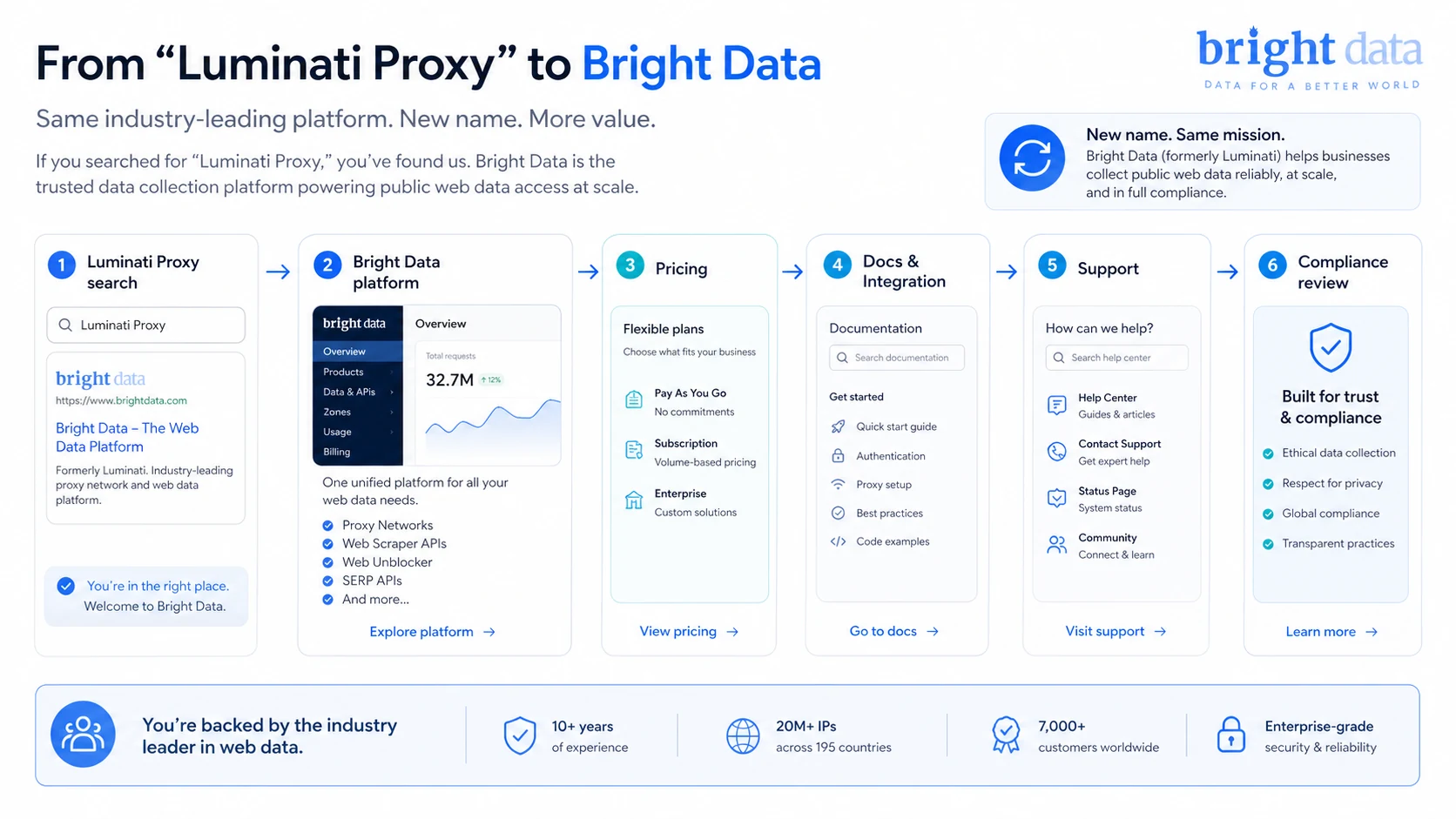
What is Bright Data’s former Luminati Proxy?
Bright Data’s former Luminati Proxy is best understood as web data infrastructure, not a simple proxy subscription.
The current public positioning is broader than “buy a proxy.” Bright Data presents itself as an enterprise-grade web data platform with proxy infrastructure, web access APIs, data feeds, scraper tools, and AI-ready public web data products. For a buyer, that means the review question is not only whether the proxy network is large. It is whether the platform matches the type of workload you actually need to run.
At the proxy level, the product family includes residential, datacenter, ISP, and mobile proxy paths. Residential proxies are generally the better fit for difficult public websites and geo-sensitive access. Datacenter proxies can be more cost-efficient for simpler targets. ISP proxies can make sense when static residential-style access matters. Mobile proxies are more specialized and should be chosen only when the workload truly needs mobile network behavior.
That is already more complex than most software reviews.
Our review approach compares current public product pages, pricing pages, documentation, license language, acceptable-use rules, buyer workflow fit, and nearby alternatives. I would not treat old Luminati directory listings or outdated pricing screenshots as reliable decision material. The safer approach is to use the current Bright Data pages for pricing, policy, docs, and support expectations.
The common wrong expectation is that Bright Data is just a bigger proxy list. It is not. It is a platform for teams that need controlled public web access at scale. That can be valuable. It also means the buyer needs more discipline before checkout.
Who should use Bright Data?
Bright Data makes the most sense for buyers who already know that proxy infrastructure is part of a real workflow.
Data teams collecting public web data are the most natural fit. If your team collects pricing, product availability, review, market, or competitive data across public pages, Bright Data gives you several paths: raw proxies, managed unblocking, browser infrastructure, scraper APIs, and datasets. The condition is that your team must understand the target rules, data rights, and usage volume before scaling.
Developers building scraping or data pipelines may also find it useful. Proxy Manager, API access, credentials, cloud or local setup, and documentation give technical buyers more control than a basic proxy seller. The tradeoff is that control adds setup choices. I would verify the simplest path first before building around the most complex one.
SEO and SERP monitoring teams can consider it, but carefully. Bright Data can support search-related workflows, yet search engines and SEO manipulation are sensitive areas. If the goal is legitimate public result monitoring, buyers should verify whether SERP API is the correct product instead of trying to force the job through a normal proxy zone.
Market intelligence and ad verification teams may benefit when country, city, ASN, or device-specific access matters. This is where proxy quality and targeting can affect business decisions. The buyer still needs to check allowed use, target restrictions, and expected monthly spend.
AI and data product teams may consider Bright Data when they need public web information to feed models, agents, or analytics systems. The key condition is governance. A team collecting data for AI workflows should not skip privacy, terms, and compliance review just because the infrastructure is available.
Who should avoid Bright Data?
Bright Data is probably not the right starting point if your needs are casual.
A solo buyer who needs one cheap proxy for a short experiment may find the product too serious for the job. The dashboard, proxy types, account verification, KYC language, and pricing variables can feel like too much when all you want is a small static proxy.
Buyers who want predictable flat-rate pricing should also be careful. Bright Data pricing can vary by residential bandwidth, datacenter IPs, ISP IPs, mobile usage, managed APIs, datasets, commitments, and promotional terms. If you cannot estimate traffic or request volume, you cannot estimate cost with much confidence.
Teams without a compliance process should slow down. Proxy infrastructure can create real policy and legal risk. Bright Data publishes acceptable-use rules, and the license agreement gives the company broad rights to suspend access for risky or non-compliant activity. If nobody on your team is responsible for acceptable use, target rules, privacy, and data handling, pricing should not be the first conversation.
I would also be cautious if your workload targets search engines, account systems, nonpublic data, classified sites, streaming domains, fake engagement, or any activity that could look abusive. Some use cases are restricted or better handled through specific products. This is not an area where “we will test first and ask later” is a smart buying strategy.
Finally, avoid Bright Data if you are buying mainly because a public offer looks attractive. A coupon can reduce first spend, but it does not simplify KYC, policy review, traffic estimation, or product selection.
How Bright Data fits into a real workflow
A realistic Bright Data workflow starts before the dashboard.
First, the buyer defines the public data job: what websites, what countries, what scale, what frequency, what data type, and what business purpose. This matters because the right product may be residential proxies, datacenter proxies, SERP API, Browser API, Web Unlocker, a Web Scraper API, or a dataset.
Second, the buyer checks the allowed-use boundary. This is not a decorative step. Bright Data has an acceptable-use policy and compliance review language, and residential or mobile access may require KYC. A serious team should treat that as part of onboarding, not as friction to ignore.
Third, the buyer chooses the smallest useful test path. That might mean creating a residential proxy zone, testing datacenter proxies on a simple target, or choosing a managed API if raw proxies would create too much maintenance.
Fourth, the technical team measures real usage. Failed requests, bandwidth burn, target restrictions, CAPTCHA friction, geo-targeting, session behavior, and support needs all affect cost.
Fifth, the buyer decides whether to stay pay-as-you-go, move into a monthly commitment, or choose a different Bright Data product.
The workflow is powerful when done carefully. It becomes expensive when buyers skip the first two steps and treat proxy buying as a quick checkout decision.
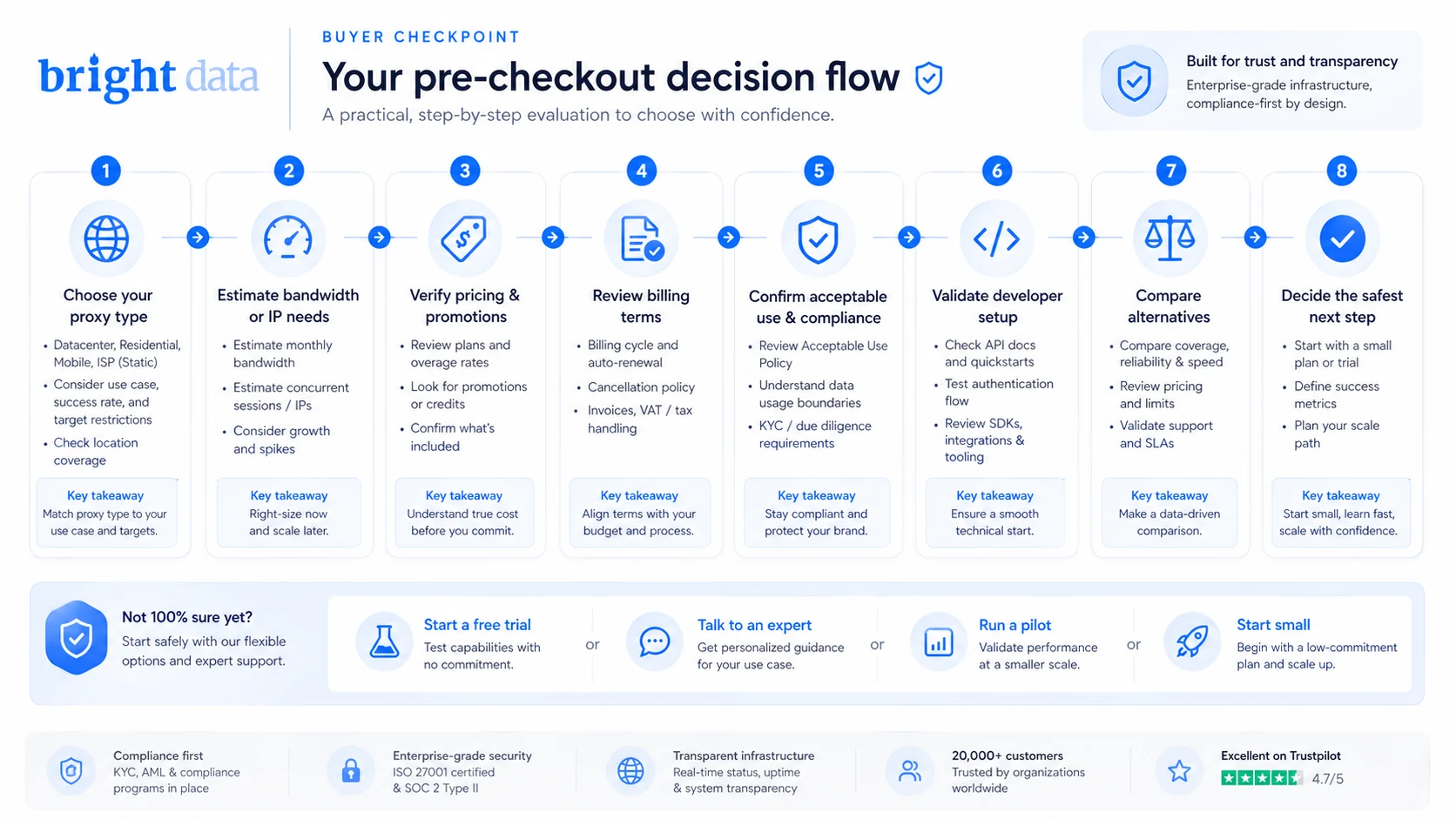
Workflow check: If your use case is legitimate, repeatable, and large enough to justify infrastructure, test the smallest Bright Data route before committing to volume.
Real-world buyer scenarios
A market intelligence team tracking public prices
This is one of the cleaner use cases. A team needs to collect public pricing and availability signals across regions, then feed the results into dashboards or internal analysis. Bright Data may fit because geo-targeting, success rate, routing control, and support matter.
The risk is cost estimation. If the team does not know how many pages, regions, retries, and failed requests are involved, residential bandwidth or managed API pricing can surprise them. I would start with a small controlled test and compare the result against Web Unlocker or a scraper API before choosing raw proxies.
An SEO team checking geo-specific search results
Bright Data can be relevant for search-related monitoring, but this is where I would slow down. SEO workflows can be legitimate, such as checking public SERP visibility across locations. They can also drift into restricted territory if the goal becomes manipulation or fake engagement.
The buyer should verify whether Bright Data’s SERP API is the correct route. If the job is search result data, a purpose-built API may be safer and cleaner than building a proxy workflow manually.
A developer building a public web data pipeline
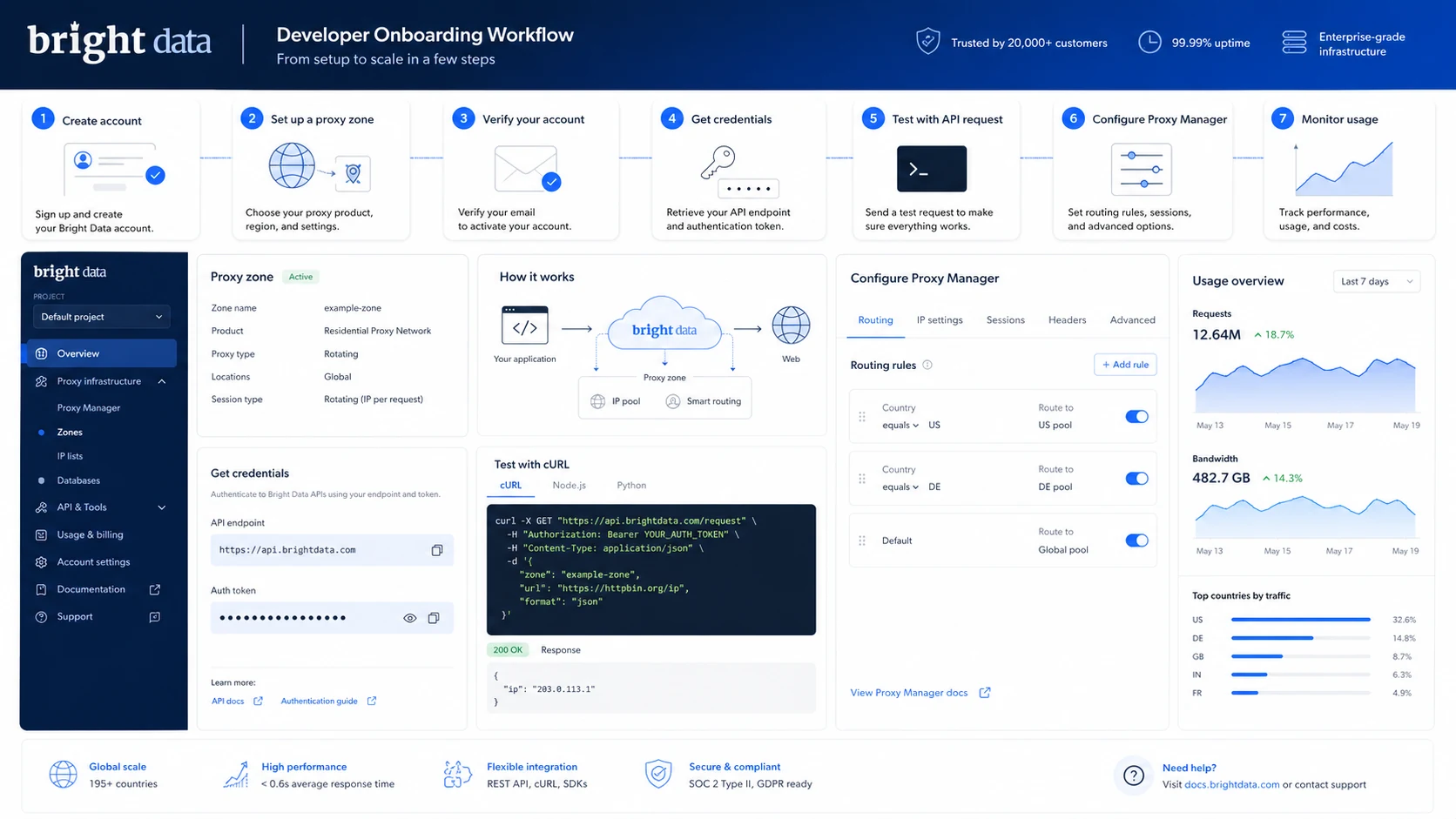
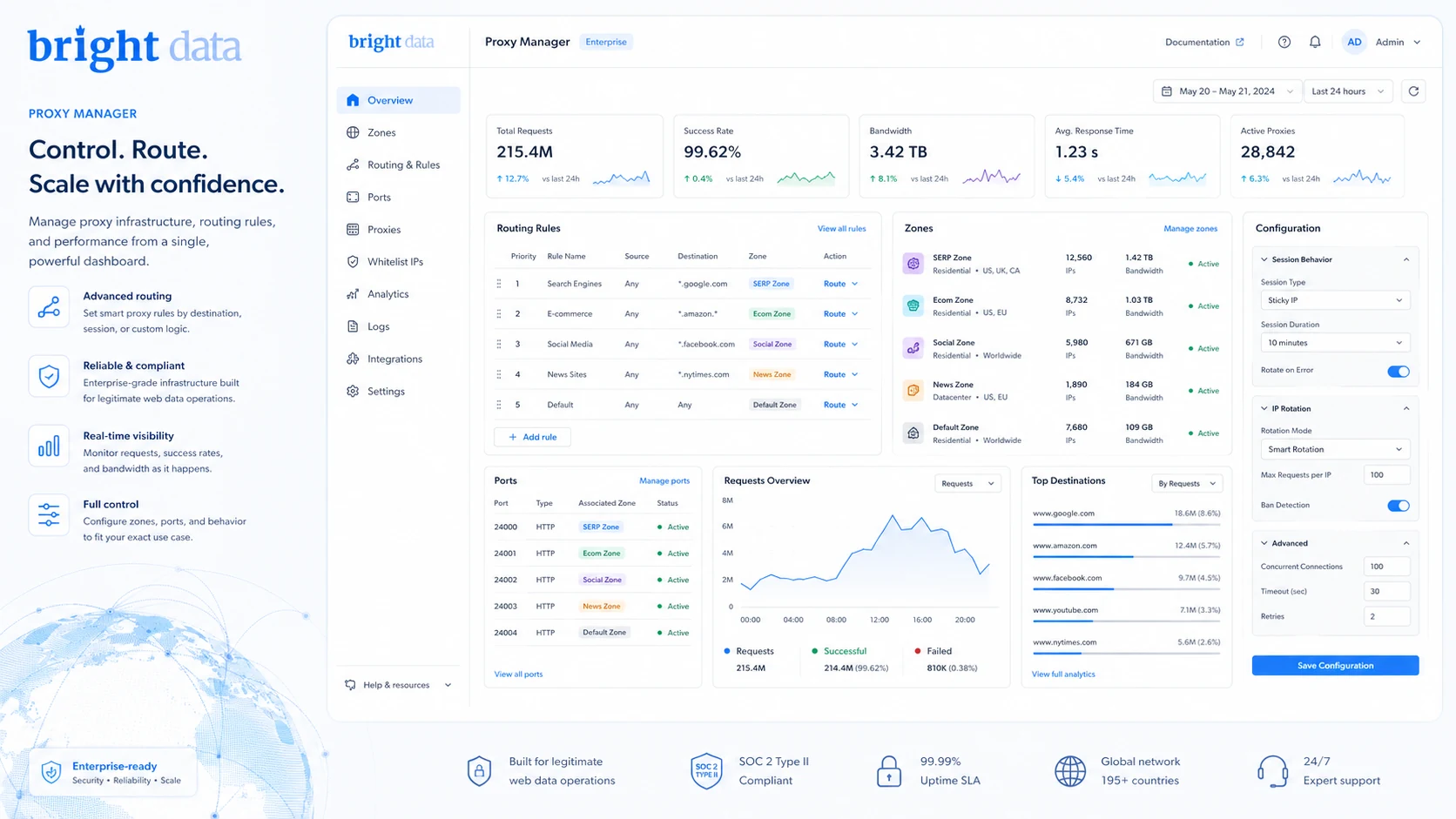
A technical buyer may like Bright Data because it gives more control. Proxy Manager, zone configuration, credentials, API access, and documentation can support a repeatable pipeline.
The risk is maintenance. If the developer spends too much time managing proxy behavior, headers, retries, and blocked targets, the lower-level route may not be the real bargain. In that case, Browser API, Web Unlocker, or a scraper product may be worth comparing.
A small business needing a cheap proxy
This is where Bright Data may be too much. A small business with a simple target and low volume may not need a broad enterprise-grade platform. Webshare or Smartproxy may feel easier to evaluate. Bright Data can still make sense if quality, compliance, or targeting is critical, but I would not start there automatically.
Key features that actually matter
Residential, datacenter, ISP, and mobile proxy paths
The range matters because proxy type changes the buying decision.
Datacenter proxies are usually cheaper and easier for simpler web access. Residential proxies are more relevant when websites are sensitive to datacenter IPs. ISP proxies can support static residential-style use cases. Mobile proxies are specialized and usually should not be chosen unless the target workflow truly needs mobile network behavior.
Buyer note: do not compare Bright Data on one headline price. Compare the proxy type that matches your actual workload.
Proxy Manager and technical control
Proxy Manager is important for buyers who want to manage proxy behavior, rules, ports, logs, routing, and integrations more directly. This is one reason Bright Data feels more like infrastructure than a simple proxy account.
The benefit is control. The drawback is setup. A non-technical buyer may not want to think about cloud hosting, local installation, Docker, server requirements, or proxy rules.
Buyer note: if Proxy Manager sounds useful, you are probably closer to the right audience. If it sounds intimidating, compare simpler tools first.
Managed web access products
Bright Data is not limited to proxy networks. It also offers products such as Web Unlocker, SERP API, Browser API, scraper products, and datasets. This matters because some buyers should not manage proxies directly.
A team collecting SERP data may prefer SERP API. A team that needs browser automation may look at Browser API. A team that simply wants structured data may compare datasets or scraper APIs.
Buyer note: the best Bright Data product may not be the proxy product you searched for.
Compliance and acceptable-use controls
Proxy tools can be abused. Bright Data’s published policies and compliance language are a meaningful part of the buying decision.
This is a positive signal for serious teams, but it also means some use cases may require review, KYC, restrictions, or a different product route. Buyers who dislike compliance friction may see this as a drawback. Buyers who need a defensible data workflow should see it as a necessary checkpoint.
Buyer note: if you cannot explain your use case clearly, do not rush into paid usage.
Documentation and developer resources
The docs are useful because they show real onboarding friction: account verification, proxy zones, payment method verification, Proxy Manager setup, credentials, ports, and product-specific configuration.
That transparency is helpful. It also shows that this is not a one-click app.
Buyer note: read the docs before paying. If the setup path already feels too technical, a managed API or simpler provider may be a better fit.
Pricing and plan value
Bright Data pricing is not one clean monthly subscription.
At the time of review, the public pricing pages present different buying paths for residential proxies, datacenter proxies, ISP proxies, and broader web data products. Residential proxy pricing is shown as bandwidth-based, with pay-as-you-go and monthly commitment options. The public proxy pricing page also shows promotional pricing and deposit-match messaging, which should be treated as live checkout items rather than permanent pricing facts.
Datacenter proxies are easier to understand at first glance because the public page shows IP-based tiers. The headline entry point in the supplied store data and current pricing references is datacenter proxies from $0.90 per IP at larger quantities, while smaller datacenter packages cost more per IP. ISP proxy pricing is also IP-based, with higher per-IP costs than datacenter proxies. Residential and mobile paths behave differently because bandwidth and product choice matter more.
The important point is not the lowest number. The important point is product fit.
A low datacenter IP price does not help if the target requires residential routing. A residential bandwidth plan can become expensive if your scraper retries too often. A pay-as-you-go route can be good for testing but more expensive for sustained high volume. A managed API may look pricier until you include the engineering time saved by not managing proxy behavior yourself.
For most buyers, I would not move from testing into monthly commitment until three things are clear:
- the correct proxy or data product
- realistic monthly usage
- whether the target workflow is allowed and stable enough to scale
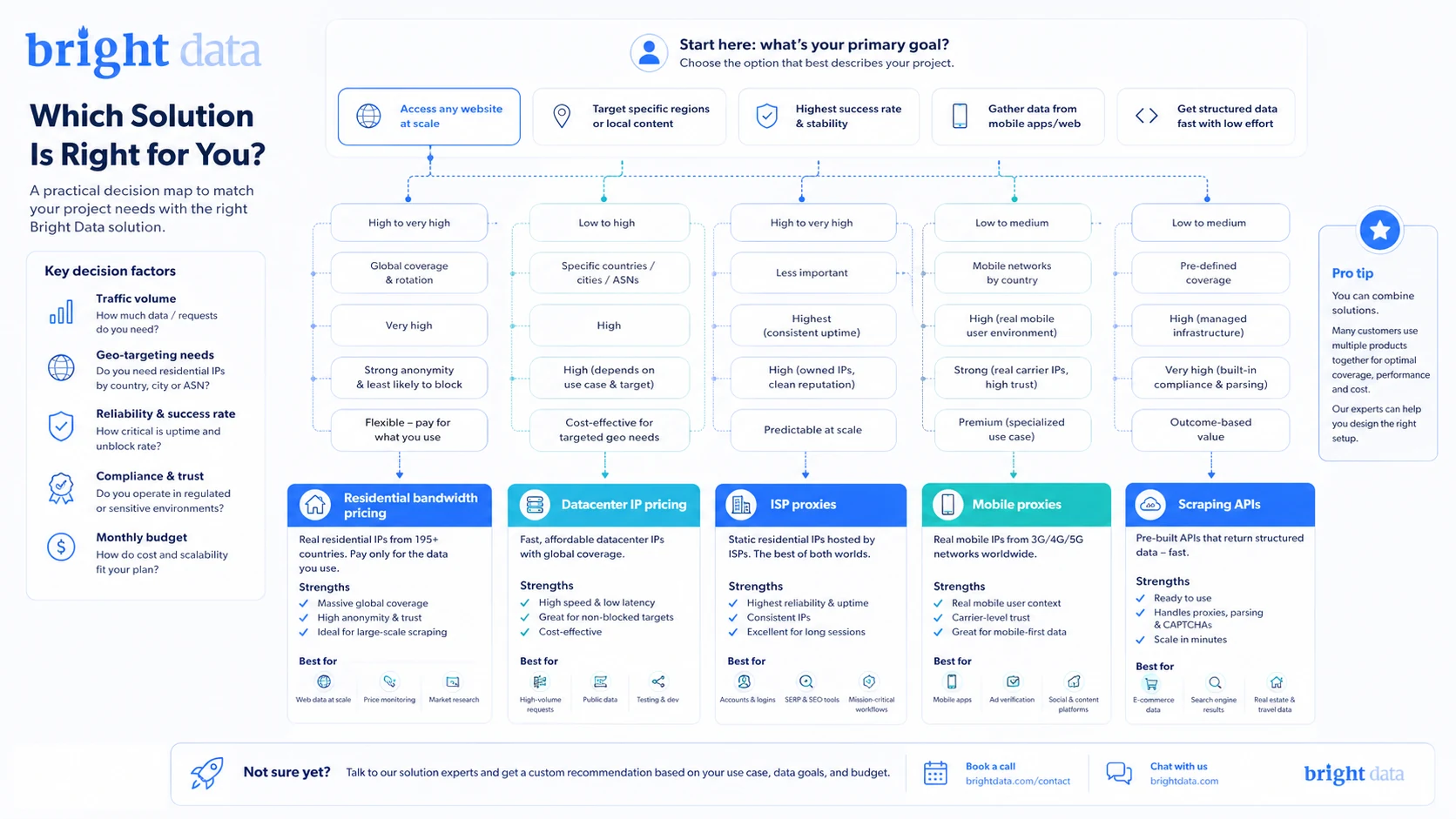
Pricing check: Before paying, compare live pricing against your expected bandwidth, IP count, target difficulty, and compliance requirements.
Free plan, trial, coupon, and checkout notes
Bright Data public materials show start-free and free-trial paths, and the documentation describes account verification steps that may include adding a payment method for identity verification. Buyers should verify the current trial, credit, payment, and KYC requirements inside the live dashboard.
The coupon path should be treated carefully. Bright Data pricing pages may show promotional pricing, deposit-match messaging, or a checkout code path, but these can change by product, account status, geography, and timing. This review does not expose coupon codes because public article copy should not reveal hidden or offer-specific checkout codes.
The safer order is simple:
- Choose the right product path.
- Confirm the use case is allowed.
- Estimate usage.
- Test the smallest workflow.
- Only then check current offers or coupon routing.
Refund risk also matters. Bright Data’s license agreement states that subscription fees are non-cancelable and non-refundable after any granted free trial period. That does not mean every billing situation is identical, but it does mean buyers should treat paid usage, monthly commitments, recharge settings, and proxy spend as real money.
A discount can improve the purchase. It should not be the reason you choose the platform.
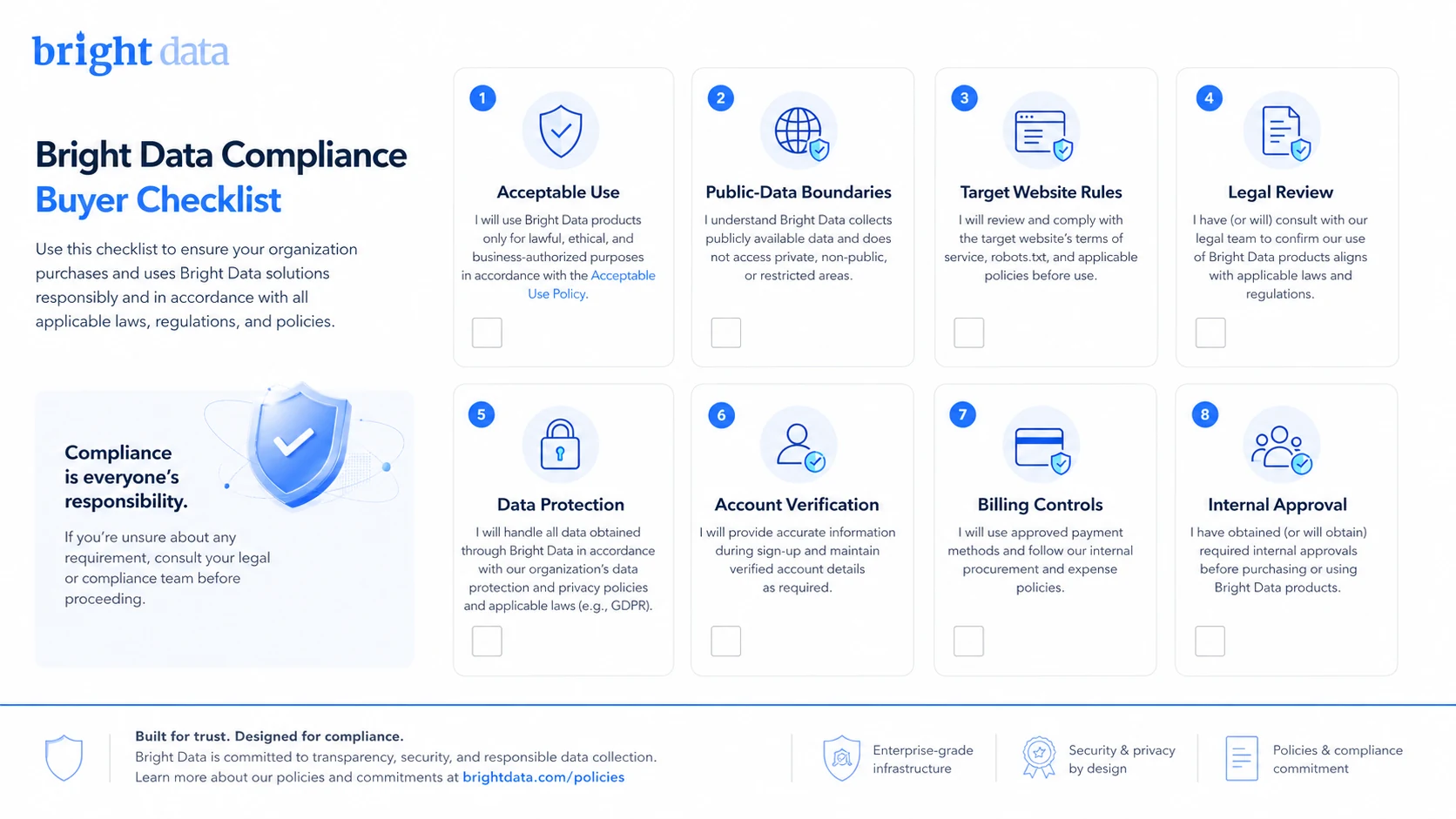
What I would check before buying Bright Data
If I were buying Bright Data for a real data workflow, I would check these items before adding budget:
- Exact product path: Residential proxies, datacenter proxies, ISP proxies, mobile proxies, SERP API, Browser API, Web Unlocker, scraper APIs, or datasets.
- Allowed use: Whether the target websites, data type, and collection method fit Bright Data’s acceptable-use policy and the target site’s rules.
- KYC and verification: Whether residential or mobile access requires compliance review, payment verification, or additional approval.
- Cost model: Bandwidth, IP count, request volume, monthly commitment, deposit terms, and recharge behavior.
- Refund and cancellation language: Whether the license and dashboard terms fit your risk tolerance before monthly or annual commitment.
- Technical maintenance: Whether your team can manage zones, credentials, Proxy Manager, retries, logs, and blocked targets.
- Alternative fit: Whether a simpler proxy seller or a scraping API would solve the same problem with less setup.
A simple test before paying
Before making a larger commitment, I would run a small, compliant test like this:
- Pick one legitimate public data use case that your team can clearly explain.
- Choose the likely product path: datacenter, residential, ISP, SERP API, Web Unlocker, Browser API, or dataset.
- Read the acceptable-use policy and confirm the target type is appropriate.
- Create the smallest allowed test route and measure success rate, failed requests, bandwidth, response quality, and setup time.
- Compare the cost of raw proxies against a managed API for the same job.
- Check whether KYC, payment verification, or support steps slow down the workflow.
- Only scale if the real usage math still makes sense.
The goal is not to prove that Bright Data has a large network. That is already clear. The goal is to prove that your specific workflow can use that network without waste, friction, or policy risk.
Pros explained
Infrastructure depth is the main advantage
Bright Data gives buyers more than a proxy list. The platform includes several proxy types, managed access products, APIs, datasets, documentation, and technical control.
That matters when the buyer has a real data operation. It matters less if the task is small and occasional.
Stronger fit for technical teams
Developers and data teams can benefit from zone setup, credentials, Proxy Manager, cloud or local workflows, API access, and detailed docs. The platform gives room to build repeatable infrastructure instead of copying proxy credentials into a random tool.
This stops being enough if the team does not have the skill or time to maintain the workflow.
Compliance visibility is better than many proxy sellers
Bright Data publishes acceptable-use rules, license language, compliance review expectations, and abuse reporting paths. That makes the buying decision more serious, but also more transparent.
For enterprise or data teams, that is a green flag. For casual buyers, it may feel like friction.
Multiple pricing paths allow controlled testing
Pay-as-you-go and product-specific pricing can help buyers start smaller, especially if they are disciplined about measuring usage.
The risk is that flexible pricing also makes cost harder to predict. A buyer who cannot estimate usage may still overspend.
Cons explained
Pricing can be difficult to compare
Bright Data is not priced like a normal SaaS app. Residential bandwidth, datacenter IPs, ISP IPs, mobile access, managed APIs, and datasets all create different cost logic.
This is a real buyer risk. If you compare the wrong plan to the wrong workload, the purchase can look cheaper or more expensive than it really is.
Refund flexibility is limited
The license agreement’s non-refundable fee language should be taken seriously. Buyers should not assume they can experiment heavily and recover spend later.
The safer path is to test small, avoid automatic recharge surprises, and read current billing terms before scaling.
Compliance review may slow down access
For residential or mobile proxy use, KYC or use-case review may be part of the process. This can be frustrating if you expected instant access.
It is not necessarily a bad sign. In this category, compliance friction can be part of responsible infrastructure. But buyers should plan for it.
It may be too heavy for small jobs
Bright Data has depth, but depth is not always value. A smaller user may prefer Webshare, Smartproxy, or a scraping API that hides proxy management.
The mistake is choosing the biggest platform because it looks safest. The better question is whether your workload needs that much platform.
Green flags and red flags
Green flags:
- You have a repeatable public web data workflow.
- You can estimate bandwidth, request volume, countries, and target difficulty.
- Your team understands acceptable-use rules and has a compliance owner.
- You need more than one proxy type or may benefit from managed APIs.
- You have developers who can manage setup, credentials, testing, and monitoring.
Red flags:
- You are buying mainly because a promotional route is visible.
- You cannot explain your use case in a compliance review.
- You do not know whether you need residential, datacenter, ISP, mobile, or an API product.
- You expect a refund if a large test burns through budget.
- You only need a small, simple proxy and do not want infrastructure complexity.
The easy mistake here is treating Bright Data as “the premium proxy option” and stopping the analysis there. Premium is only useful when the workload justifies it.
Bright Data vs alternatives
Oxylabs vs Bright Data
Oxylabs is the most direct enterprise comparison. If your team is evaluating high-scale proxy infrastructure, web scraping tools, and compliance-aware data collection, Oxylabs belongs in the same conversation.
Bright Data may still make sense if you prefer its product range, Proxy Manager workflow, public web data ecosystem, or specific pricing path. Oxylabs may be stronger if your organization already leans toward its enterprise support model or data collection approach.
The tradeoff is not “which one is cheaper?” It is which enterprise workflow your team can operate with less friction.
Smartproxy vs Bright Data
Smartproxy is often the easier comparison for smaller teams. It may feel simpler if your buyer priority is proxy access without as much infrastructure depth.
Bright Data may still be the better fit for teams that need broader web data products, more advanced controls, or stricter enterprise-style workflows. But if simplicity matters more than platform depth, Smartproxy is worth comparing before paying.
Webshare vs Bright Data
Webshare is a more budget-conscious route, especially for buyers focused on straightforward proxy buying. It can make sense when the target is simpler, the workflow is smaller, and the buyer does not need Bright Data’s broader platform.
Bright Data may justify its complexity when success rate, compliance, geo-targeting, support, or product breadth matters. Webshare may be better when the job is narrow and cost control matters more.
ScrapingBee vs Bright Data
ScrapingBee is an adjacent route, not a one-to-one proxy replacement. It is more relevant if you want a scraping API that abstracts away proxy management.
If your team does not want to manage proxy zones, headers, retries, and blocking behavior, a scraping API can be a cleaner decision. Bright Data may still win when you need deeper control, multiple product paths, or enterprise web data infrastructure.
Trust, refund, and buyer-risk notes
Bright Data is a serious platform, but serious platforms still need careful buying.
The trust signal is that the company publicly explains the Luminati rebrand, maintains current docs, publishes acceptable-use boundaries, and gives buyers multiple product paths. That is more transparent than many low-cost proxy sellers.
The risk is that transparency does not remove responsibility. Buyers are still responsible for use case legality, target rules, privacy obligations, data handling, account security, and spend control. Bright Data can suspend access for risky or non-compliant use, and the acceptable-use policy lists multiple prohibited categories, including nonpublic information collection, DDoS, spam, ad fraud, fake accounts or content, fake engagement, ticket bots, unauthorized proxy resale, SEO manipulation, and activities that violate law or third-party rights.
Refund language is also important. The license agreement says subscription fees are non-cancelable and non-refundable after any granted free trial. I would not treat Bright Data as a product to test casually with a large paid budget.
Privacy and data responsibility deserve attention as well. If your workflow involves personal data, regulated data, or sensitive targets, legal review should happen before technical setup. A proxy platform can enable access; it does not automatically make a data workflow compliant.
For teams with a legitimate, repeatable, public web data workflow, Bright Data can be a strong choice. For buyers without a clear use case, it can become expensive infrastructure purchased too early.
Final verdict
I would consider Bright Data’s former Luminati proxy network if your team has a real public web data workflow, understands compliance requirements, can estimate usage, and needs proxy infrastructure that goes beyond a cheap static proxy list.
I would be cautious if you are still unclear on proxy type, target rules, traffic volume, KYC requirements, or refund exposure. In that situation, the safer move is not to chase a discount. The safer move is to test the smallest allowed workflow and compare alternatives before scaling.
I would compare Bright Data with Oxylabs if you need enterprise proxy infrastructure, Smartproxy if you want a simpler proxy buying path, Webshare if budget is the main constraint, and ScrapingBee if you would rather use a scraping API than manage proxies directly.
The final judgment is conditional: Bright Data can be worth it for serious data teams, developers, and businesses that need compliant, scalable public web data access. It is not the easiest or cheapest choice for casual users. Before paying, make sure the platform fits the job, the policy boundary is clear, and the monthly usage math still works after the promotional language is stripped away.